In NSX 6.2 it is possible to do a “Communication Channel Health Check” to see if the NSX manager the Control Plane Agent + Firewall agent connections are “healthy” and up and running.
I encountered a problem in my lab environment where I had the problem that both the Plane Agent and the Firewall agent connections where both down.
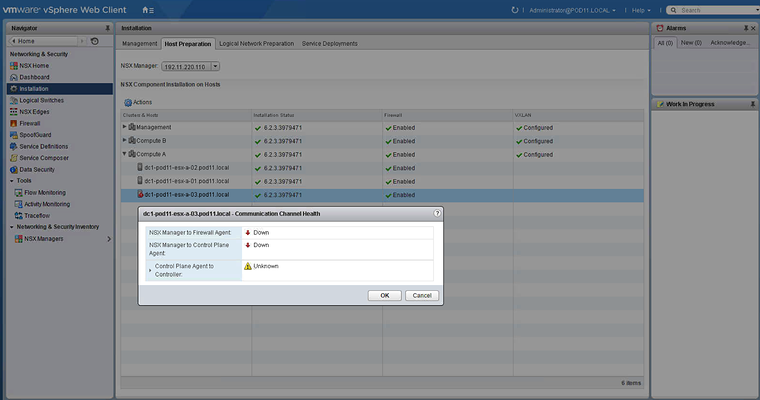
Because of this I was also not able to push any firewall rules to that host.
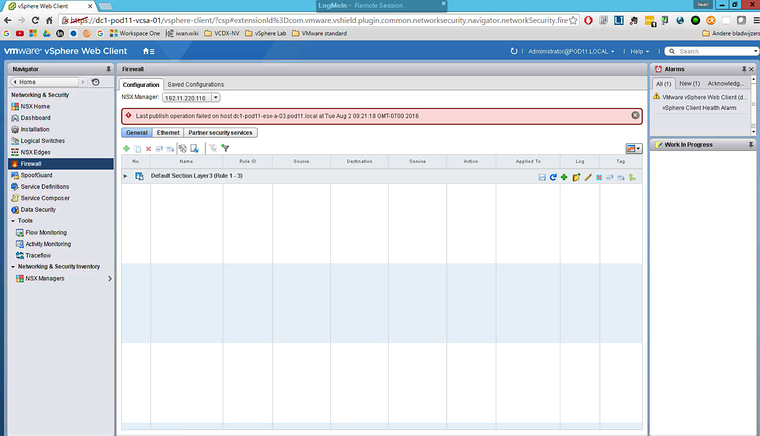
So I started googeling, and I can across this post. This post told me that the services that should be running are possibly down:
/etc/init.d/netcpad/etc/init.d/vShield-Stateful-FirewallSo I verified the status of the services and stopped / started them again.
[root@dc1-pod11-esx-a-03:~] /etc/init.d/vShield-Stateful-Firewall statusvShield-Stateful-Firewall is running
[root@dc1-pod11-esx-a-03:~] /etc/init.d/netcpad statusnetCP agent service is running
[root@dc1-pod11-esx-a-03:~] /etc/init.d/netcpad stopwatchdog-netcpa: Terminating watchdog process with PID 34973Memory reservation released for netcpanetCP agent service is stopped
[root@dc1-pod11-esx-a-03:~] /etc/init.d/vShield-Stateful-Firewall stopwatchdog-vShield-Stateful-Firewall: Terminating watchdog process with PID 35483vShield-Stateful-Firewall stoppedwatchdog-dfwpktlogs: Terminating watchdog process with PID 35463Resource pool 'host/vim/vmvisor/vsfwd' released.
[root@dc1-pod11-esx-a-03:~] /etc/init.d/vShield-Stateful-Firewall startvShield-Stateful-Firewall is not runningwatchdog-dfwpktlogs: PID file /var/run/vmware/watchdog-dfwpktlogs.PID does not existwatchdog-dfwpktlogs: Unable to terminate watchdog: No running watchdog process for dfwpktlogsResource pool 'host/vim/vmvisor/vsfwd' release failed. retrying..Resource pool 'host/vim/vmvisor/vsfwd' release failed. retrying..Resource pool 'host/vim/vmvisor/vsfwd' release failed. retrying..Resource pool 'host/vim/vmvisor/vsfwd' release failed. retrying..Resource pool 'host/vim/vmvisor/vsfwd' release failed. retrying..vShield-Stateful-Firewall started
[root@dc1-pod11-esx-a-03:~] /etc/init.d/netcpad startMemory reservation set for netcpaReload security domainsnetCP agent service starts[root@dc1-pod11-esx-a-03:~]
This unfortunately still did not resolve the problem …
My next step was that I just rebooted the host and that did not fix the problem either.
I eventually fixed it with the following steps:
- Put host in maintenance mode
- Take it out of the cluster (drag and drop in DC object)
- Reboot twice
- Put it back into the cluster (drag and drop in cluster object)
- Take is OUT OF maintenance mode
- Force sync / resole (in host preparation)
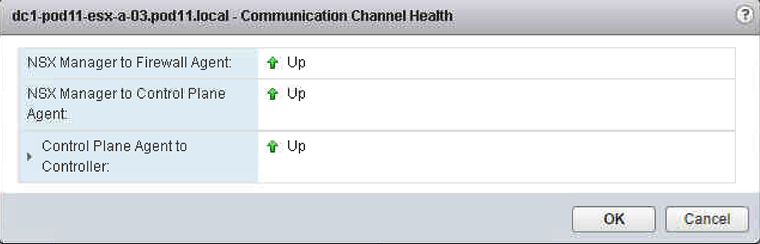
These actions caused a reinstall of the VIB’s on the faulty hosts and that eventually resolved the issue. I was trying to resolve this issue whiteout an host reboot, but this was not possible …
Originally published on the old wiki at /index.php/Communication_Channel_Health_Check_showing_down_/_down.