| Software | Version | Filename |
|---|---|---|
| VMware vCenter Server Appliance | 7.00U3G | VMware-VCSA-all-7.0.3-20150588.iso |
| VMware ESXi Server | 7.00U3F | VMware-VMvisor-Installer-7.0U3f-20036589.x86_64.iso |
| VMware NSX | 4.0.0.1 | nsx-unified-appliance-4.0.0.1.0.20159694.ova |
| TinyVM | 2.7 | TinyVM.ova |
| Ubiquiti Networks Edge Router 4 (Hardware) | Edge OS v2.0.9-hotfix.2 | N/A |
| VyOS | VyOS 1.4-rolling-202202180317 | VyOS 1.4-rolling-202202180317.iso |
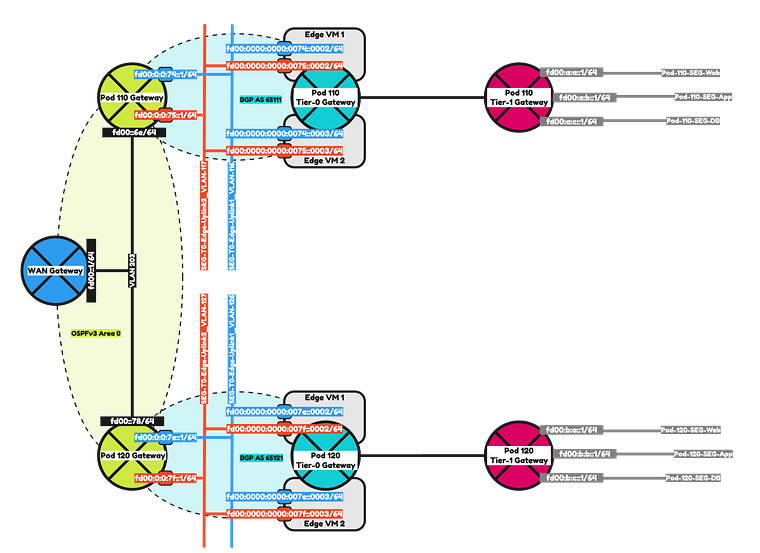
- Configure IPv6 OSPFv3 routing between the Pod-110 and Pod-120 Routers and the WAN Gateway.
- Create a Tier-0 Gateway on Pod-110 and Pod-120 and configure IPv6 BGP between the Tier-0 Gateways and the Pod Routers.
- Create a Tier-1 Gateway with a Web, App and DB Segment on Pod-110 and Pod-120 and connect the Tier-1 Gateway to the Tier-0 Gateway.
- Deploy VMs on all the segments.
- Make sure the Web, App and DB VMs on Pod-110 can reach the Web, App and DB VMs on Pod-120 using end-to-end IPv6 network communication.
To make it a bit easier to understand I have included two network diagrams below. One with the IPv4 address details and one with the IPv6 address details. I will be using the IPv6 address details moving forward.
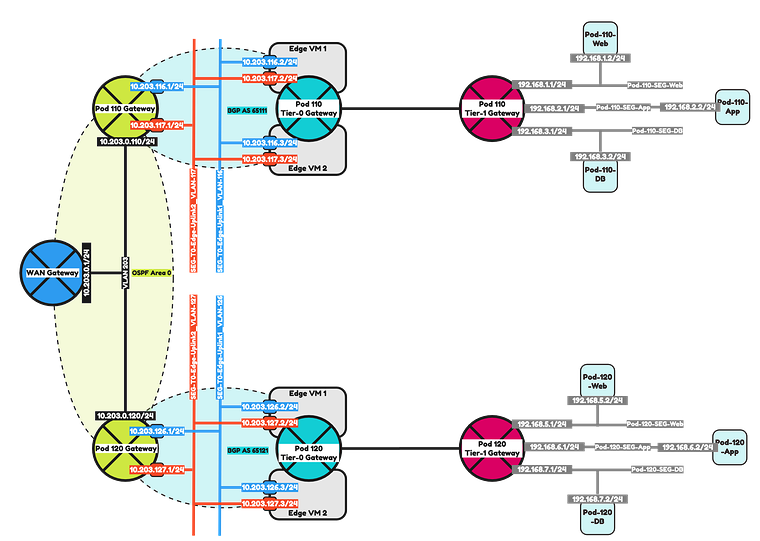
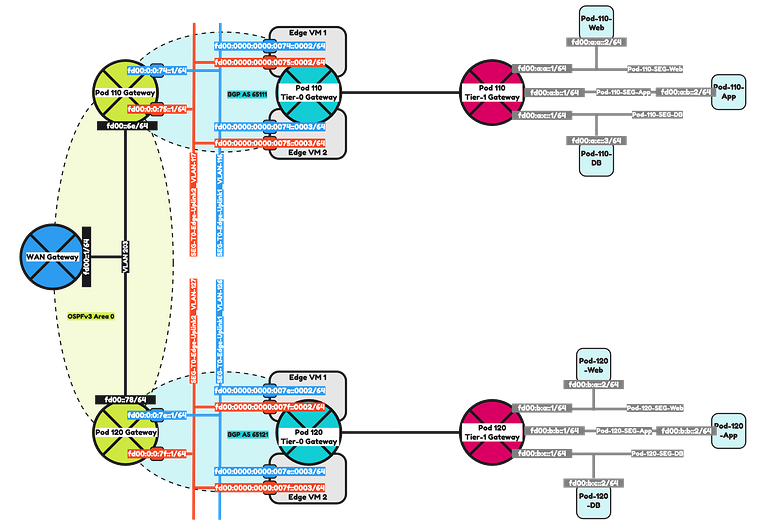
The Steps
- STEP 1: Configure IPv6 Routing using OSPFv3 on the WAN Gateway
- STEP 2: Configure IPv6 Routing using OSPFv3 between the WAN Gateway and the Pod Gateway
- STEP 3: Prepare Pod Gateways for IPv6 BGP
- STEP 4: Add IPv6 BGP Uplink Segments in NSX
- STEP 5: Create a Tier-0 Gateway
- STEP 6: Configure IPv6 BGP Routing between Tier-0 Gateway and the Pod Gateway
- STEP 7: Create a Tier-1 Gateway
- STEP 8: Add IPv6 Web, App and DB Segments in NSX
- STEP 9: Configure Route Advertise connected Tier-1 Gateway segment networks to BGP
- STEP 10: Configure route redistribution between BGP and OSPFv3
- STEP 11: Create Test Virtual Machines and perform ping connectivity tests
STEP 1» Configure IPv6 Routing using OSPFv3 on the WAN Gateway
The first step in this lab is to make sure OSPFv3 is configured in the WAN Gateway so that it can exchange IPv6 networks with the Pod-110 and Pod-120 Routers.
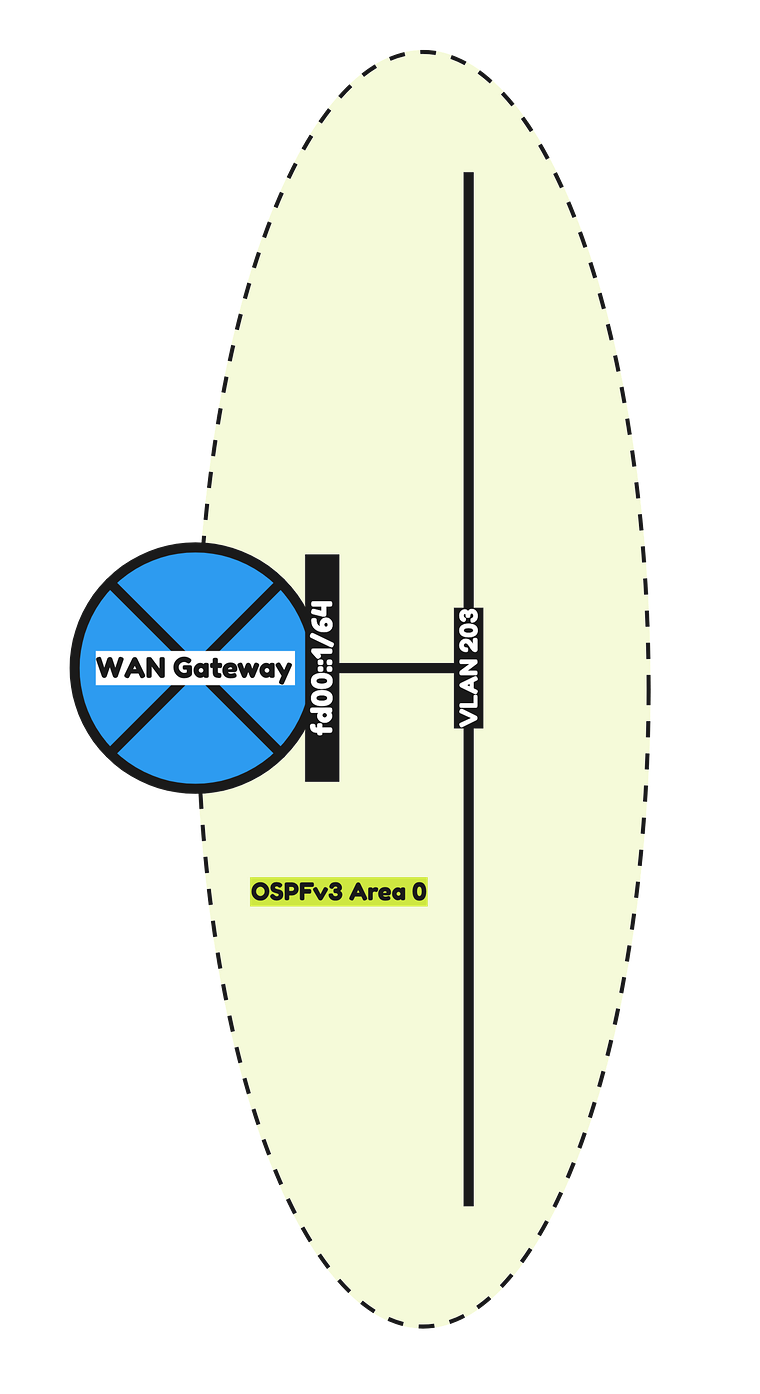
The configuration parameters that I will used are listed in the table below.
| Hardware | Ubiquiti Networks Edge Router 4 |
|---|---|
| Hostname | WAN-Gateway |
| Domain Name | sddc.lab |
| DNS Server | 10.203.0.5 |
| VLAN 203 IP Address | 10.203.0.1/24 |
| VLAN 203 IPv6 Address | fd00::1/64 |
| OSPF Area | 0 |
| OSPF dead timer | 40 |
| OSPF hello timer | 10 |
| OSPFv3 Area | 0.0.0.0 |
The commands that I am using to configure the WAN Gateway can be found below.
WAN Gateway OSPFv3 configuration
configure#set system domain-name sddc.labset system host-name WAN-Gatewayset system name-server 10.203.0.5#set service ssh port 22set service ssh protocol-version v2#set interfaces ethernet eth1 description 'eth1 - LAN'set interfaces ethernet eth1 duplex autoset interfaces ethernet eth1 mtu 9000set interfaces ethernet eth1 speed auto#set interfaces ethernet eth1 vif 203 description 'Router Uplink'set interfaces ethernet eth1 vif 203 address 10.203.0.1/24set interfaces ethernet eth1 vif 203 address 'fd00::1/64'set interfaces ethernet eth1 vif 203 ip ospf dead-interval 40set interfaces ethernet eth1 vif 203 ip ospf hello-interval 10set interfaces ethernet eth1 vif 203 ip ospf priority 1set interfaces ethernet eth1 vif 203 ip ospf retransmit-interval 5set interfaces ethernet eth1 vif 203 ip ospf transmit-delay 1set interfaces ethernet eth1 vif 203 mtu 1500#set interfaces ethernet eth1 vif 203 ipv6 dup-addr-detect-transmits 1set interfaces ethernet eth1 vif 203 ipv6 router-advert cur-hop-limit 64set interfaces ethernet eth1 vif 203 ipv6 router-advert link-mtu 0set interfaces ethernet eth1 vif 203 ipv6 router-advert managed-flag falseset interfaces ethernet eth1 vif 203 ipv6 router-advert max-interval 600set interfaces ethernet eth1 vif 203 ipv6 router-advert other-config-flag falseset interfaces ethernet eth1 vif 203 ipv6 router-advert prefix 'fd00::/64' autonomous-flag trueset interfaces ethernet eth1 vif 203 ipv6 router-advert prefix 'fd00::/64' on-link-flag trueset interfaces ethernet eth1 vif 203 ipv6 router-advert prefix 'fd00::/64' valid-lifetime 2592000set interfaces ethernet eth1 vif 203 ipv6 router-advert reachable-time 0set interfaces ethernet eth1 vif 203 ipv6 router-advert retrans-timer 0set interfaces ethernet eth1 vif 203 ipv6 router-advert send-advert true#set protocols ospf area 0 area-type normalset protocols ospf area 0 network 10.203.0.0/24set protocols ospf parameters abr-type ciscoset protocols ospf parameters router-id 10.203.0.1set protocols ospf redistribute connected metric-type 2#set protocols ospfv3 area 0.0.0.0 area-type normalset protocols ospfv3 area 0.0.0.0 interface eth1.203set protocols ospfv3 area 0.0.0.0 range 'fd00::/64'set protocols ospfv3 parameters abr-type ciscoset protocols ospfv3 parameters router-id 10.203.0.1set protocols ospfv3 redistribute connected#commitsave
OSPF Verification
After the configuration of the WAN Gateway I did a quick verification to see if I could see any OSPFv3 neighbors.
admin@WAN-Gateway:~$ show ip ospf neighboradmin@WAN-Gateway:~$Because my Pod Routers are not configured yet with OSPFv3 I am not able to see the neighbors yet. I will do this configuration in the next step.
STEP 2» Configure IPv6 Routing using OSPFv3 between the WAN Gateway and the Pod Gateways
Now that the WAN Gateway is fully configured with OSPFv3 I am going to configure the Pod Routers with OSPFv3 so that the WAN gateway and the Pod Routers can form a neighbor relationship to exchange IPv6 routes.
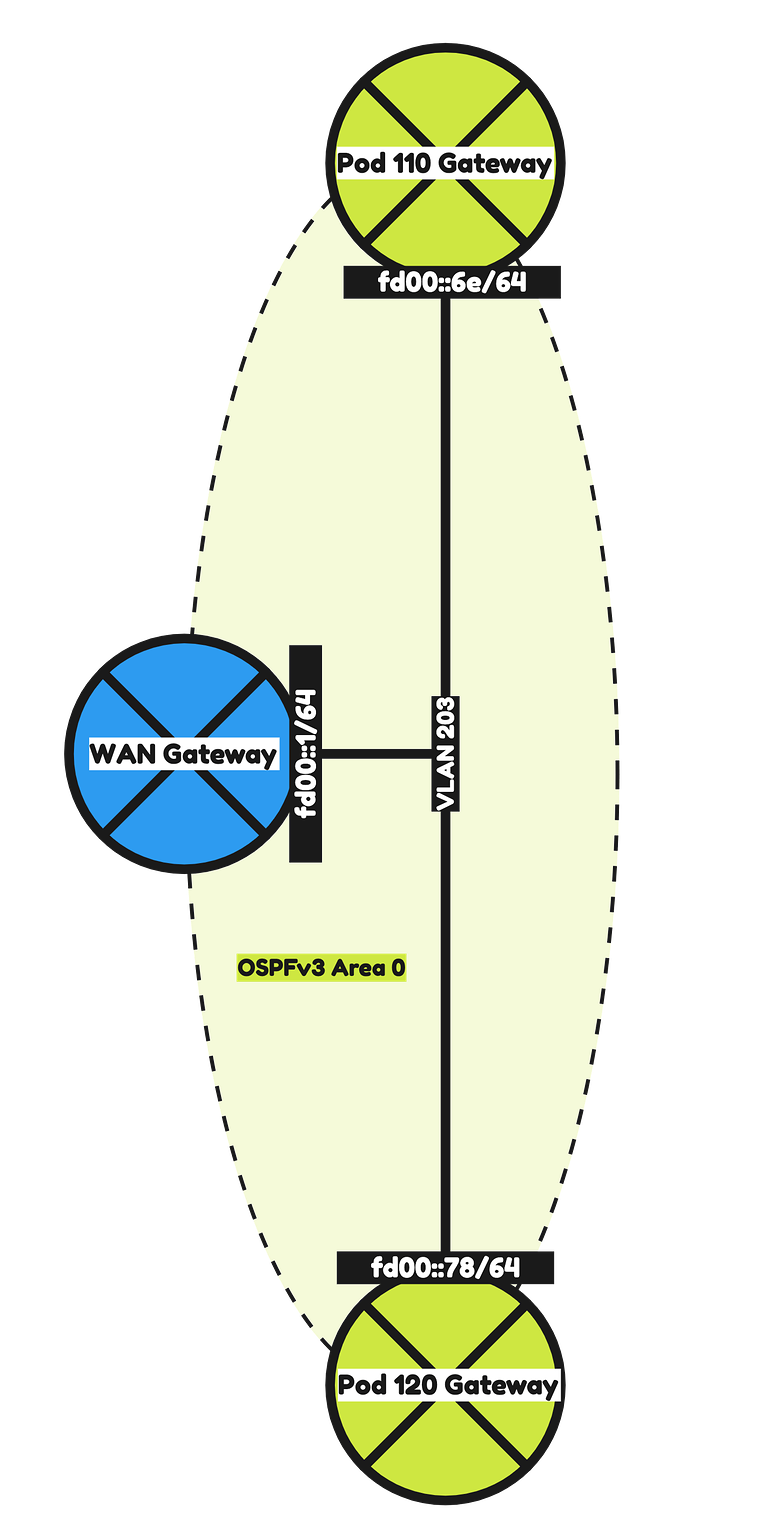
Pod 110
The configuration parameters that I will use for Pod-110 are listed in the table below.
| Software | VyOS |
|---|---|
| Hostname | Pod-110-Router |
| Domain Name | sddc.lab |
| DNS/NTP Server (IPv4) | 10.203.0.5 |
| DNS/NTP Server (IPv6) | fd00:0000:0000:0000::0005 |
| VLAN 203 IPv4 Address | 10.203.0.110/24 |
| VLAN 203 IPv6 Address | fd00:0000:0000:0000::006e/64 |
| OSPF Area | 0 |
| OSPF dead timer | 40 |
| OSPF hello timer | 10 |
| OSPFv3 Area | 0.0.0.0 |
I also decided to configure some additional interfaces so that these networks can be redistributed into OSPF.
The configuration parameters for these interfaces ale listed in the table below.
| | | VLAN | IPv4 address | IPv6 address |
|---|---|---|---|
| Management VLAN Pod 110 | 110 | 10.203.110.1/24 | fd00:0000:0000:006e::0001/64 |
| BGP Uplink VLAN #1 Pod 110 | 116 | 10.203.116.1/24 | fd00:0000:0000:0074::0001/64 |
| BGP Uplink VLAN #2 Pod 110 | 117 | 10.203.117.1/24 | fd00:0000:0000:0075::0001/64 |
The commands that I am using to configure the Pod-110 Router can be found below.
Pod-110-Router OSPFv3 configuration
configure#set system domain-name sddc.labset system host-name 'Pod-110-Router'set system name-server '10.203.0.5'set system name-server 'fd00:0000:0000:0000::0005'#set service ssh port 22set service ssh protocol-version v2#set interfaces ethernet eth0 address '10.203.0.110/24'set interfaces ethernet eth0 address 'fd00:0000:0000:0000::006e/64'set interfaces ethernet eth0 description 'Router Uplink'set interfaces ethernet eth0 mtu '1500'#set interfaces ethernet eth1 mtu '9000'set interfaces ethernet eth1 vif 110 address '10.203.110.1/24'set interfaces ethernet eth1 vif 110 address 'fd00:0000:0000:006e::0001/64'set interfaces ethernet eth1 vif 110 description 'Management'set interfaces ethernet eth1 vif 110 mtu '1500'#set interfaces ethernet eth1 vif 116 address '10.203.116.1/24'set interfaces ethernet eth1 vif 116 address 'fd00:0000:0000:0074::0001/64'set interfaces ethernet eth1 vif 116 description 'NSX Edge Uplink #1'set interfaces ethernet eth1 vif 116 mtu '1500'set interfaces ethernet eth1 vif 117 address '10.203.117.1/24'set interfaces ethernet eth1 vif 117 address 'fd00:0000:0000:0075::0001/64'set interfaces ethernet eth1 vif 117 description 'NSX Edge Uplink #2'set interfaces ethernet eth1 vif 117 mtu '1500'#set protocols ospf area 0 network '10.203.0.0/24'set protocols ospf area 110 area-type normalset protocols ospf area 110 network '10.203.116.0/24'set protocols ospf area 110 network '10.203.117.0/24'set protocols ospf log-adjacency-changesset protocols ospf parameters router-id '10.203.0.110'set protocols ospf redistribute connected metric-type '2'set protocols ospfv3 interface eth0 area '0.0.0.0'set protocols ospfv3 parameters router-id '10.203.0.110'set protocols ospfv3 redistribute connected#set protocols static route 0.0.0.0/0 next-hop 10.203.0.1 distance '250'#set service router-advert interface eth0 prefix fd00::/64set service router-advert interface eth1.110 prefix fd00:0:0:6e::/64set service router-advert interface eth1.116 prefix fd00:0:0:74::/64set service router-advert interface eth1.117 prefix fd00:0:0:75::/64#set system ntp listen-address '10.203.110.1'set system ntp server 10.203.0.5set system ntp server fd00:0000:0000:0000::0005#commitsave
Pod 120
The configuration parameters that I will use for Pod-110 are listed in the table below.
| Software | VyOS |
|---|---|
| Hostname | Pod-120-Router |
| Domain Name | sddc.lab |
| DNS/NTP Server (IPv4) | 10.203.0.5 |
| DNS/NTP Server (IPv6) | fd00:0000:0000:0000::0005 |
| VLAN 203 IP Address | 10.203.0.120/24 |
| VLAN 203 IPv6 Address | fd00:0000:0000:0000::0078/64 |
| OSPF Area | 0 |
| OSPF dead timer | 40 |
| OSPF hello timer | 10 |
| OSPFv3 Area | 0.0.0.0 |
I also decided to configure some additional interfaces so that these networks can be redistributed into OSPF.
The configuration parameters for these interfaces ale listed in the table below.
| VLAN | IPv4 address | IPv6 address | |
|---|---|---|---|
| Management VLAN Pod 120 | 120 | 10.203.120.1/24 | fd00:0000:0000:0078::0001/64 |
| BGP Uplink VLAN #1 Pod 120 | 126 | 10.203.126.1/24 | fd00:0000:0000:007e::0001/64 |
| BGP Uplink VLAN #2 Pod 120 | 127 | 10.203.127.1/24 | fd00:0000:0000:007f::0001/64 |
The commands that I am using to configure the Pod-110 Router can be found below.
Pod-120-Router OSPFv3 configuration
configure#set system domain-name sddc.labset system host-name 'Pod-120-Router'set system name-server '10.203.0.5'set system name-server 'fd00:0000:0000:0000::0005'#set service ssh port 22set service ssh protocol-version v2#set interfaces ethernet eth0 address '10.203.0.120/24'set interfaces ethernet eth0 address 'fd00:0000:0000:0000::0078/64'set interfaces ethernet eth0 description 'Router Uplink'set interfaces ethernet eth0 mtu '1500'#set interfaces ethernet eth1 mtu '9000'set interfaces ethernet eth1 vif 120 address '10.203.120.1/24'set interfaces ethernet eth1 vif 120 address 'fd00:0000:0000:0078::0001/64'set interfaces ethernet eth1 vif 120 description 'Management'set interfaces ethernet eth1 vif 120 mtu '1500'#set interfaces ethernet eth1 vif 126 address '10.203.126.1/24'set interfaces ethernet eth1 vif 126 address 'fd00:0000:0000:007e::0001/64'set interfaces ethernet eth1 vif 126 description 'NSX Edge Uplink #1'set interfaces ethernet eth1 vif 126 mtu '1500'#set interfaces ethernet eth1 vif 127 address '10.203.127.1/24'set interfaces ethernet eth1 vif 127 address 'fd00:0000:0000:007f::0001/64'set interfaces ethernet eth1 vif 127 description 'NSX Edge Uplink #2'set interfaces ethernet eth1 vif 127 mtu '1500'#set protocols ospf area 0 network '10.203.0.0/24'set protocols ospf area 120 area-type normalset protocols ospf area 120 network '10.203.126.0/24'set protocols ospf area 120 network '10.203.127.0/24'set protocols ospf log-adjacency-changesset protocols ospf parameters router-id '10.203.0.120'set protocols ospf redistribute connected metric-type '2'set protocols ospfv3 interface eth0 area '0.0.0.0'set protocols ospfv3 parameters router-id '10.203.0.120'set protocols ospfv3 redistribute connected#set protocols static route 0.0.0.0/0 next-hop 10.203.0.1 distance '250'#set service router-advert interface eth0 prefix fd00::/64set service router-advert interface eth1.120 prefix fd00:0:0:78::/64set service router-advert interface eth1.126 prefix fd00:0:0:7e::/64set service router-advert interface eth1.127 prefix fd00:0:0:7f::/64#set system ntp listen-address '10.203.120.1'set system ntp server 10.203.0.5set system ntp server fd00:0000:0000:0000::0005#commitsave
OSPF Verification
Now that OSPFv3 is configured between the WAN Gateway and the Pod Routers I can now verify if there is a neighbor adjacency formed.
On the WAN Gateway I see two neighbors that are the Pod Routers.
admin@WAN-Gateway:~$ show ipv6 ospfv3 neighborOSPFv3 Process (*null*)Neighbor ID Pri State Dead Time Interface Instance ID10.203.0.110 1 Full/DR 00:00:31 eth1.203 010.203.0.120 1 Full/Backup 00:00:35 eth1.203 0ubnt@ubnt:~$On the Pod-110 Router I also have two neighbors.
vyos@Pod-110-Router:~$ show ipv6 ospfv3 neighborNeighbor ID Pri DeadTime State/IfState Duration I/F[State]10.203.0.1 1 00:00:38 Full/DROther 5d11:01:06 eth0[DR]10.203.0.120 1 00:00:32 Full/BDR 5d17:25:40 eth0[DR]vyos@Pod-110-Router:~$On the Pod-120 Router I also have two neighbors.
vyos@Pod-120-Router:~$ show ipv6 ospfv3 neighborNeighbor ID Pri DeadTime State/IfState Duration I/F[State]10.203.0.1 1 00:00:30 Full/DROther 5d11:02:16 eth0[BDR]10.203.0.110 1 00:00:32 Full/DR 5d17:26:56 eth0[BDR]vyos@Pod-120-Router:~$
STEP 3» Prepare Pod Gateways for IPv6 BGP
Now that OSPFv3 os working I am now going to prepare IPv6 BGP on the Pod Routers so that it will be able to peer with the Pod Tier-0 Gateways.
Pod 110
I have already configured the BGP uplink VLANs and interfaces in the previous step.
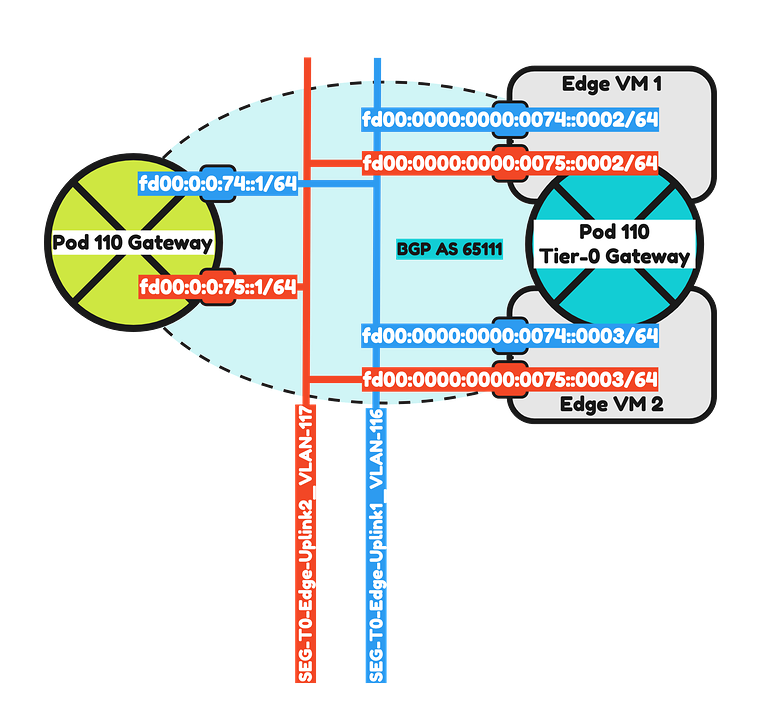
So now it is time to configured IPv6 BGP on Pod-110 using the configuration parameters in the table below
| Neigbor | Local AS | Remote AS | Peer IPv4 | Peer IPv6 |
|---|---|---|---|---|
| WAN Gateway | 65110 | 65000 | 10.203.0.1 | fd00:0000:0000:0000::0001 |
| Pod-110-T0-EdgeVM-01-1 | 65110 | 65111 | 10.203.116.2 | fd00:0000:0000:0074::0002 |
| Pod-110-T0-EdgeVM-02-1 | 65110 | 65111 | 10.203.116.3 | fd00:0000:0000:0074::0003 |
| Pod-110-T0-EdgeVM-01-2 | 65110 | 65111 | 10.203.117.2 | fd00:0000:0000:0075::0002 |
| Pod-110-T0-EdgeVM-02-2 | 65110 | 65111 | 10.203.117.3 | fd00:0000:0000:0075::0003 |
The commands that I am using to configure the Pod-110 Router can be found below.
Pod-110-Router IPv6 BGP configuration
set protocols bgp local-as '65110'set protocols bgp neighbor 10.203.0.1 address-family ipv4-unicastset protocols bgp neighbor 10.203.0.1 description 'Lab-Router'set protocols bgp neighbor 10.203.0.1 remote-as '65000'set protocols bgp neighbor 10.203.116.2 address-family ipv4-unicast default-originateset protocols bgp neighbor 10.203.116.2 description 'Pod-110-T0-EdgeVM-01-1'set protocols bgp neighbor 10.203.116.2 remote-as '65111'set protocols bgp neighbor 10.203.116.3 address-family ipv4-unicast default-originateset protocols bgp neighbor 10.203.116.3 description 'Pod-110-T0-EdgeVM-02-1'set protocols bgp neighbor 10.203.116.3 remote-as '65111'set protocols bgp neighbor 10.203.117.2 address-family ipv4-unicast default-originateset protocols bgp neighbor 10.203.117.2 description 'Pod-110-T0-EdgeVM-01-2'set protocols bgp neighbor 10.203.117.2 remote-as '65111'set protocols bgp neighbor 10.203.117.3 address-family ipv4-unicast default-originateset protocols bgp neighbor 10.203.117.3 description 'Pod-110-T0-EdgeVM-02-2'set protocols bgp neighbor 10.203.117.3 remote-as '65111'set protocols bgp neighbor fd00:0000:0000:0000::0001 address-family ipv6-unicastset protocols bgp neighbor fd00:0000:0000:0000::0001 description 'Lab-Router'set protocols bgp neighbor fd00:0000:0000:0000::0001 remote-as '65000'set protocols bgp neighbor fd00:0000:0000:0074::0002 address-family ipv6-unicast default-originateset protocols bgp neighbor fd00:0000:0000:0074::0002 description 'Pod-110-T0-EdgeVM-01-1'set protocols bgp neighbor fd00:0000:0000:0074::0002 remote-as '65111'set protocols bgp neighbor fd00:0000:0000:0074::0003 address-family ipv6-unicast default-originateset protocols bgp neighbor fd00:0000:0000:0074::0003 description 'Pod-110-T0-EdgeVM-02-1'set protocols bgp neighbor fd00:0000:0000:0074::0003 remote-as '65111'set protocols bgp neighbor fd00:0000:0000:0075::0002 address-family ipv6-unicast default-originateset protocols bgp neighbor fd00:0000:0000:0075::0002 description 'Pod-110-T0-EdgeVM-01-2'set protocols bgp neighbor fd00:0000:0000:0075::0002 remote-as '65111'set protocols bgp neighbor fd00:0000:0000:0075::0003 address-family ipv6-unicast default-originateset protocols bgp neighbor fd00:0000:0000:0075::0003 description 'Pod-110-T0-EdgeVM-02-2'set protocols bgp neighbor fd00:0000:0000:0075::0003 remote-as '65111'set protocols bgp parameters router-id '10.203.110.1'#To make the SDDC Network configuration complete I have also added the VLANs and interfaces based on the table below.
| VLAN | IPv4 Address | IPv6 Address | |
|---|---|---|---|
| vMotion | 111 | 10.203.111.1/24 | fd00:0000:0000:006f::0001/64 |
| vSAN | 112 | 10.203.112.1/24 | fd00:0000:0000:0070::0001/64 |
| IP Storage | 113 | 10.203.113.1/24 | fd00:0000:0000:0071::0001/64 |
| Overlay Transport | 114 | 10.203.114.1/24 | fd00:0000:0000:0072::0001/64 |
| Service VM Management | 115 | 10.203.115.1/24 | fd00:0000:0000:0073::0001/64 |
| RTEP Transport | 118 | 10.203.118.1/24 | fd00:0000:0000:0076::0001/64 |
The commands that I am using to configure the Pod-110 Router can be found below.
Pod-110-Router IPv6 SDDC VLAN/interface configuration
set interfaces ethernet eth1 vif 111 address '10.203.111.1/24'set interfaces ethernet eth1 vif 111 address 'fd00:0000:0000:006f::0001/64'set interfaces ethernet eth1 vif 111 description 'vMotion'set interfaces ethernet eth1 vif 111 mtu '9000'set interfaces ethernet eth1 vif 112 address '10.203.112.1/24'set interfaces ethernet eth1 vif 112 address 'fd00:0000:0000:0070::0001/64'set interfaces ethernet eth1 vif 112 description 'vSAN'set interfaces ethernet eth1 vif 112 mtu '9000'set interfaces ethernet eth1 vif 113 address '10.203.113.1/24'set interfaces ethernet eth1 vif 113 address 'fd00:0000:0000:0071::0001/64'set interfaces ethernet eth1 vif 113 description 'IP Storage'set interfaces ethernet eth1 vif 113 mtu '9000'set interfaces ethernet eth1 vif 114 address '10.203.114.1/24'set interfaces ethernet eth1 vif 114 address 'fd00:0000:0000:0072::0001/64'set interfaces ethernet eth1 vif 114 description 'Overlay Transport'set interfaces ethernet eth1 vif 114 mtu '9000'set interfaces ethernet eth1 vif 115 address '10.203.115.1/24'set interfaces ethernet eth1 vif 115 address 'fd00:0000:0000:0073::0001/64'set interfaces ethernet eth1 vif 115 description 'Service VM Management'set interfaces ethernet eth1 vif 115 mtu '1500'set interfaces ethernet eth1 vif 118 address '10.203.118.1/24'set interfaces ethernet eth1 vif 118 address 'fd00:0000:0000:0076::0001/64'set interfaces ethernet eth1 vif 118 description 'RTEP Transport'set interfaces ethernet eth1 vif 118 mtu '1500'set interfaces loopback lo#set service router-advert interface eth1.111 prefix fd00:0:0:6f::/64set service router-advert interface eth1.112 prefix fd00:0:0:70::/64set service router-advert interface eth1.113 prefix fd00:0:0:71::/64set service router-advert interface eth1.114 prefix fd00:0:0:72::/64set service router-advert interface eth1.115 prefix fd00:0:0:73::/64set service router-advert interface eth1.118 prefix fd00:0:0:76::/64#Because the Pod-110 Tier-0 Gateway is not configured yet, I do not see any BGP neighbors (output not included). This will be configured in Step 4.
Pod 120
I have already configured the BGP uplink VLANs and interfaces in the previous step.
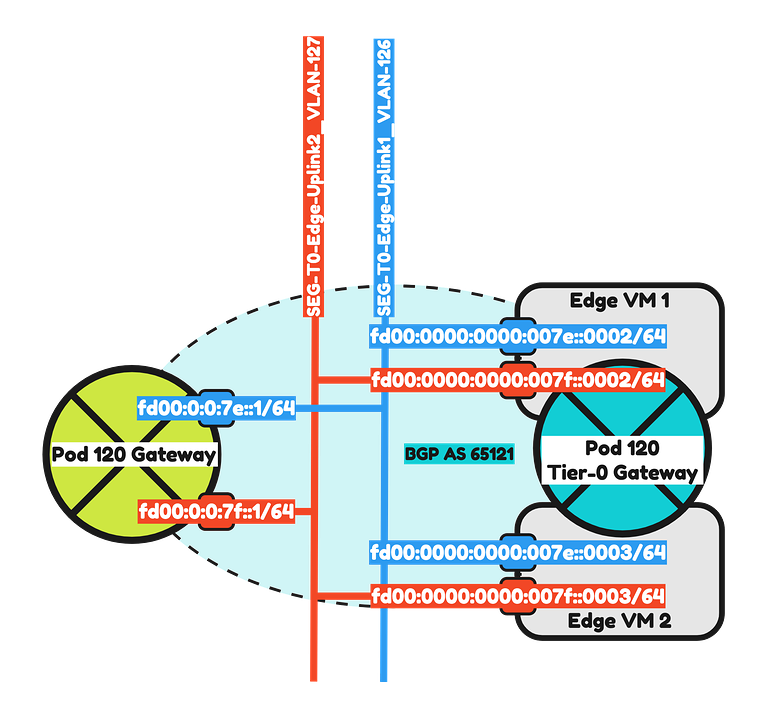
So now it is time to configured IPv6 BGP on Pod-120 using the configuration parameters in the table below
| Neigbor | Local AS | Remote AS | Peer IPv4 | Peer IPv6 |
|---|---|---|---|---|
| WAN Gateway | 65120 | 65000 | 10.203.0.1 | fd00:0000:0000:0000::0001 |
| Pod-110-T0-EdgeVM-01-1 | 65120 | 65121 | 10.203.126.2 | fd00:0000:0000:007e::0002 |
| Pod-110-T0-EdgeVM-02-1 | 65120 | 65121 | 10.203.126.3 | fd00:0000:0000:007e::0003 |
| Pod-110-T0-EdgeVM-01-2 | 65120 | 65121 | 10.203.127.2 | fd00:0000:0000:007f::0002 |
| Pod-110-T0-EdgeVM-02-2 | 65120 | 65121 | 10.203.127.3 | fd00:0000:0000:007f::0003 |
The commands that I am using to configure the Pod-110 Router can be found below.
Pod-120-Router IPv6 BGP configuration
set protocols bgp local-as '65120'set protocols bgp neighbor 10.203.0.1 address-family ipv4-unicastset protocols bgp neighbor 10.203.0.1 description 'Lab-Router'set protocols bgp neighbor 10.203.0.1 remote-as '65000'set protocols bgp neighbor 10.203.126.2 address-family ipv4-unicast default-originateset protocols bgp neighbor 10.203.126.2 description 'Pod-120-T0-EdgeVM-01-1'set protocols bgp neighbor 10.203.126.2 remote-as '65121'set protocols bgp neighbor 10.203.126.3 address-family ipv4-unicast default-originateset protocols bgp neighbor 10.203.126.3 description 'Pod-120-T0-EdgeVM-02-1'set protocols bgp neighbor 10.203.126.3 remote-as '65121'set protocols bgp neighbor 10.203.127.2 address-family ipv4-unicast default-originateset protocols bgp neighbor 10.203.127.2 description 'Pod-120-T0-EdgeVM-01-2'set protocols bgp neighbor 10.203.127.2 remote-as '65121'set protocols bgp neighbor 10.203.127.3 address-family ipv4-unicast default-originateset protocols bgp neighbor 10.203.127.3 description 'Pod-120-T0-EdgeVM-02-2'set protocols bgp neighbor 10.203.127.3 remote-as '65121'set protocols bgp neighbor fd00:0000:0000:0000::0001 address-family ipv6-unicastset protocols bgp neighbor fd00:0000:0000:0000::0001 description 'Lab-Router'set protocols bgp neighbor fd00:0000:0000:0000::0001 remote-as '65000'set protocols bgp neighbor fd00:0000:0000:007e::0002 address-family ipv6-unicast default-originateset protocols bgp neighbor fd00:0000:0000:007e::0002 description 'Pod-120-T0-EdgeVM-01-1'set protocols bgp neighbor fd00:0000:0000:007e::0002 remote-as '65121'set protocols bgp neighbor fd00:0000:0000:007e::0003 address-family ipv6-unicast default-originateset protocols bgp neighbor fd00:0000:0000:007e::0003 description 'Pod-120-T0-EdgeVM-02-1'set protocols bgp neighbor fd00:0000:0000:007e::0003 remote-as '65121'set protocols bgp neighbor fd00:0000:0000:007f::0002 address-family ipv6-unicast default-originateset protocols bgp neighbor fd00:0000:0000:007f::0002 description 'Pod-120-T0-EdgeVM-01-2'set protocols bgp neighbor fd00:0000:0000:007f::0002 remote-as '65121'set protocols bgp neighbor fd00:0000:0000:007f::0003 address-family ipv6-unicast default-originateset protocols bgp neighbor fd00:0000:0000:007f::0003 description 'Pod-120-T0-EdgeVM-02-2'set protocols bgp neighbor fd00:0000:0000:007f::0003 remote-as '65121'set protocols bgp parameters router-id '10.203.120.1'#To make the SDDC Network configuration complete I have also added the VLANs and interfaces based on the table below.
| VLAN | IPv4 Address | IPv6 Address | |
|---|---|---|---|
| vMotion | 121 | 10.203.121.1/24 | fd00:0000:0000:0079::0001/64 |
| vSAN | 122 | 10.203.122.1/24 | fd00:0000:0000:007a::0001/64 |
| IP Storage | 123 | 10.203.123.1/24 | fd00:0000:0000:007b::0001/64 |
| Overlay Transport | 124 | 10.203.124.1/24 | fd00:0000:0000:007c::0001/64 |
| Service VM Management | 125 | 10.203.125.1/24 | fd00:0000:0000:007d::0001/64 |
| RTEP Transport | 128 | 10.203.128.1/24 | fd00:0000:0000:0080::0001/64 |
The commands that I am using to configure the Pod-110 Router can be found below.
Pod-120-Router IPv6 SDDC VLAN/interface configuration
set interfaces ethernet eth1 vif 121 address '10.203.121.1/24'set interfaces ethernet eth1 vif 121 address 'fd00:0000:0000:0079::0001/64'set interfaces ethernet eth1 vif 121 description 'vMotion'set interfaces ethernet eth1 vif 121 mtu '9000'set interfaces ethernet eth1 vif 122 address '10.203.122.1/24'set interfaces ethernet eth1 vif 122 address 'fd00:0000:0000:007a::0001/64'set interfaces ethernet eth1 vif 122 description 'vSAN'set interfaces ethernet eth1 vif 122 mtu '9000'set interfaces ethernet eth1 vif 123 address '10.203.123.1/24'set interfaces ethernet eth1 vif 123 address 'fd00:0000:0000:007b::0001/64'set interfaces ethernet eth1 vif 123 description 'IP Storage'set interfaces ethernet eth1 vif 123 mtu '9000'set interfaces ethernet eth1 vif 124 address '10.203.124.1/24'set interfaces ethernet eth1 vif 124 address 'fd00:0000:0000:007c::0001/64'set interfaces ethernet eth1 vif 124 description 'Overlay Transport'set interfaces ethernet eth1 vif 124 mtu '9000'set interfaces ethernet eth1 vif 125 address '10.203.125.1/24'set interfaces ethernet eth1 vif 125 address 'fd00:0000:0000:007d::0001/64'set interfaces ethernet eth1 vif 125 description 'Service VM Management'set interfaces ethernet eth1 vif 125 mtu '1500'set interfaces ethernet eth1 vif 128 address '10.203.128.1/24'set interfaces ethernet eth1 vif 128 address 'fd00:0000:0000:0080::0001/64'set interfaces ethernet eth1 vif 128 description 'RTEP Transport'set interfaces ethernet eth1 vif 128 mtu '1500'set interfaces loopback lo#set service router-advert interface eth1.121 prefix fd00:0:0:79::/64set service router-advert interface eth1.122 prefix fd00:0:0:7a::/64set service router-advert interface eth1.123 prefix fd00:0:0:7b::/64set service router-advert interface eth1.124 prefix fd00:0:0:7c::/64set service router-advert interface eth1.125 prefix fd00:0:0:7d::/64set service router-advert interface eth1.128 prefix fd00:0:0:80::/64#Because the Pod-120 Tier-0 Gateway is not configured yet, I do not see any BGP neighbors (output not included). This will be configured in Step 4.
STEP 4» Add IPv6 BGP Uplink Segments in NSX
The Tier-0 Gateway is using NSX Segments as the main way of communicating with the Physical network. These segments are created inside NSX.
Pod 110
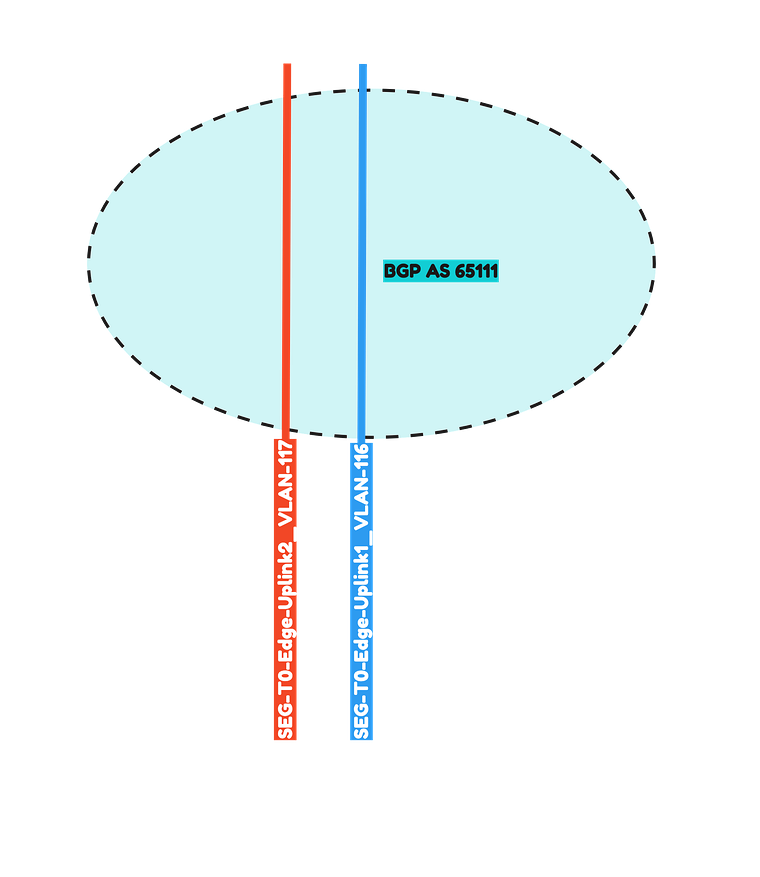
Pod-110 is using Virtual Edges. These Edges are responsible for hosting the Tier-0 Gateway. These Edges are using VDS Port Groups, NSX Uplink Profiles. Transport Zones with Uplink Teaming Policy Names just to make sure the Tier-0 Gateway is able to create its uplink interfaces for BGP peering over VLAN 116 and 117.
For reference I have included some of the Edge prerequisites below.
-
VDS Port Groups

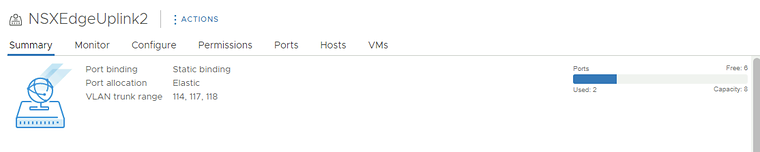
-
NSX Edge Uplink Profiles
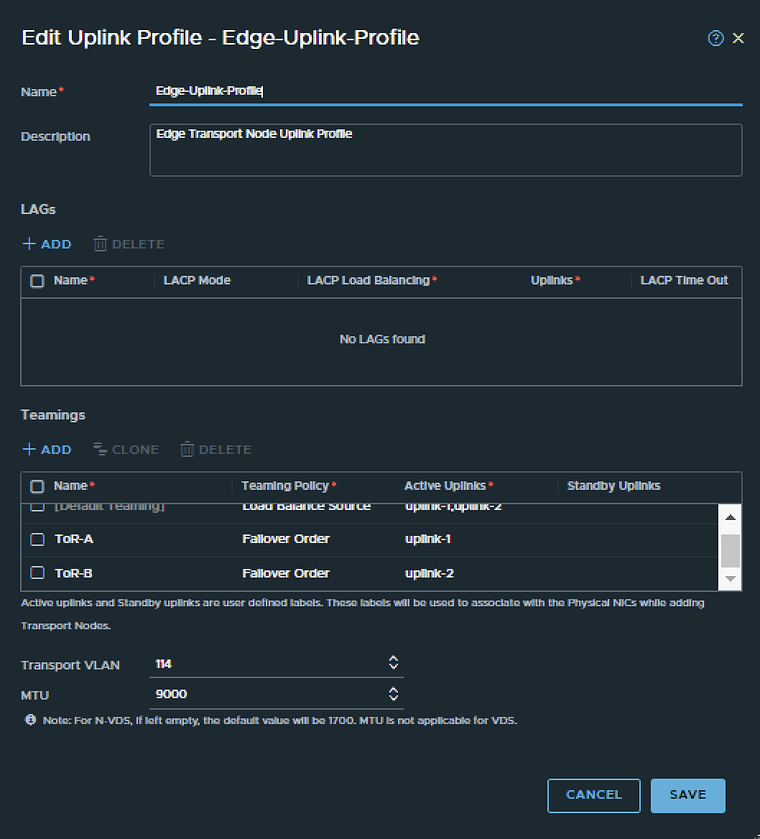
-
NSX Edge Transport Zone
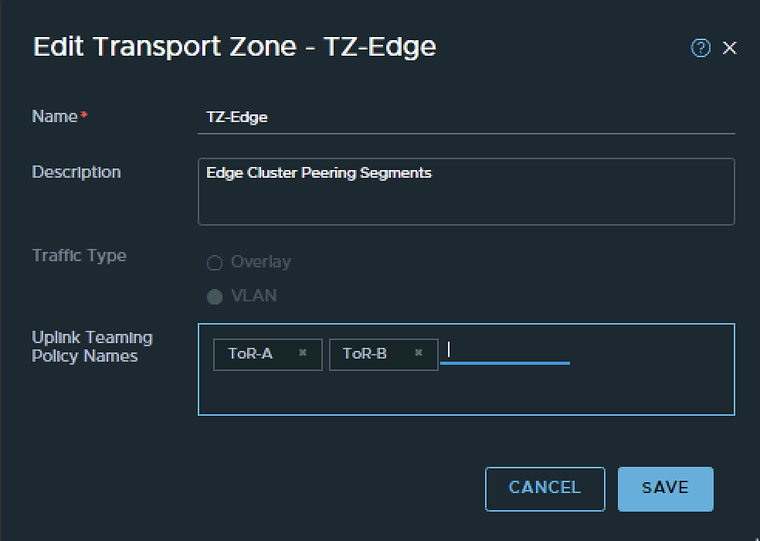
-
NSX Edge configuration
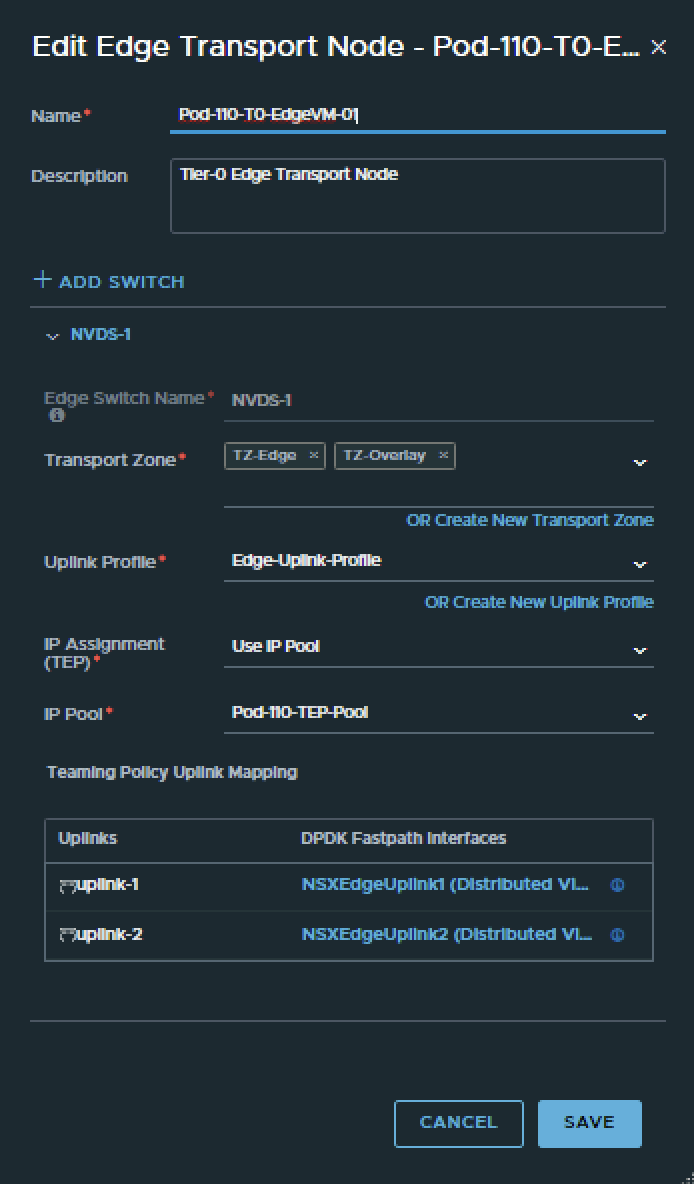
To configure the BGP peers towards the Pod-110 Router I have use the configuration parameters in the table below.
| Segment Name | Transport Zone | Uplink Teaming Policy | VLAN | IPv6 Network | IPv4 network |
|---|---|---|---|---|---|
| SEG-T0-Edge-Uplink1_VLAN-116 | TZ-Edge | VLAN | Tor-A | 116 | fd00:0:0:74::/64 | 10.203.116.0/24 |
| SEG-T0-Edge-Uplink2_VLAN-117 | TZ-Edge | VLAN | Tor-B | 117 | fd00:0:0:75::/64 | 10.203.117.0/24 |
This is the output of both segments after I have created them.
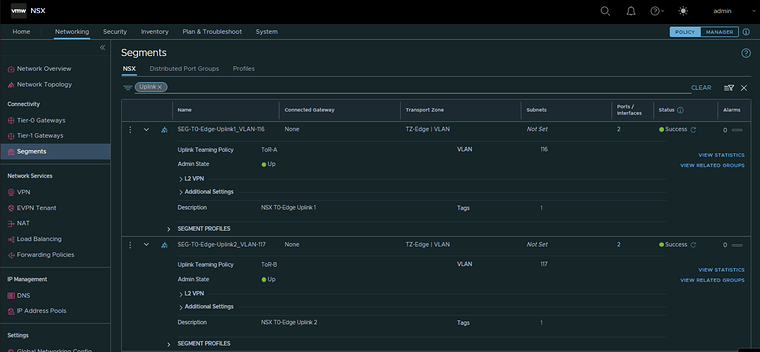
Pod 120
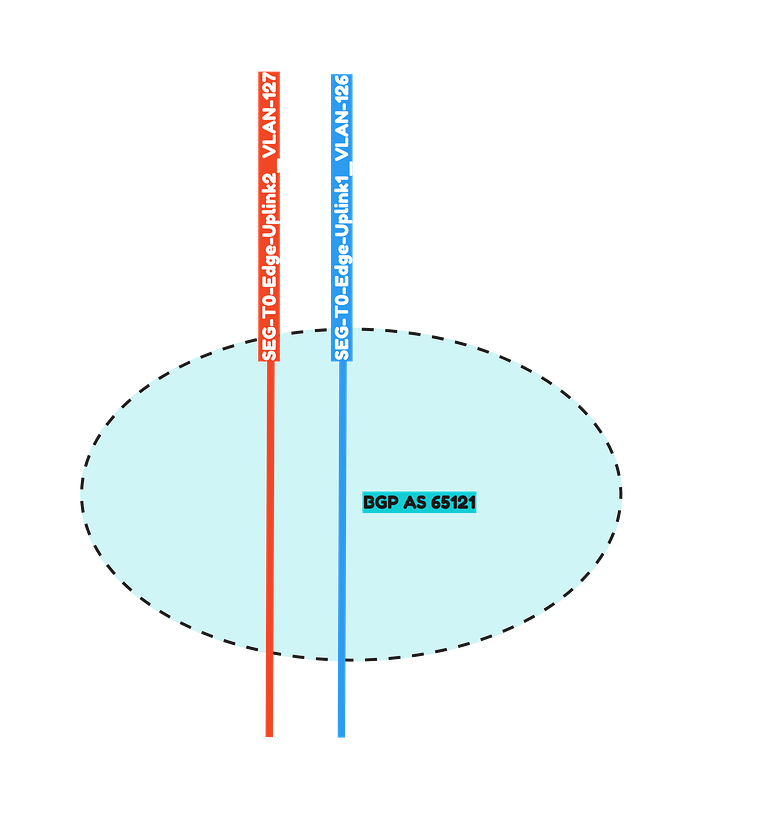
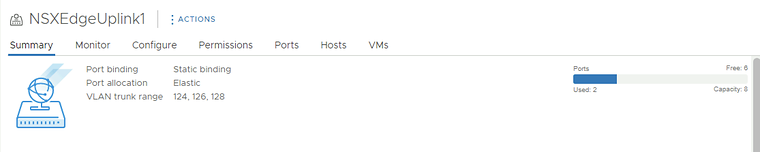
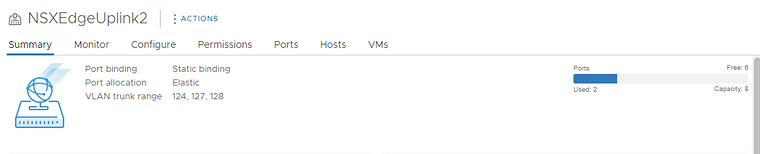
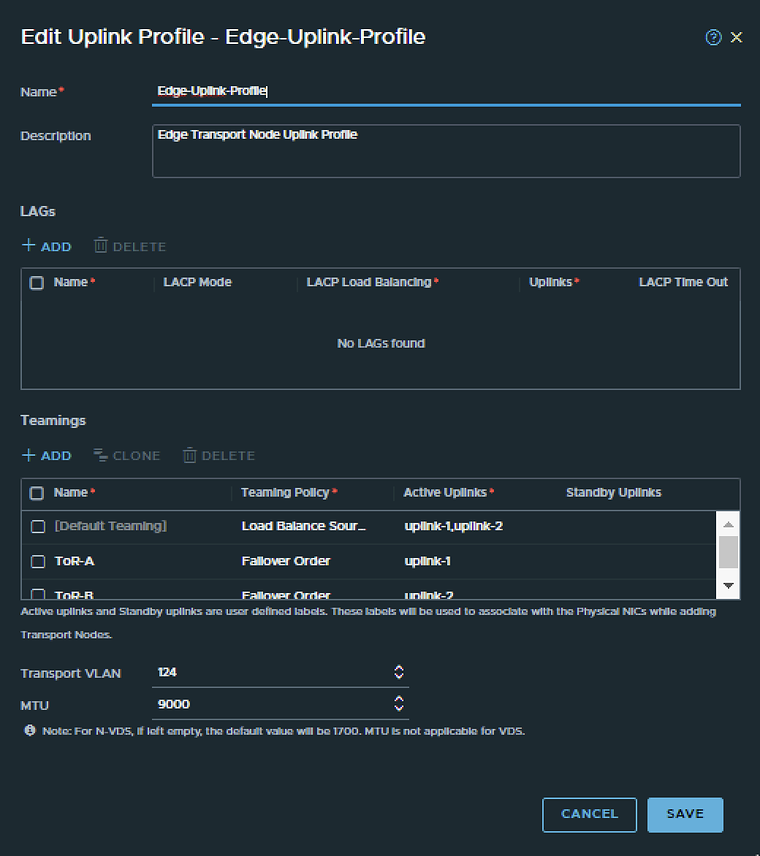
Pod-120 is using Virtual Edges. These Edges are responsible for hosting the Tier-0 Gateway. These Edges are using VDS Port Groups, NSX Uplink Profiles. Transport Zones with Uplink Teaming Policy Names just to make sure the Tier-0 Gateway is able to create its uplink interfaces for BGP peering over VLAN 126 and 127.
-
VDS Port Groups
-
NSX Edge Uplink Profiles
-
NSX Edge Transport Zone
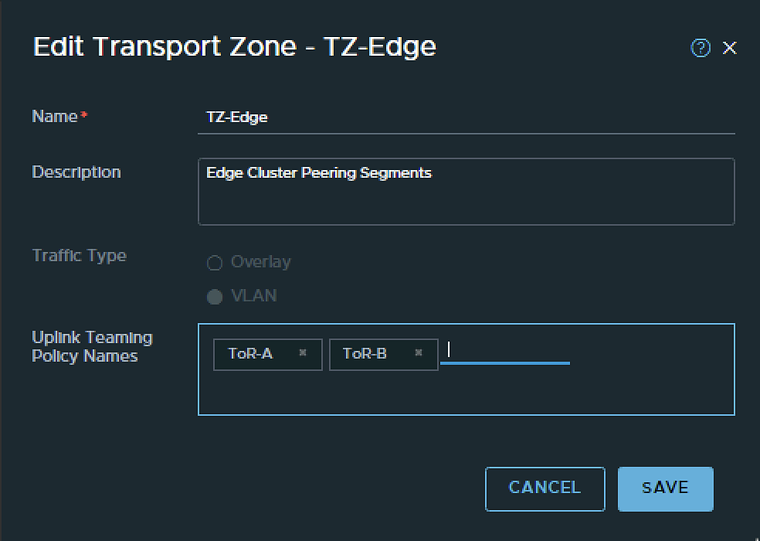
-
NSX Edge configuration
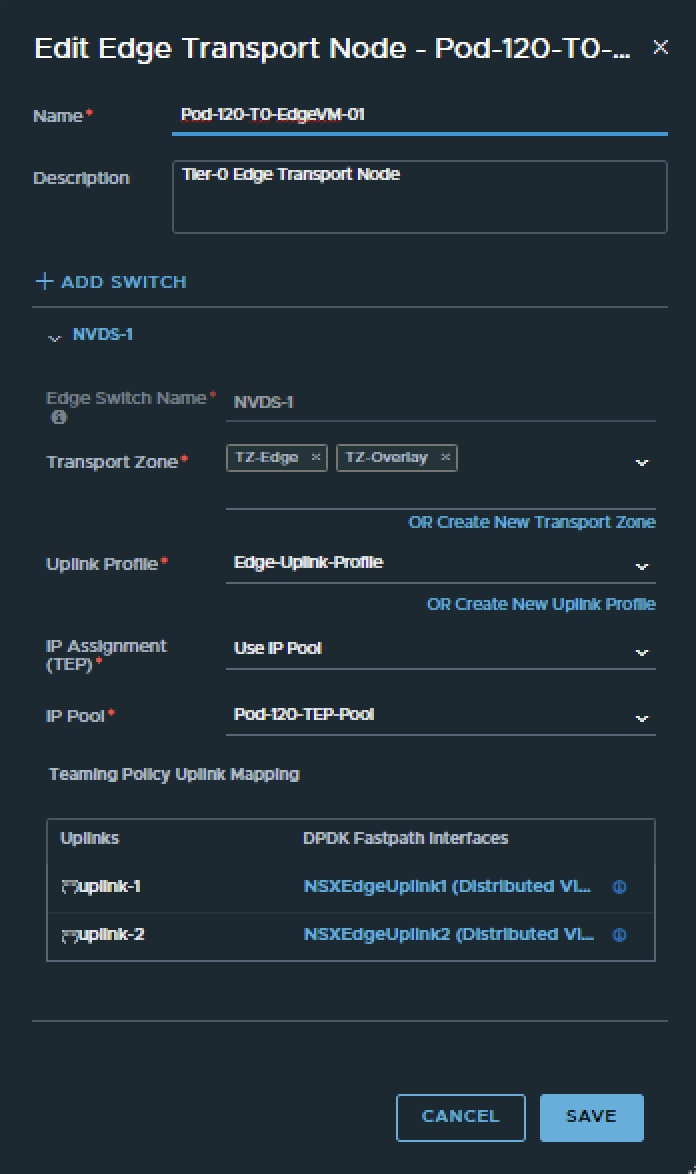
To configure the BGP peers towards the Pod-120 Router I have use the configuration parameters in the table below.
| Segment Name | Transport Zone | Uplink Teaming Policy | VLAN | IPv6 Network | IPv4 network |
|---|---|---|---|---|---|
| SEG-T0-Edge-Uplink1_VLAN-126 | TZ-Edge | VLAN | Tor-A | 126 | fd00:0:0:7e::/64 | 10.203.126.0/24 |
| SEG-T0-Edge-Uplink2_VLAN-127 | TZ-Edge | VLAN | Tor-B | 127 | fd00:0:0:7f::/64 | 10.203.127.0/24 |
This is the output of both segments after I have created them.
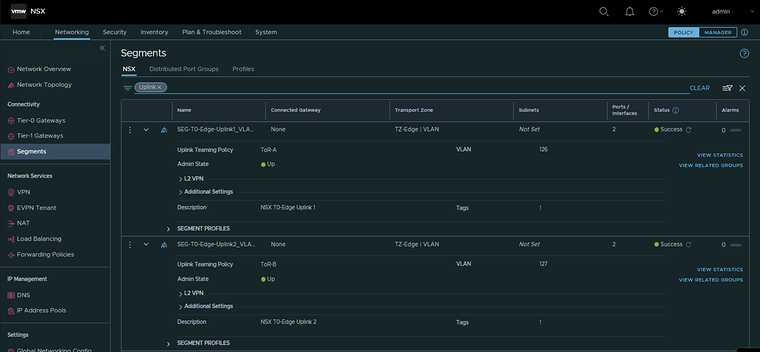
STEP 5» Create a Tier–0 Gateway
Now it is time to create the Tier-0 Gateways and configure the Uplink Interfaces for the BGP and uplink network traffic.
Pod 110
I have created the Tier-0 Gateway using the configuration parameters in the table below.
| Name | Edge Cluster |
|---|---|
| T0-Gateway-01 | T0-Pod-110-T0-Edge-Cluster-01 |
This is the output of the Tier-0 Gateway after I have created it.
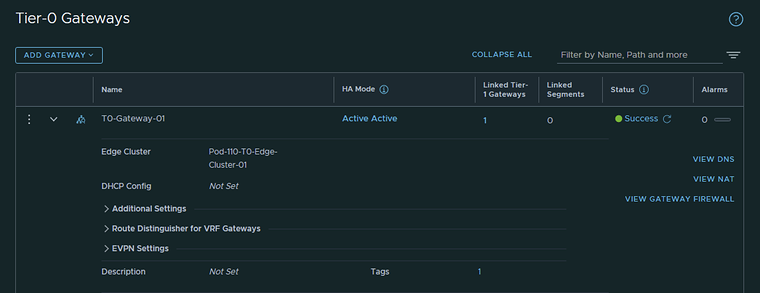
I have created the Tier-0 Gateway uplink interfaces using the configuration parameters in the table below.
| Interface Name | Edge Node | Segment | IPv4 Address | IPv6 Address |
|---|---|---|---|---|
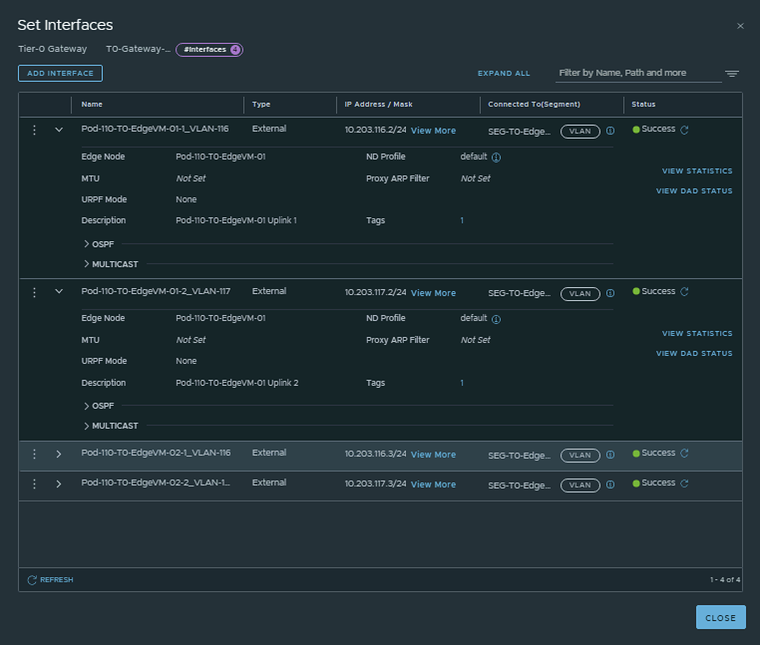
| Pod-110-T0-EdgeVM-01-1_VLAN-116 | Pod-110-T0-EdgeVM-01 | SEG-T0-Edge-Uplink1_VLAN-116 | 10.203.116.2/24 | fd00:0000:0000:0074::0002/64 |
| Pod-110-T0-EdgeVM-01-2_VLAN-117 | Pod-110-T0-EdgeVM-01 | SEG-T0-Edge-Uplink2_VLAN-117 | 10.203.117.2/24 | fd00:0000:0000:0075::0002/64 |
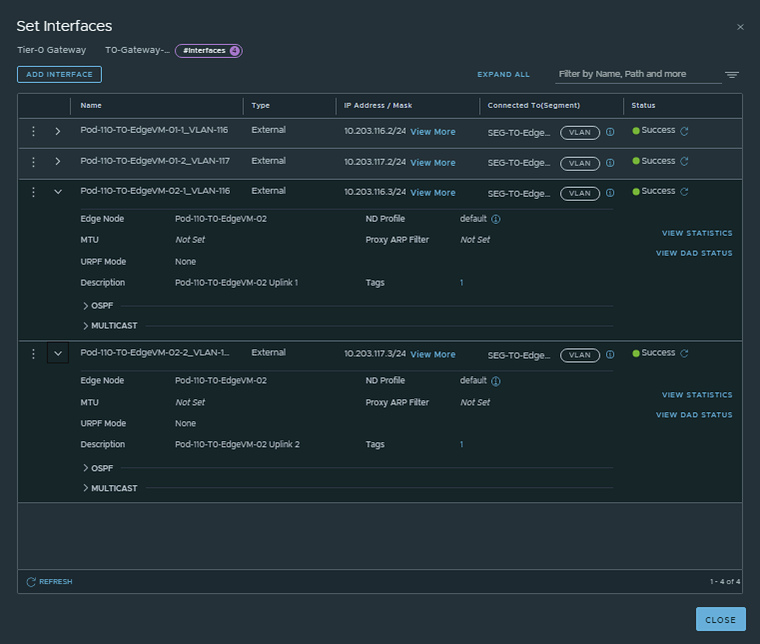
| Pod-110-T0-EdgeVM-02-1_VLAN-116 | Pod-110-T0-EdgeVM-02 | SEG-T0-Edge-Uplink1_VLAN-116 | 10.203.116.3/24 | fd00:0000:0000:0074::0003/64 |
| Pod-110-T0-EdgeVM-02-2_VLAN-117 | Pod-110-T0-EdgeVM-02 | SEG-T0-Edge-Uplink2_VLAN-117 | 10.203.117.3/24 | fd00:0000:0000:0075::0003/64 |
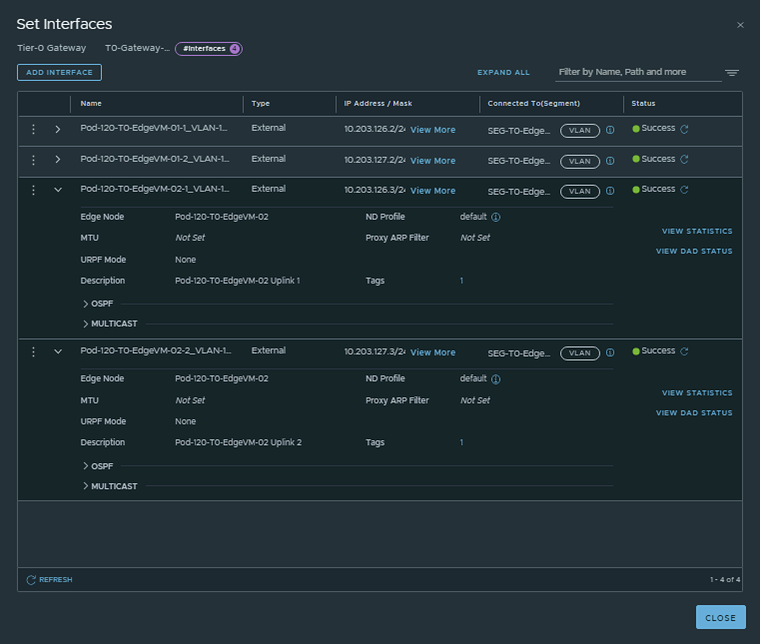
This is the output of the EdgeVM-01 interfaces after I have created them.
This is the output of the EdgeVM-02 interfaces after I have created them.
Pod 120
I have created the Tier-0 Gateway using the configuration parameters in the table below.
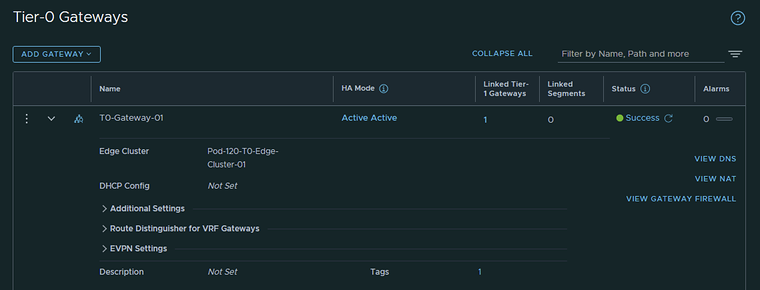
| Name | Edge Cluster |
|---|---|
| T0-Gateway-01 | T0-Pod-120-T0-Edge-Cluster-01 |
This is the output of the Tier-0 Gateway after I have created it.
I have created the Tier-0 Gateway uplink interfaces using the configuration parameters in the table below.
| Interface Name | Edge Node | Segment | IPv4 Address | IPv6 Address |
|---|---|---|---|---|
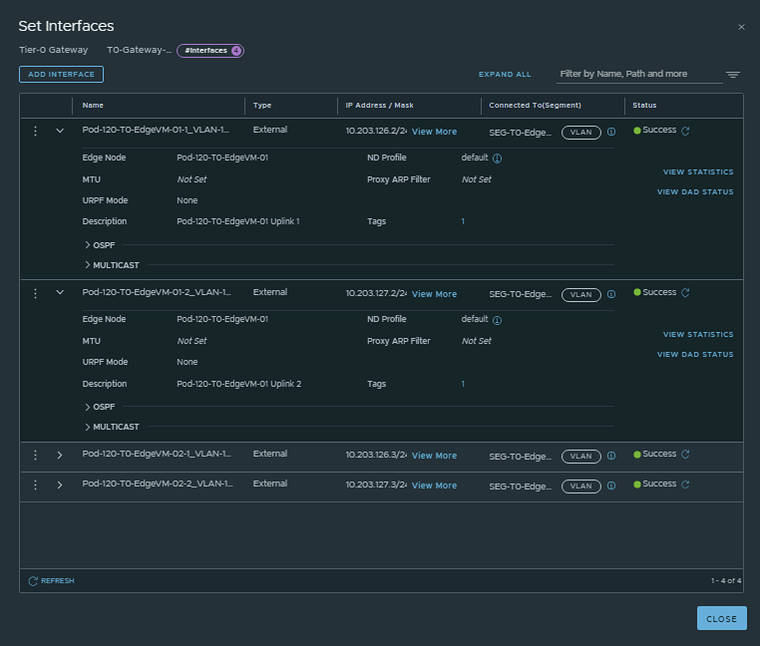
| Pod-120-T0-EdgeVM-01-1_VLAN-126 | Pod-120-T0-EdgeVM-01 | SEG-T0-Edge-Uplink1_VLAN-126 | 10.203.126.2/24 | fd00:0000:0000:007e::0002/64 |
| Pod-120-T0-EdgeVM-01-2_VLAN-127 | Pod-120-T0-EdgeVM-01 | SEG-T0-Edge-Uplink2_VLAN-127 | 10.203.127.2/24 | fd00:0000:0000:007f::0002/64 |
| Pod-120-T0-EdgeVM-02-1_VLAN-126 | Pod-120-T0-EdgeVM-02 | SEG-T0-Edge-Uplink1_VLAN-126 | 10.203.126.3/24 | fd00:0000:0000:007e::0003/64 |
| Pod-120-T0-EdgeVM-02-2_VLAN-127 | Pod-120-T0-EdgeVM-02 | SEG-T0-Edge-Uplink2_VLAN-127 | 10.203.127.3/24 | fd00:0000:0000:007f::0003/64 |
This is the output of the EdgeVM-01 interfaces after I have created them.
This is the output of the EdgeVM-02 interfaces after I have created them.
STEP 6» Configure IPv6 BGP Routing between Tier–0 Gateway and the Pod Gateway
Now that the Tier-0 Gateway is in place and the uplink interfaces are configured I am going to configure BGP on the Tier-0 Gateway. BGP is already configured on the POD-Router in one of the previous steps.
Pod 110
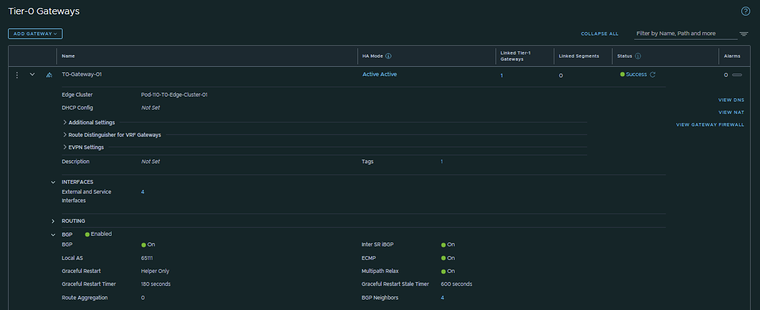
I have configured BGP using the configuration parameters in the table below.
| T0-Gateway-01 | |
|---|---|
| BGP | enabled |
| Local AS | 65111 |
| Inter SR iBGP | on |
| ECMP | on |
| Multipath Relax | on |
This is the output of the Tier-0 Gateway’s BGP configuration.
Now that BGP is enabled I will configure the actual neighbors towards the Pod-110 Router.
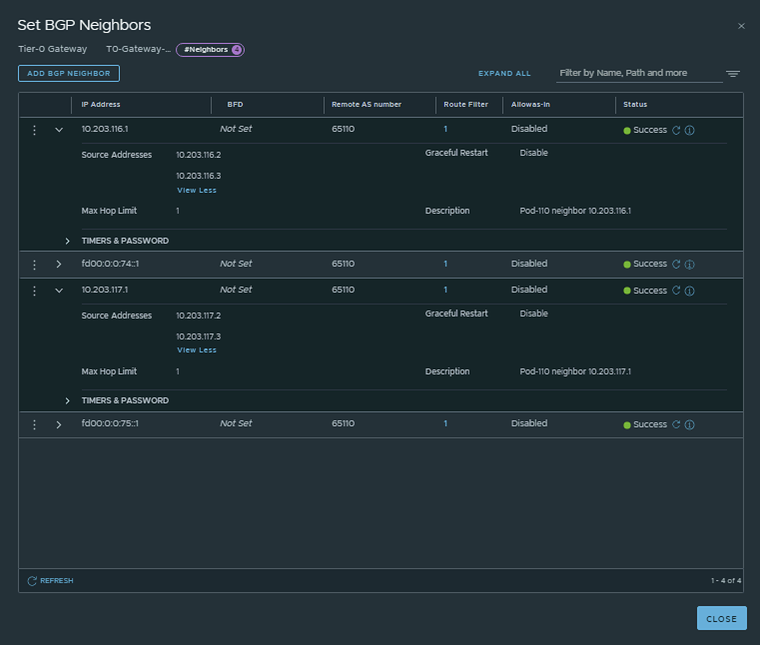
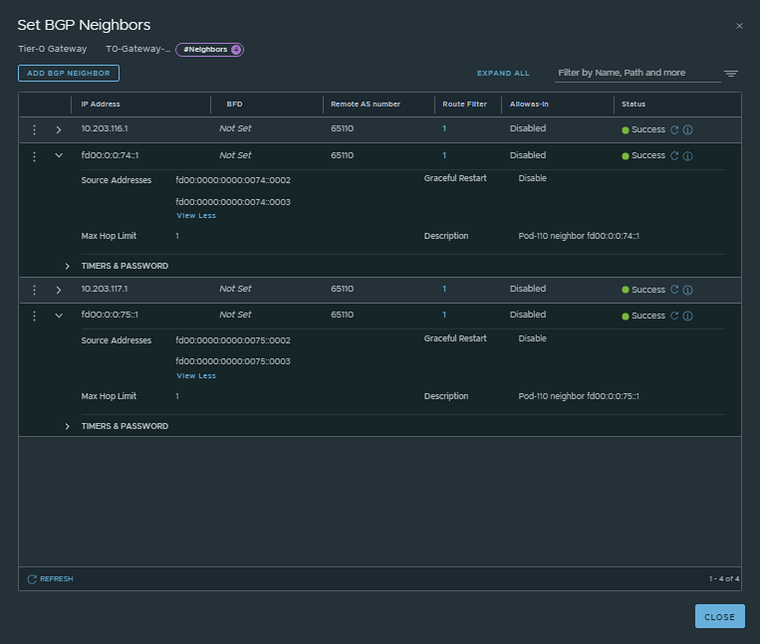
I have configured the BGP neighbors using the configuration parameters in the table below.
Neigbor |
Local AS |
Remote AS |
Peer IPv4 |
Source IPv4 |
Peer IPv6 |
Source IPv6 |
|---|---|---|---|---|---|---|
Pod-110-Router |
65111 |
65110 |
10.203.116.1 |
10.203.116.2 |
fd00:0:0:74::1 |
fd00:0000:0000:0074::0002 |
Pod-110-Router |
65111 |
65110 |
10.203.117.1 |
10.203.117.2 |
fd00:0:0:75::1 |
fd00:0000:0000:0075::0002 |
This is the output of the Tier-0 Gateway’s BGP neighbor configuration for IPv4.
This is the output of the Tier-0 Gateway’s BGP neighbor configuration for IPv6.
💡
The BGP neighbors on the Tier-0 Gateways can be verified on both Edge-VMs by logging into the Tier-0 SR VRF (not the DR).
Verify BGP neighbors on the Pod 110 Router
vyos@Pod-110-Router:~$ show ip bgp neighborsBGP neighbor is 10.203.0.1, remote AS 65000, local AS 65110, external link Description: Lab-Router  BGP version 4, remote router ID 0.0.0.0, local router ID 10.203.110.1  BGP state = Active  Last read 6d04h11m, Last write never  Hold time is 180, keepalive interval is 60 seconds  Graceful restart information:    Local GR Mode: Helper*    Remote GR Mode: NotApplicable    R bit: False    Timers:      Configured Restart Time(sec): 120      Received Restart Time(sec): 0  Message statistics:    Inq depth is 0    Outq depth is 0                         Sent       Rcvd    Opens:                  0          0    Notifications:          0          0    Updates:                0          0    Keepalives:             0          0    Route Refresh:          0          0    Capability:             0          0    Total:                  0          0  Minimum time between advertisement runs is 0 seconds
 For address family: IPv4 Unicast  Not part of any update group  Community attribute sent to this neighbor(all)  0 accepted prefixes
  Connections established 0; dropped 0  Last reset 6d04h11m,  Waiting for peer OPENBGP Connect Retry Timer in Seconds: 120Next connect timer due in 28 secondsRead thread: off  Write thread: off  FD used: -1
BGP neighbor is 10.203.116.2, remote AS 65111, local AS 65110, external link Description: Pod-110-T0-EdgeVM-01-1Hostname: Pod-110-T0-EdgeVM-01  BGP version 4, remote router ID 0.0.0.0, local router ID 10.203.110.1  BGP state = Active  Last read 3d10h34m, Last write 3d07h08m  Hold time is 180, keepalive interval is 60 seconds  Graceful restart information:    Local GR Mode: Helper*    Remote GR Mode: NotApplicable    R bit: False    Timers:      Configured Restart Time(sec): 120      Received Restart Time(sec): 0  Message statistics:    Inq depth is 0    Outq depth is 0                         Sent       Rcvd    Opens:                 66          1    Notifications:        132          0    Updates:                6          6    Keepalives:          3830       3827    Route Refresh:          0          0    Capability:             0          0    Total:               4034       3834  Minimum time between advertisement runs is 0 seconds
 For address family: IPv4 Unicast  Not part of any update group  Community attribute sent to this neighbor(all)  Default information originate, default not sent  0 accepted prefixes
  Connections established 1; dropped 1  Last reset 3d10h31m,   Notification sent (Hold Timer Expired)BGP Connect Retry Timer in Seconds: 120Next connect timer due in 89 secondsRead thread: off  Write thread: off  FD used: -1
BGP neighbor is 10.203.116.3, remote AS 65111, local AS 65110, external link Description: Pod-110-T0-EdgeVM-02-1Hostname: Pod-110-T0-EdgeVM-02  BGP version 4, remote router ID 0.0.0.0, local router ID 10.203.110.1  BGP state = Active  Last read 20:36:28, Last write 20:36:29  Hold time is 180, keepalive interval is 60 seconds  Graceful restart information:    Local GR Mode: Helper*    Remote GR Mode: NotApplicable    R bit: False    Timers:      Configured Restart Time(sec): 120      Received Restart Time(sec): 0  Message statistics:    Inq depth is 0    Outq depth is 0                         Sent       Rcvd    Opens:                 77          9    Notifications:        152          2    Updates:               15         16    Keepalives:          4444       4418    Route Refresh:          0          0    Capability:             0          0    Total:               4688       4445  Minimum time between advertisement runs is 0 seconds
 For address family: IPv4 Unicast  Not part of any update group  Community attribute sent to this neighbor(all)  Default information originate, default not sent  0 accepted prefixes
  Connections established 9; dropped 9  Last reset 20:36:14,   Notification received (Cease/Peer Unconfigured)BGP Connect Retry Timer in Seconds: 120Next connect timer due in 32 secondsRead thread: off  Write thread: off  FD used: -1
BGP neighbor is 10.203.117.2, remote AS 65111, local AS 65110, external link Description: Pod-110-T0-EdgeVM-01-2Hostname: Pod-110-T0-EdgeVM-01  BGP version 4, remote router ID 0.0.0.0, local router ID 10.203.110.1  BGP state = Active  Last read 3d10h34m, Last write 3d07h08m  Hold time is 180, keepalive interval is 60 seconds  Graceful restart information:    Local GR Mode: Helper*    Remote GR Mode: NotApplicable    R bit: False    Timers:      Configured Restart Time(sec): 120      Received Restart Time(sec): 0  Message statistics:    Inq depth is 0    Outq depth is 0                         Sent       Rcvd    Opens:                 65          1    Notifications:        130          0    Updates:                6          6    Keepalives:          3830       3827    Route Refresh:          0          0    Capability:             0          0    Total:               4031       3834  Minimum time between advertisement runs is 0 seconds
 For address family: IPv4 Unicast  Not part of any update group  Community attribute sent to this neighbor(all)  Default information originate, default not sent  0 accepted prefixes
  Connections established 1; dropped 1  Last reset 3d10h31m,   Notification sent (Hold Timer Expired)BGP Connect Retry Timer in Seconds: 120Next connect timer due in 79 secondsRead thread: off  Write thread: off  FD used: -1
BGP neighbor is 10.203.117.3, remote AS 65111, local AS 65110, external link Description: Pod-110-T0-EdgeVM-02-2Hostname: Pod-110-T0-EdgeVM-02  BGP version 4, remote router ID 0.0.0.0, local router ID 10.203.110.1  BGP state = Active  Last read 20:36:23, Last write 20:36:25  Hold time is 180, keepalive interval is 60 seconds  Graceful restart information:    Local GR Mode: Helper*    Remote GR Mode: NotApplicable    R bit: False    Timers:      Configured Restart Time(sec): 120      Received Restart Time(sec): 0  Message statistics:    Inq depth is 0    Outq depth is 0                         Sent       Rcvd    Opens:                 80         10    Notifications:        156          2    Updates:               16         17    Keepalives:          4442       4414    Route Refresh:          0          0    Capability:             0          0    Total:               4694       4443  Minimum time between advertisement runs is 0 seconds
 For address family: IPv4 Unicast  Not part of any update group  Community attribute sent to this neighbor(all)  Default information originate, default not sent  0 accepted prefixes
  Connections established 10; dropped 10  Last reset 20:36:14,   Notification received (Cease/Peer Unconfigured)BGP Connect Retry Timer in Seconds: 120Next connect timer due in 80 secondsRead thread: off  Write thread: off  FD used: -1
BGP neighbor is fd00::1, remote AS 65000, local AS 65110, external link Description: Lab-Router  BGP version 4, remote router ID 0.0.0.0, local router ID 10.203.110.1  BGP state = Active  Last read 6d04h11m, Last write never  Hold time is 180, keepalive interval is 60 seconds  Graceful restart information:    Local GR Mode: Helper*    Remote GR Mode: NotApplicable    R bit: False    Timers:      Configured Restart Time(sec): 120      Received Restart Time(sec): 0  Message statistics:    Inq depth is 0    Outq depth is 0                         Sent       Rcvd    Opens:                  0          0    Notifications:          0          0    Updates:                0          0    Keepalives:             0          0    Route Refresh:          0          0    Capability:             0          0    Total:                  0          0  Minimum time between advertisement runs is 0 seconds
 For address family: IPv6 Unicast  Not part of any update group  Community attribute sent to this neighbor(all)  0 accepted prefixes
  Connections established 0; dropped 0  Last reset 6d04h11m,  Waiting for peer OPENBGP Connect Retry Timer in Seconds: 120Next connect timer due in 29 secondsRead thread: off  Write thread: off  FD used: -1
BGP neighbor is fd00:0:0:74::2, remote AS 65111, local AS 65110, external link Description: Pod-110-T0-EdgeVM-01-1Hostname: Pod-110-T0-EdgeVM-01  BGP version 4, remote router ID 0.0.0.0, local router ID 10.203.110.1  BGP state = Active  Last read 3d10h34m, Last write 3d07h08m  Hold time is 180, keepalive interval is 60 seconds  Graceful restart information:    Local GR Mode: Helper*    Remote GR Mode: NotApplicable    R bit: False    Timers:      Configured Restart Time(sec): 120      Received Restart Time(sec): 0  Message statistics:    Inq depth is 0    Outq depth is 0                         Sent       Rcvd    Opens:                 65          1    Notifications:        130          0    Updates:                7          6    Keepalives:          3830       3827    Route Refresh:          0          0    Capability:             0          0    Total:               4032       3834  Minimum time between advertisement runs is 0 seconds
 For address family: IPv6 Unicast  Not part of any update group  Community attribute sent to this neighbor(all)  Default information originate, default not sent  0 accepted prefixes
  Connections established 1; dropped 1  Last reset 3d10h31m,   Notification sent (Hold Timer Expired)BGP Connect Retry Timer in Seconds: 120Next connect timer due in 85 secondsRead thread: off  Write thread: off  FD used: -1
BGP neighbor is fd00:0:0:74::3, remote AS 65111, local AS 65110, external link Description: Pod-110-T0-EdgeVM-02-1Hostname: Pod-110-T0-EdgeVM-02  BGP version 4, remote router ID 0.0.0.0, local router ID 10.203.110.1  BGP state = Active  Last read 20:36:25, Last write 20:36:25  Hold time is 180, keepalive interval is 60 seconds  Graceful restart information:    Local GR Mode: Helper*    Remote GR Mode: NotApplicable    R bit: False    Timers:      Configured Restart Time(sec): 120      Received Restart Time(sec): 0  Message statistics:    Inq depth is 0    Outq depth is 0                         Sent       Rcvd    Opens:                 78          9    Notifications:        154          2    Updates:               16         15    Keepalives:          4444       4418    Route Refresh:          0          0    Capability:             0          0    Total:               4692       4444  Minimum time between advertisement runs is 0 seconds
 For address family: IPv6 Unicast  Not part of any update group  Community attribute sent to this neighbor(all)  Default information originate, default not sent  0 accepted prefixes
  Connections established 9; dropped 9  Last reset 20:36:13,   Notification received (Cease/Peer Unconfigured)BGP Connect Retry Timer in Seconds: 120Next connect timer due in 64 secondsRead thread: off  Write thread: off  FD used: -1
BGP neighbor is fd00:0:0:75::2, remote AS 65111, local AS 65110, external link Description: Pod-110-T0-EdgeVM-01-2Hostname: Pod-110-T0-EdgeVM-01  BGP version 4, remote router ID 0.0.0.0, local router ID 10.203.110.1  BGP state = Active  Last read 3d10h34m, Last write 3d07h08m  Hold time is 180, keepalive interval is 60 seconds  Graceful restart information:    Local GR Mode: Helper*    Remote GR Mode: NotApplicable    R bit: False    Timers:      Configured Restart Time(sec): 120      Received Restart Time(sec): 0  Message statistics:    Inq depth is 0    Outq depth is 0                         Sent       Rcvd    Opens:                 66          1    Notifications:        132          0    Updates:                6          6    Keepalives:          3830       3827    Route Refresh:          0          0    Capability:             0          0    Total:               4034       3834  Minimum time between advertisement runs is 0 seconds
 For address family: IPv6 Unicast  Not part of any update group  Community attribute sent to this neighbor(all)  Default information originate, default not sent  0 accepted prefixes
  Connections established 1; dropped 1  Last reset 3d10h31m,   Notification sent (Hold Timer Expired)BGP Connect Retry Timer in Seconds: 120Next connect timer due in 46 secondsRead thread: off  Write thread: off  FD used: -1
BGP neighbor is fd00:0:0:75::3, remote AS 65111, local AS 65110, external link Description: Pod-110-T0-EdgeVM-02-2Hostname: Pod-110-T0-EdgeVM-02  BGP version 4, remote router ID 0.0.0.0, local router ID 10.203.110.1  BGP state = Active  Last read 20:36:23, Last write 20:36:23  Hold time is 180, keepalive interval is 60 seconds  Graceful restart information:    Local GR Mode: Helper*    Remote GR Mode: NotApplicable    R bit: False    Timers:      Configured Restart Time(sec): 120      Received Restart Time(sec): 0  Message statistics:    Inq depth is 0    Outq depth is 0                         Sent       Rcvd    Opens:                 79         11    Notifications:        156          2    Updates:               19         16    Keepalives:          4444       4414    Route Refresh:          0          0    Capability:             0          0    Total:               4698       4443  Minimum time between advertisement runs is 0 seconds
 For address family: IPv6 Unicast  Not part of any update group  Community attribute sent to this neighbor(all)  Default information originate, default not sent  0 accepted prefixes
  Connections established 11; dropped 11  Last reset 20:36:13,   Notification received (Cease/Peer Unconfigured)BGP Connect Retry Timer in Seconds: 120Next connect timer due in 39 secondsRead thread: off  Write thread: off  FD used: -1
vyos@Pod-110-Router:~$
Verify BGP neighbors on the Tier-0 Gateway VRF on the Pod 110 EdgeVM-01
Pod-110-T0-EdgeVM-01> get logical-routerWed Sep 07 2022 UTC 10:39:35.805Logical RouterUUID                                   VRF    LR-ID  Name                              Type                        Ports   Neighbors736a80e3-23f6-5a2d-81d6-bbefb2786666   0      0                                        TUNNEL                      4       16/5000
322f1657-3057-44cc-8b32-a947837afbf6   1      2      SR-T0-Gateway-01                  SERVICE_ROUTER_TIER0        7       6/20000
85cbb437-7eab-41ca-99d8-f06655c1c339   3      1      DR-T0-Gateway-01                  DISTRIBUTED_ROUTER_TIER0    5       2/20000
23184393-a35e-46df-989c-6af86651f127   4      3      DR-T1-Gateway-01                  DISTRIBUTED_ROUTER_TIER1    7       2/20000
Pod-110-T0-EdgeVM-01> vrf 1Pod-110-T0-EdgeVM-01(tier0_sr[1])> get bgp neighbor summaryBFD States: NC - Not configured, DC - Disconnected            AD - Admin down, DW - Down, IN - Init, UP - UpBGP summary information for VRF default for address-family: ipv4UnicastRouter ID: 10.203.116.2  Local AS: 65111
Neighbor                            AS          State Up/DownTime  BFD InMsgs  OutMsgs InPfx  OutPfx
10.203.116.1                        65110       Estab 03:42:03     NC  228     228     1      510.203.117.1                        65110       Estab 03:42:03     NC  228     228     1      6
BFD States: NC - Not configured, DC - Disconnected            AD - Admin down, DW - Down, IN - Init, UP - UpBGP summary information for VRF default for address-family: ipv6UnicastRouter ID: 10.203.116.2  Local AS: 65111
Neighbor                            AS          State Up/DownTime  BFD InMsgs  OutMsgs InPfx  OutPfx
fd00:0:0:74::1                      65110       Estab 03:42:03     NC  228     228     1      5fd00:0:0:75::1                      65110       Estab 03:42:03     NC  228     228     1      6
Wed Sep 07 2022 UTC 10:40:00.202Pod-110-T0-EdgeVM-01(tier0_sr[1])>
Verify BGP neighbors on the Tier-0 Gateway VRF on the Pod 110 EdgeVM-02
Pod-110-T0-EdgeVM-02> get logical-routerWed Sep 07 2022 UTC 10:40:33.273Logical RouterUUID                                   VRF    LR-ID  Name                              Type                        Ports   Neighbors736a80e3-23f6-5a2d-81d6-bbefb2786666   0      0                                        TUNNEL                      4       16/5000
85cbb437-7eab-41ca-99d8-f06655c1c339   1      1      DR-T0-Gateway-01                  DISTRIBUTED_ROUTER_TIER0    5       2/20000
120dbcf7-2d18-4bb6-94a3-b4797adb5b1b   2      8      SR-T0-Gateway-01                  SERVICE_ROUTER_TIER0        7       6/20000
23184393-a35e-46df-989c-6af86651f127   4      3      DR-T1-Gateway-01                  DISTRIBUTED_ROUTER_TIER1    7       2/20000
Pod-110-T0-EdgeVM-02> vrf 2Pod-110-T0-EdgeVM-02(tier0_sr[2])> get bgp neighbor summaryBFD States: NC - Not configured, DC - Disconnected            AD - Admin down, DW - Down, IN - Init, UP - UpBGP summary information for VRF default for address-family: ipv4UnicastRouter ID: 10.203.117.3  Local AS: 65111
Neighbor                            AS          State Up/DownTime  BFD InMsgs  OutMsgs InPfx  OutPfx
10.203.116.1                        65110       Estab 03:42:46     NC  228     228     1      510.203.117.1                        65110       Estab 03:42:46     NC  228     228     1      6
BFD States: NC - Not configured, DC - Disconnected            AD - Admin down, DW - Down, IN - Init, UP - UpBGP summary information for VRF default for address-family: ipv6UnicastRouter ID: 10.203.117.3  Local AS: 65111
Neighbor                            AS          State Up/DownTime  BFD InMsgs  OutMsgs InPfx  OutPfx
fd00:0:0:74::1                      65110       Estab 03:42:46     NC  228     228     1      5fd00:0:0:75::1                      65110       Estab 03:42:46     NC  228     228     1      6
Wed Sep 07 2022 UTC 10:40:49.136Pod-110-T0-EdgeVM-02(tier0_sr[2])>
Pod 120
I have configured BGP using the configuration parameters in the table below.
| T0-Gateway-01 | |
|---|---|
| BGP | enabled |
| Local AS | 65121 |
| Inter SR iBGP | on |
| ECMP | on |
| Multipath Relax | on |
This is the output of the Tier-0 Gateway’s BGP configuration.
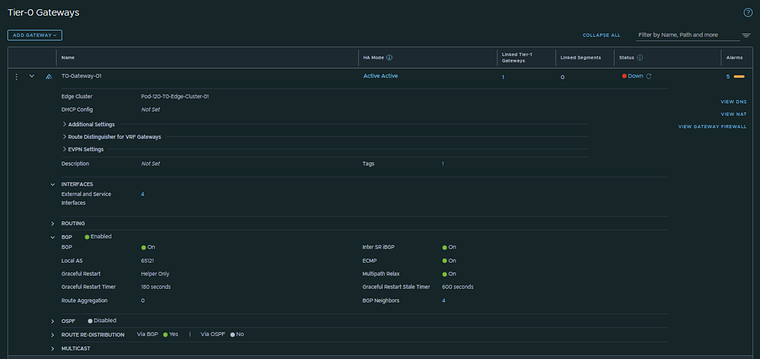
Now that BGP is enabled I will configure the actual neighbors towards the Pod-120 Router.
I have configured the BGP neighbors using the configuration parameters in the table below.
Neigbor |
Local AS |
Remote AS |
Peer IPv4 |
Source IPv4 |
Peer IPv6 |
Source IPv6 |
|---|---|---|---|---|---|---|
Pod-120-Router |
65121 |
65120 |
10.203.126.1 |
10.203.126.2 |
fd00:0:0:7e::1 |
fd00:0000:0000:007e::0002 |
Pod-120-Router |
65121 |
65120 |
10.203.127.1 |
10.203.127.2 |
fd00:0:0:7f::1 |
fd00:0000:0000:007f::0002 |
This is the output of the Tier-0 Gateway’s BGP neighbor configuration for IPv4.
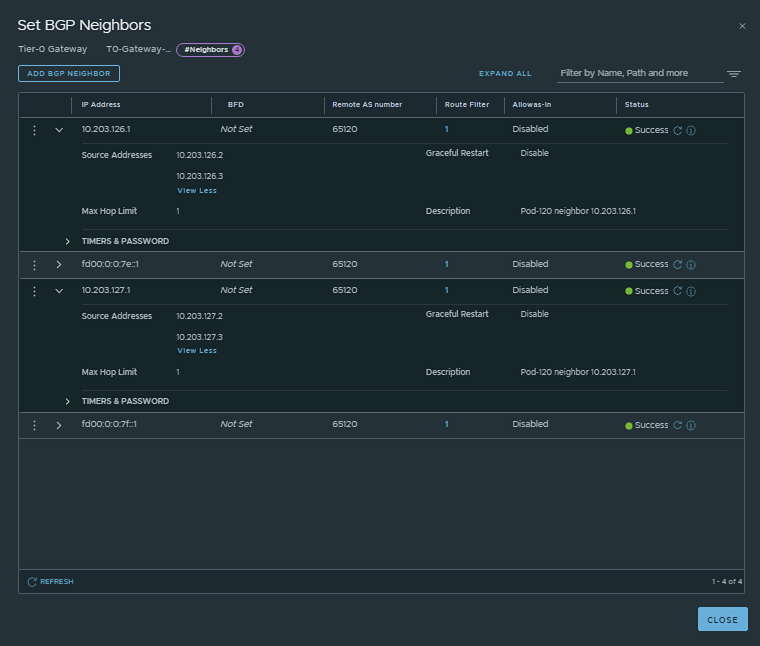
This is the output of the Tier-0 Gateway’s BGP neighbor configuration for IPv6.
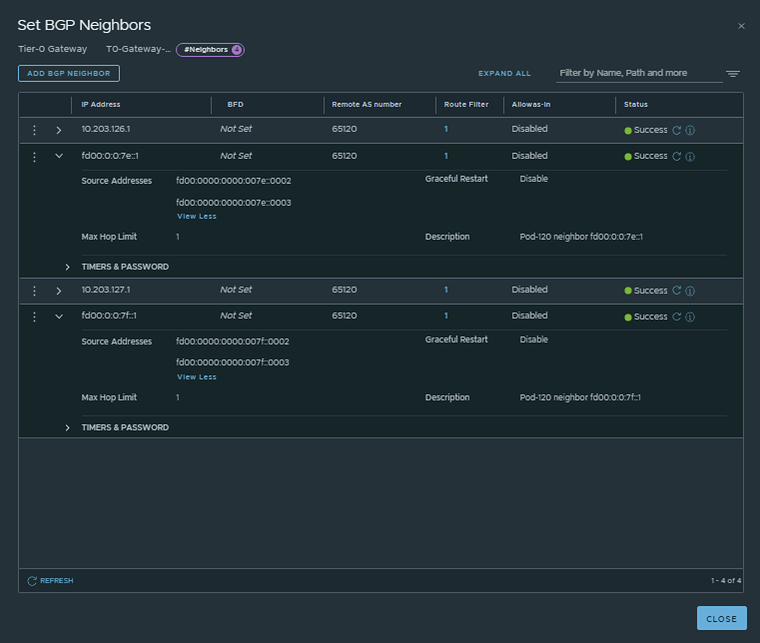
💡
The BGP neighbors on the Tier-0 Gateways can be verified on both Edge-VMs by logging into the Tier-0 SR VRF (not the DR).
Verify BGP neighbors on the Pod 120 Router
vyos@Pod-120-Router:~$ show ip bgp neighborsBGP neighbor is 10.203.0.1, remote AS 65000, local AS 65120, external link Description: Lab-Router  BGP version 4, remote router ID 0.0.0.0, local router ID 10.203.120.1  BGP state = Active  Last read 5d18h40m, Last write never  Hold time is 180, keepalive interval is 60 seconds  Graceful restart information:    Local GR Mode: Helper*    Remote GR Mode: NotApplicable    R bit: False    Timers:      Configured Restart Time(sec): 120      Received Restart Time(sec): 0  Message statistics:    Inq depth is 0    Outq depth is 0                         Sent       Rcvd    Opens:                  0          0    Notifications:          0          0    Updates:                0          0    Keepalives:             0          0    Route Refresh:          0          0    Capability:             0          0    Total:                  0          0  Minimum time between advertisement runs is 0 seconds
 For address family: IPv4 Unicast  Not part of any update group  Community attribute sent to this neighbor(all)  0 accepted prefixes
  Connections established 0; dropped 0  Last reset 5d18h40m,  Waiting for peer OPENBGP Connect Retry Timer in Seconds: 120Next connect timer due in 95 secondsRead thread: off  Write thread: off  FD used: -1
BGP neighbor is 10.203.126.2, remote AS 65121, local AS 65120, external link Description: Pod-120-T0-EdgeVM-01-1Hostname: Pod-120-T0-EdgeVM-01  BGP version 4, remote router ID 10.203.126.2, local router ID 10.203.120.1  BGP state = Established, up for 5d16h35m  Last read 00:00:39, Last write 00:00:40  Hold time is 180, keepalive interval is 60 seconds  Neighbor capabilities:    4 Byte AS: advertised and received    Extended Message: advertised    AddPath:      IPv4 Unicast: RX advertised and received    Route refresh: advertised and received(old & new)    Enhanced Route Refresh: advertised    Address Family IPv4 Unicast: advertised and received    Hostname Capability: advertised (name: Pod-120-Router,domain name: n/a) received (name: Pod-120-T0-EdgeVM-01,domain name: n/a)    Graceful Restart Capability: advertised  Graceful restart information:    Local GR Mode: Helper*    Remote GR Mode: Disable    R bit: False    Timers:      Configured Restart Time(sec): 120      Received Restart Time(sec): 0  Message statistics:    Inq depth is 0    Outq depth is 0                         Sent       Rcvd    Opens:                  1          1    Notifications:          0          0    Updates:                3          4    Keepalives:          8196       8196    Route Refresh:          0          0    Capability:             0          0    Total:               8200       8201  Minimum time between advertisement runs is 0 seconds
 For address family: IPv4 Unicast  Update group 3, subgroup 3  Packet Queue length 0  Community attribute sent to this neighbor(all)  Default information originate, default sent  5 accepted prefixes
  Connections established 1; dropped 0  Last reset 5d18h40m,  No AFI/SAFI activated for peerLocal host: 10.203.126.1, Local port: 179Foreign host: 10.203.126.2, Foreign port: 39979Nexthop: 10.203.126.1Nexthop global: fd00:0:0:7e::1Nexthop local: fe80::20c:29ff:fee3:7980BGP connection: shared networkBGP Connect Retry Timer in Seconds: 120Estimated round trip time: 5 msRead thread: on  Write thread: on  FD used: 34
BGP neighbor is 10.203.126.3, remote AS 65121, local AS 65120, external link Description: Pod-120-T0-EdgeVM-02-1Hostname: Pod-120-T0-EdgeVM-02  BGP version 4, remote router ID 10.203.127.3, local router ID 10.203.120.1  BGP state = Established, up for 5d16h35m  Last read 00:00:53, Last write 00:00:54  Hold time is 180, keepalive interval is 60 seconds  Neighbor capabilities:    4 Byte AS: advertised and received    Extended Message: advertised    AddPath:      IPv4 Unicast: RX advertised and received    Route refresh: advertised and received(old & new)    Enhanced Route Refresh: advertised    Address Family IPv4 Unicast: advertised and received    Hostname Capability: advertised (name: Pod-120-Router,domain name: n/a) received (name: Pod-120-T0-EdgeVM-02,domain name: n/a)    Graceful Restart Capability: advertised  Graceful restart information:    Local GR Mode: Helper*    Remote GR Mode: Disable    R bit: False    Timers:      Configured Restart Time(sec): 120      Received Restart Time(sec): 0  Message statistics:    Inq depth is 0    Outq depth is 0                         Sent       Rcvd    Opens:                 61          2    Notifications:          0          2    Updates:                3          4    Keepalives:          8197       8197    Route Refresh:          0          0    Capability:             0          0    Total:               8261       8205  Minimum time between advertisement runs is 0 seconds
 For address family: IPv4 Unicast  Update group 3, subgroup 3  Packet Queue length 0  Community attribute sent to this neighbor(all)  Default information originate, default sent  5 accepted prefixes
  Connections established 2; dropped 1  Last reset 5d18h35m,  No AFI/SAFI activated for peerLocal host: 10.203.126.1, Local port: 179Foreign host: 10.203.126.3, Foreign port: 46401Nexthop: 10.203.126.1Nexthop global: fd00:0:0:7e::1Nexthop local: fe80::20c:29ff:fee3:7980BGP connection: shared networkBGP Connect Retry Timer in Seconds: 120Estimated round trip time: 4 msRead thread: on  Write thread: on  FD used: 28
BGP neighbor is 10.203.127.2, remote AS 65121, local AS 65120, external link Description: Pod-120-T0-EdgeVM-01-2Hostname: Pod-120-T0-EdgeVM-01  BGP version 4, remote router ID 10.203.126.2, local router ID 10.203.120.1  BGP state = Established, up for 5d16h35m  Last read 00:00:39, Last write 00:00:40  Hold time is 180, keepalive interval is 60 seconds  Neighbor capabilities:    4 Byte AS: advertised and received    Extended Message: advertised    AddPath:      IPv4 Unicast: RX advertised and received    Route refresh: advertised and received(old & new)    Enhanced Route Refresh: advertised    Address Family IPv4 Unicast: advertised and received    Hostname Capability: advertised (name: Pod-120-Router,domain name: n/a) received (name: Pod-120-T0-EdgeVM-01,domain name: n/a)    Graceful Restart Capability: advertised  Graceful restart information:    Local GR Mode: Helper*    Remote GR Mode: Disable    R bit: False    Timers:      Configured Restart Time(sec): 120      Received Restart Time(sec): 0  Message statistics:    Inq depth is 0    Outq depth is 0                         Sent       Rcvd    Opens:                  1          1    Notifications:          0          0    Updates:                3          4    Keepalives:          8196       8196    Route Refresh:          0          0    Capability:             0          0    Total:               8200       8201  Minimum time between advertisement runs is 0 seconds
 For address family: IPv4 Unicast  Update group 3, subgroup 3  Packet Queue length 0  Community attribute sent to this neighbor(all)  Default information originate, default sent  5 accepted prefixes
  Connections established 1; dropped 0  Last reset 5d18h40m,  No AFI/SAFI activated for peerLocal host: 10.203.127.1, Local port: 179Foreign host: 10.203.127.2, Foreign port: 39009Nexthop: 10.203.127.1Nexthop global: fd00:0:0:7f::1Nexthop local: fe80::20c:29ff:fee3:7980BGP connection: shared networkBGP Connect Retry Timer in Seconds: 120Estimated round trip time: 5 msRead thread: on  Write thread: on  FD used: 35
BGP neighbor is 10.203.127.3, remote AS 65121, local AS 65120, external link Description: Pod-120-T0-EdgeVM-02-2Hostname: Pod-120-T0-EdgeVM-02  BGP version 4, remote router ID 10.203.127.3, local router ID 10.203.120.1  BGP state = Established, up for 5d16h35m  Last read 00:00:53, Last write 00:00:54  Hold time is 180, keepalive interval is 60 seconds  Neighbor capabilities:    4 Byte AS: advertised and received    Extended Message: advertised    AddPath:      IPv4 Unicast: RX advertised and received    Route refresh: advertised and received(old & new)    Enhanced Route Refresh: advertised    Address Family IPv4 Unicast: advertised and received    Hostname Capability: advertised (name: Pod-120-Router,domain name: n/a) received (name: Pod-120-T0-EdgeVM-02,domain name: n/a)    Graceful Restart Capability: advertised  Graceful restart information:    Local GR Mode: Helper*    Remote GR Mode: Disable    R bit: False    Timers:      Configured Restart Time(sec): 120      Received Restart Time(sec): 0  Message statistics:    Inq depth is 0    Outq depth is 0                         Sent       Rcvd    Opens:                 61          2    Notifications:          0          2    Updates:                3          4    Keepalives:          8197       8197    Route Refresh:          0          0    Capability:             0          0    Total:               8261       8205  Minimum time between advertisement runs is 0 seconds
 For address family: IPv4 Unicast  Update group 3, subgroup 3  Packet Queue length 0  Community attribute sent to this neighbor(all)  Default information originate, default sent  5 accepted prefixes
  Connections established 2; dropped 1  Last reset 5d18h35m,  No AFI/SAFI activated for peerLocal host: 10.203.127.1, Local port: 179Foreign host: 10.203.127.3, Foreign port: 33637Nexthop: 10.203.127.1Nexthop global: fd00:0:0:7f::1Nexthop local: fe80::20c:29ff:fee3:7980BGP connection: shared networkBGP Connect Retry Timer in Seconds: 120Estimated round trip time: 4 msRead thread: on  Write thread: on  FD used: 31
BGP neighbor is fd00::1, remote AS 65000, local AS 65120, external link Description: Lab-Router  BGP version 4, remote router ID 0.0.0.0, local router ID 10.203.120.1  BGP state = Active  Last read 5d18h40m, Last write never  Hold time is 180, keepalive interval is 60 seconds  Graceful restart information:    Local GR Mode: Helper*    Remote GR Mode: NotApplicable    R bit: False    Timers:      Configured Restart Time(sec): 120      Received Restart Time(sec): 0  Message statistics:    Inq depth is 0    Outq depth is 0                         Sent       Rcvd    Opens:                  0          0    Notifications:          0          0    Updates:                0          0    Keepalives:             0          0    Route Refresh:          0          0    Capability:             0          0    Total:                  0          0  Minimum time between advertisement runs is 0 seconds
 For address family: IPv6 Unicast  Not part of any update group  Community attribute sent to this neighbor(all)  0 accepted prefixes
  Connections established 0; dropped 0  Last reset 5d18h40m,  Waiting for peer OPENBGP Connect Retry Timer in Seconds: 120Next connect timer due in 111 secondsRead thread: off  Write thread: off  FD used: -1
BGP neighbor is fd00:0:0:7e::2, remote AS 65121, local AS 65120, external link Description: Pod-120-T0-EdgeVM-01-1Hostname: Pod-120-T0-EdgeVM-01  BGP version 4, remote router ID 10.203.126.2, local router ID 10.203.120.1  BGP state = Established, up for 5d16h35m  Last read 00:00:39, Last write 00:00:40  Hold time is 180, keepalive interval is 60 seconds  Neighbor capabilities:    4 Byte AS: advertised and received    Extended Message: advertised    AddPath:      IPv6 Unicast: RX advertised and received    Route refresh: advertised and received(old & new)    Enhanced Route Refresh: advertised    Address Family IPv6 Unicast: advertised and received    Hostname Capability: advertised (name: Pod-120-Router,domain name: n/a) received (name: Pod-120-T0-EdgeVM-01,domain name: n/a)    Graceful Restart Capability: advertised  Graceful restart information:    Local GR Mode: Helper*    Remote GR Mode: Disable    R bit: False    Timers:      Configured Restart Time(sec): 120      Received Restart Time(sec): 0  Message statistics:    Inq depth is 0    Outq depth is 0                         Sent       Rcvd    Opens:                  1          1    Notifications:          0          0    Updates:                3          4    Keepalives:          8196       8196    Route Refresh:          0          0    Capability:             0          0    Total:               8200       8201  Minimum time between advertisement runs is 0 seconds
 For address family: IPv6 Unicast  Update group 4, subgroup 4  Packet Queue length 0  Community attribute sent to this neighbor(all)  Default information originate, default sent  5 accepted prefixes
  Connections established 1; dropped 0  Last reset 5d18h40m,  No AFI/SAFI activated for peerLocal host: fd00:0:0:7e::1, Local port: 179Foreign host: fd00:0:0:7e::2, Foreign port: 33751Nexthop: 10.203.126.1Nexthop global: fd00:0:0:7e::1Nexthop local: fe80::20c:29ff:fee3:7980BGP connection: shared networkBGP Connect Retry Timer in Seconds: 120Estimated round trip time: 4 msRead thread: on  Write thread: on  FD used: 36
BGP neighbor is fd00:0:0:7e::3, remote AS 65121, local AS 65120, external link Description: Pod-120-T0-EdgeVM-02-1Hostname: Pod-120-T0-EdgeVM-02  BGP version 4, remote router ID 10.203.127.3, local router ID 10.203.120.1  BGP state = Established, up for 5d16h35m  Last read 00:00:53, Last write 00:00:53  Hold time is 180, keepalive interval is 60 seconds  Neighbor capabilities:    4 Byte AS: advertised and received    Extended Message: advertised    AddPath:      IPv6 Unicast: RX advertised and received    Route refresh: advertised and received(old & new)    Enhanced Route Refresh: advertised    Address Family IPv6 Unicast: advertised and received    Hostname Capability: advertised (name: Pod-120-Router,domain name: n/a) received (name: Pod-120-T0-EdgeVM-02,domain name: n/a)    Graceful Restart Capability: advertised  Graceful restart information:    Local GR Mode: Helper*    Remote GR Mode: Disable    R bit: False    Timers:      Configured Restart Time(sec): 120      Received Restart Time(sec): 0  Message statistics:    Inq depth is 0    Outq depth is 0                         Sent       Rcvd    Opens:                 61          2    Notifications:          0          2    Updates:                3          4    Keepalives:          8197       8197    Route Refresh:          0          0    Capability:             0          0    Total:               8261       8205  Minimum time between advertisement runs is 0 seconds
 For address family: IPv6 Unicast  Update group 4, subgroup 4  Packet Queue length 0  Community attribute sent to this neighbor(all)  Default information originate, default sent  5 accepted prefixes
  Connections established 2; dropped 1  Last reset 5d18h35m,  No AFI/SAFI activated for peerLocal host: fd00:0:0:7e::1, Local port: 179Foreign host: fd00:0:0:7e::3, Foreign port: 38153Nexthop: 10.203.126.1Nexthop global: fd00:0:0:7e::1Nexthop local: fe80::20c:29ff:fee3:7980BGP connection: shared networkBGP Connect Retry Timer in Seconds: 120Estimated round trip time: 4 msRead thread: on  Write thread: on  FD used: 32
BGP neighbor is fd00:0:0:7f::2, remote AS 65121, local AS 65120, external link Description: Pod-120-T0-EdgeVM-01-2Hostname: Pod-120-T0-EdgeVM-01  BGP version 4, remote router ID 10.203.126.2, local router ID 10.203.120.1  BGP state = Established, up for 5d16h35m  Last read 00:00:39, Last write 00:00:40  Hold time is 180, keepalive interval is 60 seconds  Neighbor capabilities:    4 Byte AS: advertised and received    Extended Message: advertised    AddPath:      IPv6 Unicast: RX advertised and received    Route refresh: advertised and received(old & new)    Enhanced Route Refresh: advertised    Address Family IPv6 Unicast: advertised and received    Hostname Capability: advertised (name: Pod-120-Router,domain name: n/a) received (name: Pod-120-T0-EdgeVM-01,domain name: n/a)    Graceful Restart Capability: advertised  Graceful restart information:    Local GR Mode: Helper*    Remote GR Mode: Disable    R bit: False    Timers:      Configured Restart Time(sec): 120      Received Restart Time(sec): 0  Message statistics:    Inq depth is 0    Outq depth is 0                         Sent       Rcvd    Opens:                  1          1    Notifications:          0          0    Updates:                3          4    Keepalives:          8196       8196    Route Refresh:          0          0    Capability:             0          0    Total:               8200       8201  Minimum time between advertisement runs is 0 seconds
 For address family: IPv6 Unicast  Update group 4, subgroup 4  Packet Queue length 0  Community attribute sent to this neighbor(all)  Default information originate, default sent  5 accepted prefixes
  Connections established 1; dropped 0  Last reset 5d18h40m,  No AFI/SAFI activated for peerLocal host: fd00:0:0:7f::1, Local port: 179Foreign host: fd00:0:0:7f::2, Foreign port: 40945Nexthop: 10.203.127.1Nexthop global: fd00:0:0:7f::1Nexthop local: fe80::20c:29ff:fee3:7980BGP connection: shared networkBGP Connect Retry Timer in Seconds: 120Estimated round trip time: 5 msRead thread: on  Write thread: on  FD used: 37
BGP neighbor is fd00:0:0:7f::3, remote AS 65121, local AS 65120, external link Description: Pod-120-T0-EdgeVM-02-2Hostname: Pod-120-T0-EdgeVM-02  BGP version 4, remote router ID 10.203.127.3, local router ID 10.203.120.1  BGP state = Established, up for 5d16h35m  Last read 00:00:52, Last write 00:00:53  Hold time is 180, keepalive interval is 60 seconds  Neighbor capabilities:    4 Byte AS: advertised and received    Extended Message: advertised    AddPath:      IPv6 Unicast: RX advertised and received    Route refresh: advertised and received(old & new)    Enhanced Route Refresh: advertised    Address Family IPv6 Unicast: advertised and received    Hostname Capability: advertised (name: Pod-120-Router,domain name: n/a) received (name: Pod-120-T0-EdgeVM-02,domain name: n/a)    Graceful Restart Capability: advertised  Graceful restart information:    Local GR Mode: Helper*    Remote GR Mode: Disable    R bit: False    Timers:      Configured Restart Time(sec): 120      Received Restart Time(sec): 0  Message statistics:    Inq depth is 0    Outq depth is 0                         Sent       Rcvd    Opens:                 62          2    Notifications:          0          2    Updates:                3          4    Keepalives:          8197       8197    Route Refresh:          0          0    Capability:             0          0    Total:               8262       8205  Minimum time between advertisement runs is 0 seconds
 For address family: IPv6 Unicast  Update group 4, subgroup 4  Packet Queue length 0  Community attribute sent to this neighbor(all)  Default information originate, default sent  5 accepted prefixes
  Connections established 2; dropped 1  Last reset 5d18h35m,  No AFI/SAFI activated for peerLocal host: fd00:0:0:7f::1, Local port: 179Foreign host: fd00:0:0:7f::3, Foreign port: 42663Nexthop: 10.203.127.1Nexthop global: fd00:0:0:7f::1Nexthop local: fe80::20c:29ff:fee3:7980BGP connection: shared networkBGP Connect Retry Timer in Seconds: 120Estimated round trip time: 4 msRead thread: on  Write thread: on  FD used: 33
vyos@Pod-120-Router:~$
Verify BGP neighbors on the Tier-0 Gateway VRF on the Pod 120 EdgeVM-01
Pod-120-T0-EdgeVM-01> get logical-routersTue Sep 06 2022 UTC 13:43:16.392Logical RouterUUID                                   VRF    LR-ID  Name                              Type                        Ports   Neighbors736a80e3-23f6-5a2d-81d6-bbefb2786666   0      0                                        TUNNEL                      4       16/5000
e011df91-bfbc-46d4-8f8a-adbcc2b241d6   1      1      DR-T0-Gateway-01                  DISTRIBUTED_ROUTER_TIER0    5       2/20000
06668568-786e-4b5c-8f99-0ff0799c7c9f   2      14     DR-T1-Gateway-01                  DISTRIBUTED_ROUTER_TIER1    7       2/20000
157da70b-9636-4163-b175-35e8f7535637   3      2      SR-T0-Gateway-01                  SERVICE_ROUTER_TIER0        7       6/20000
Pod-120-T0-EdgeVM-01> vrf 3Pod-120-T0-EdgeVM-01(tier0_sr[3])> get bgp neighbor summaryBFD States: NC - Not configured, DC - Disconnected            AD - Admin down, DW - Down, IN - Init, UP - UpBGP summary information for VRF default for address-family: ipv4UnicastRouter ID: 10.203.126.2  Local AS: 65121
Neighbor                            AS          State Up/DownTime  BFD InMsgs  OutMsgs InPfx  OutPfx
10.203.126.1                        65120       Estab 5d16h42m     NC  8207    8208    1      510.203.127.1                        65120       Estab 5d16h42m     NC  8207    8208    1      6
BFD States: NC - Not configured, DC - Disconnected            AD - Admin down, DW - Down, IN - Init, UP - UpBGP summary information for VRF default for address-family: ipv6UnicastRouter ID: 10.203.126.2  Local AS: 65121
Neighbor                            AS          State Up/DownTime  BFD InMsgs  OutMsgs InPfx  OutPfx
fd00:0:0:7e::1                      65120       Estab 5d16h42m     NC  8207    8208    1      5fd00:0:0:7f::1                      65120       Estab 5d16h42m     NC  8207    8208    1      6
Tue Sep 06 2022 UTC 13:43:40.065Pod-120-T0-EdgeVM-01(tier0_sr[3])>
Verify BGP neighbors on the Tier-0 Gateway VRF on the Pod 120 EdgeVM-02
Pod-120-T0-EdgeVM-02> get logical-routerTue Sep 06 2022 UTC 13:44:05.247Logical RouterUUID                                   VRF    LR-ID  Name                              Type                        Ports   Neighbors736a80e3-23f6-5a2d-81d6-bbefb2786666   0      0                                        TUNNEL                      4       16/5000
e011df91-bfbc-46d4-8f8a-adbcc2b241d6   1      1      DR-T0-Gateway-01                  DISTRIBUTED_ROUTER_TIER0    5       2/20000
06668568-786e-4b5c-8f99-0ff0799c7c9f   2      14     DR-T1-Gateway-01                  DISTRIBUTED_ROUTER_TIER1    7       2/20000
9ec0f75a-5f89-4551-9462-96de69c6a38f   3      7      SR-T0-Gateway-01                  SERVICE_ROUTER_TIER0        7       6/20000
Pod-120-T0-EdgeVM-02> vrf 3Pod-120-T0-EdgeVM-02(tier0_sr[3])> get bgp neighbor summaryBFD States: NC - Not configured, DC - Disconnected            AD - Admin down, DW - Down, IN - Init, UP - UpBGP summary information for VRF default for address-family: ipv4UnicastRouter ID: 10.203.127.3  Local AS: 65121
Neighbor                            AS          State Up/DownTime  BFD InMsgs  OutMsgs InPfx  OutPfx
10.203.126.1                        65120       Estab 5d16h43m     NC  8210    8213    1      510.203.127.1                        65120       Estab 5d16h43m     NC  8210    8213    1      6
BFD States: NC - Not configured, DC - Disconnected            AD - Admin down, DW - Down, IN - Init, UP - UpBGP summary information for VRF default for address-family: ipv6UnicastRouter ID: 10.203.127.3  Local AS: 65121
Neighbor                            AS          State Up/DownTime  BFD InMsgs  OutMsgs InPfx  OutPfx
fd00:0:0:7e::1                      65120       Estab 5d16h43m     NC  8210    8213    1      5fd00:0:0:7f::1                      65120       Estab 5d16h43m     NC  8210    8213    1      6
Tue Sep 06 2022 UTC 13:44:26.834Pod-120-T0-EdgeVM-02(tier0_sr[3])>
STEP 7» Create a Tier–1 Gateway
Now it is time to create the Tier-1 Gateways and link them to the Tier-0 Gateway.
Pod 110
I have created the Tier-1 Gateway using the configuration parameters in the table below.
| Name | Linked Tier-0 Gateway |
|---|---|
| T1-Gateway-01 | T0-Gateway-01 |
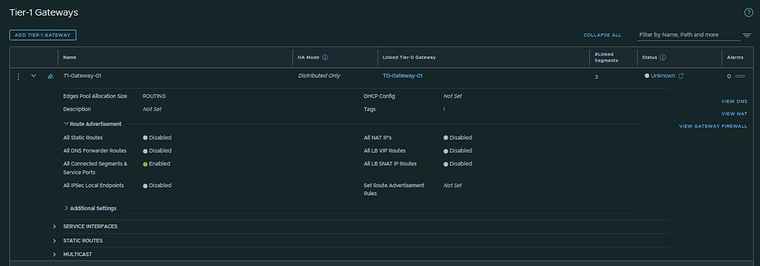
This is the output of the Tier-1 Gateway after I have created it.
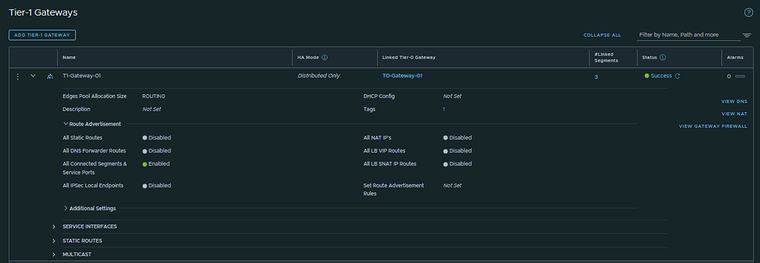
Pod 120
I have created the Tier-1 Gateway using the configuration parameters in the table below.
| Name | Linked Tier-0 Gateway |
|---|---|
| T1-Gateway-01 | T0-Gateway-01 |
This is the output of the Tier-1 Gateway after I have created it.
STEP 8» Add IPv6 Web App and DB Segments in NSX
Now that I have created to Tier-1 Gateway and linked the Tier-1 Gateway to the Tier-0 Gateway I am going to create three segments that are going to be linked to the Tier-1 Gateway.
Pod 110
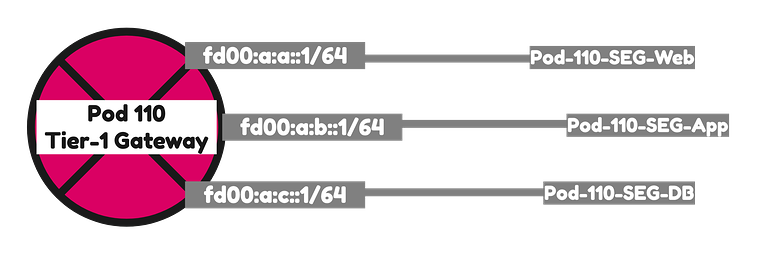
I have created the Segments using the configuration parameters in the table below.
| Segment Name | IPv6 Network | IPv6 T1 Interface address | IPv4 Network | IPv4 T1 Interface address | Transport Zone | Connected Gateway |
|---|---|---|---|---|---|---|
| Pod-110-Web | fd00:a:a::/64 | fd00:a:a::1 | 192.168.1.0/24 | 192.168.1.1 | TZ-Overlay | Overlay | T1-Gateway-01 |
| Pod-110-App | fd00:a:b::/64 | fd00:a:b::1 | 192.168.2.0/24 | 192.168.2.1 | TZ-Overlay | Overlay | T1-Gateway-01 |
| Pod-110-DB | fd00:a:c::/64 | fd00:a:c::1 | 192.168.3.0/24 | 192.168.3.1 | TZ-Overlay | Overlay | T1-Gateway-01 |
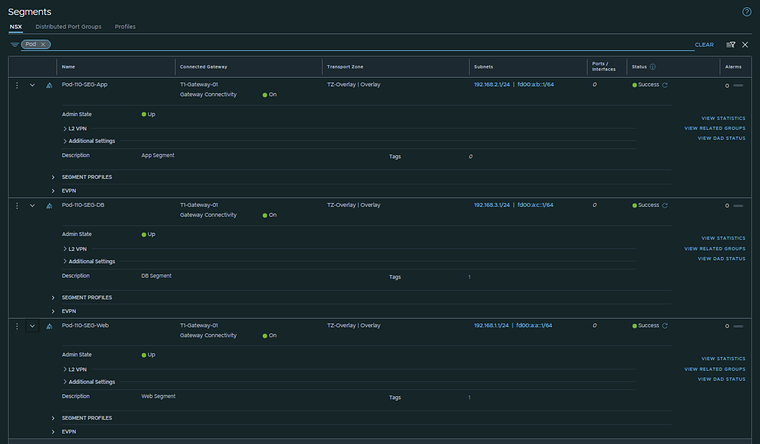
This is the output of all three segments after I have created them.
Pod 120
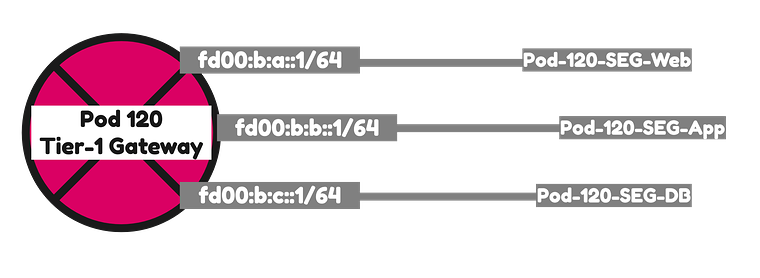
I have created the Segments using the configuration parameters in the table below.
| Segment Name | IPv6 Network | IPv6 T1 Interface address | IPv4 Network | IPv4 T1 Interface address | Transport Zone | Connected Gateway |
|---|---|---|---|---|---|---|
| Pod-120-Web | fd00:b:a::/64 | fd00:b:a::1 | 192.168.5.0/24 | 192.168.5.1 | TZ-Overlay | Overlay | T1-Gateway-01 |
| Pod-120-App | fd00:b:b::/64 | fd00:b:b::1 | 192.168.6.0/24 | 192.168.6.1 | TZ-Overlay | Overlay | T1-Gateway-01 |
| Pod-120-DB | fd00:b:c::/64 | fd00:b:c::1 | 192.168.7.0/24 | 192.168.7.1 | TZ-Overlay | Overlay | T1-Gateway-01 |
This is the output of all three segments after I have created them.
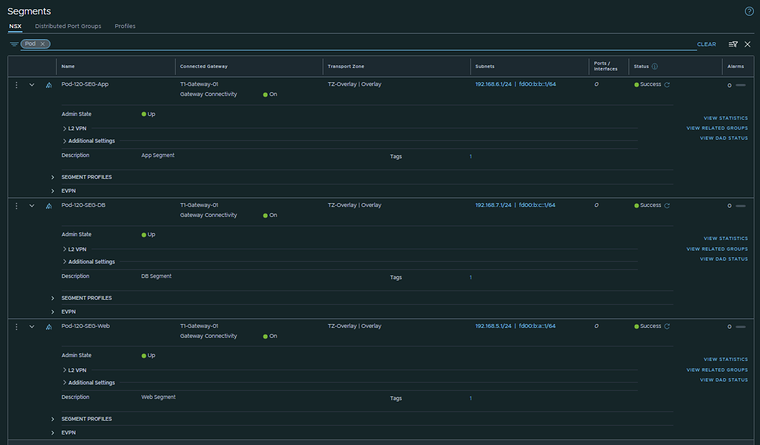
STEP 9» Configure Route Advertise connected Tier–1 Gateway segment networks to BGP
Now that the Segments are connected to the Tier-1 Gateways both in Pod 110 and Pod 120 these networks need to be advertised into the network so that the Virtual Machines of the Web, App and DB Segment in Pod 110 can reach the Virtual Machines of the Web, App and DB Segment in Pod 120.
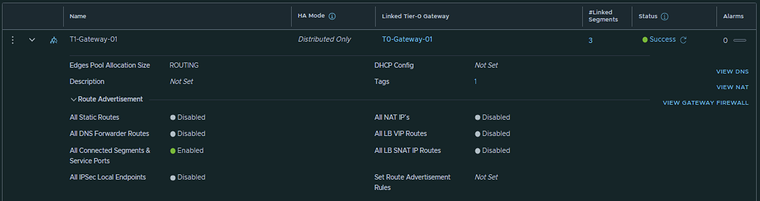
Pod 110
T1–Gateway
On the Tier-1 Gateway I have enabled Route Advertisement for “All connected Segments & Service Ports”.
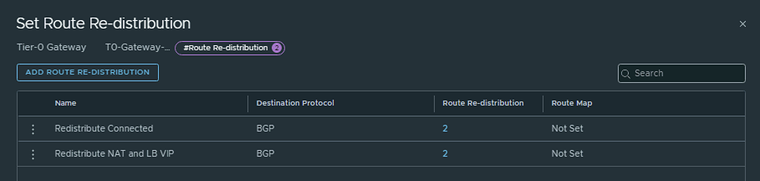
T0–Gateway
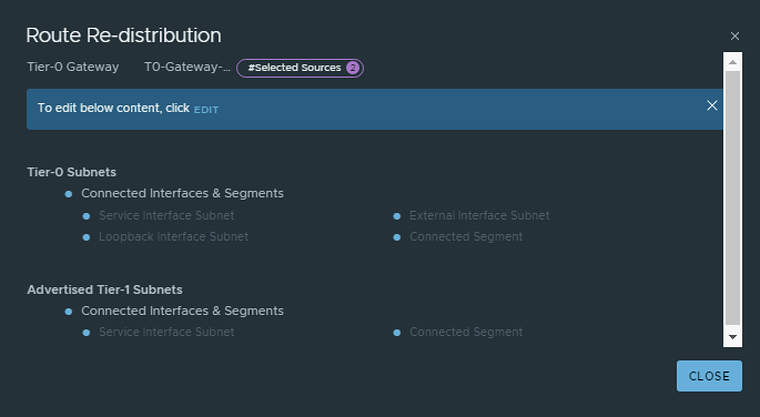
On the Tier-0 Gateway I have enables Route Redistribution so it will Advertise Tier-1 Subnets by enabling “Connected interfaces & Segments”.

Pod 120
T1–Gateway
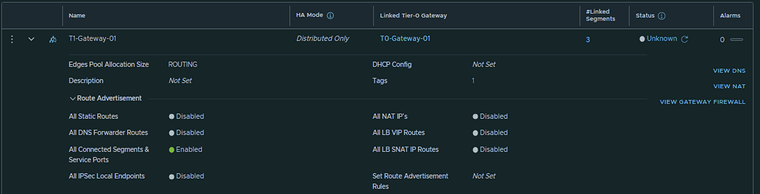
On the Tier-1 Gateway I have enabled Route Advertisement for “All connected Segments & Service Ports”.
T0–Gateway
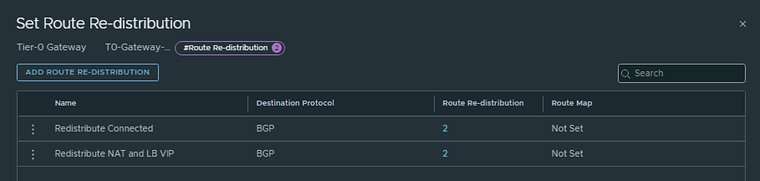
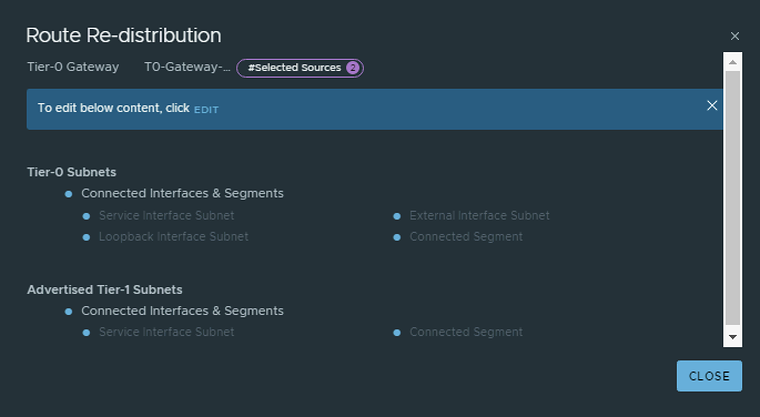
On the Tier-0 Gateway I have enables Route Redistribution so it will Advertise Tier-1 Subnets by enabling “Connected interfaces & Segments”.

STEP 10» Configure route redistribution between BGP and OSPFv3
In the previous step we have only enabled that the Web, App and Database are advertised into BGP. But between the Pods OSPFv3 is running.
Pod 110
To redistribute the Networks learned using BGP into OSPF and the other way around I have configured the following commands on the Pod 110 Router.
#set protocols ospf redistribute bgpset protocols ospfv3 redistribute bgp#
Verify Routing
After the redistribution configuration was done I can now see the Pod 120 networks inside my Pod 110 Router and the Pod 110 Tier0 and Tier 1 Gateway.
An output of the routing tables can be found below:
Pod-110-Router (IPv6)
vyos@Pod-110-Router:~$ show ipv6 routeCodes: K - kernel route, C - connected, S - static, R - RIPng,       O - OSPFv3, I - IS-IS, B - BGP, N - NHRP, T - Table,       v - VNC, V - VNC-Direct, A - Babel, F - PBR,       f - OpenFabric,       > - selected route, * - FIB route, q - queued, r - rejected, b - backup       t - trapped, o - offload failure
O   fd00::/64 [110/1] is directly connected, eth0, weight 1, 02:06:00C>* fd00::/64 is directly connected, eth0, 11:40:13C>* fd00:0:0:6e::/64 is directly connected, eth1.110, 11:40:15C>* fd00:0:0:6f::/64 is directly connected, eth1.111, 11:40:14C>* fd00:0:0:70::/64 is directly connected, eth1.112, 11:40:14C>* fd00:0:0:71::/64 is directly connected, eth1.113, 11:40:15C>* fd00:0:0:72::/64 is directly connected, eth1.114, 11:40:15C>* fd00:0:0:73::/64 is directly connected, eth1.115, 11:40:14B   fd00:0:0:74::/64 [20/0] via fe80::250:56ff:fe9e:1748, eth1.117, weight 1, 09:49:24                            via fe80::250:56ff:fe9e:60a9, eth1.117, weight 1, 09:49:24                            via fe80::250:56ff:fe9e:72ee, eth1.116, weight 1, 09:49:24                            via fe80::250:56ff:fe9e:d5d1, eth1.116, weight 1, 09:49:24C>* fd00:0:0:74::/64 is directly connected, eth1.116, 11:40:14B   fd00:0:0:75::/64 [20/0] via fe80::250:56ff:fe9e:1748, eth1.117, weight 1, 09:49:24                            via fe80::250:56ff:fe9e:60a9, eth1.117, weight 1, 09:49:24                            via fe80::250:56ff:fe9e:72ee, eth1.116, weight 1, 09:49:24                            via fe80::250:56ff:fe9e:d5d1, eth1.116, weight 1, 09:49:24C>* fd00:0:0:75::/64 is directly connected, eth1.117, 11:40:14C>* fd00:0:0:76::/64 is directly connected, eth1.118, 11:40:13C>* fd00:0:0:77::/64 is directly connected, eth1.119, 11:40:13O>* fd00:0:0:78::/64 [110/20] via fe80::20c:29ff:fee3:7976, eth0, weight 1, 02:06:00O>* fd00:0:0:79::/64 [110/20] via fe80::20c:29ff:fee3:7976, eth0, weight 1, 02:06:00O>* fd00:0:0:7a::/64 [110/20] via fe80::20c:29ff:fee3:7976, eth0, weight 1, 02:06:00O>* fd00:0:0:7b::/64 [110/20] via fe80::20c:29ff:fee3:7976, eth0, weight 1, 02:06:00O>* fd00:0:0:7c::/64 [110/20] via fe80::20c:29ff:fee3:7976, eth0, weight 1, 02:06:00O>* fd00:0:0:7d::/64 [110/20] via fe80::20c:29ff:fee3:7976, eth0, weight 1, 02:06:00O>* fd00:0:0:7e::/64 [110/20] via fe80::20c:29ff:fee3:7976, eth0, weight 1, 02:06:00O>* fd00:0:0:7f::/64 [110/20] via fe80::20c:29ff:fee3:7976, eth0, weight 1, 02:06:00O>* fd00:0:0:80::/64 [110/20] via fe80::20c:29ff:fee3:7976, eth0, weight 1, 02:06:00O>* fd00:0:0:81::/64 [110/20] via fe80::20c:29ff:fee3:7976, eth0, weight 1, 02:06:00O>* fd00:0:0:ffff::/64 [110/20] via fe80::b6fb:e4ff:feca:eb06, eth0, weight 1, 02:06:00B>* fd00:a:a::/64 [20/0] via fe80::250:56ff:fe9e:1748, eth1.117, weight 1, 09:49:20  *                      via fe80::250:56ff:fe9e:60a9, eth1.117, weight 1, 09:49:20  *                      via fe80::250:56ff:fe9e:72ee, eth1.116, weight 1, 09:49:20  *                      via fe80::250:56ff:fe9e:d5d1, eth1.116, weight 1, 09:49:20B>* fd00:a:b::/64 [20/0] via fe80::250:56ff:fe9e:1748, eth1.117, weight 1, 09:49:09  *                      via fe80::250:56ff:fe9e:60a9, eth1.117, weight 1, 09:49:09  *                      via fe80::250:56ff:fe9e:72ee, eth1.116, weight 1, 09:49:09  *                      via fe80::250:56ff:fe9e:d5d1, eth1.116, weight 1, 09:49:09B>* fd00:a:c::/64 [20/0] via fe80::250:56ff:fe9e:1748, eth1.117, weight 1, 09:49:09  *                      via fe80::250:56ff:fe9e:60a9, eth1.117, weight 1, 09:49:09  *                      via fe80::250:56ff:fe9e:72ee, eth1.116, weight 1, 09:49:09  *                      via fe80::250:56ff:fe9e:d5d1, eth1.116, weight 1, 09:49:09O>* fd00:b:a::/64 [110/20] via fe80::20c:29ff:fee3:7976, eth0, weight 1, 00:01:20O>* fd00:b:b::/64 [110/20] via fe80::20c:29ff:fee3:7976, eth0, weight 1, 00:01:20O>* fd00:b:c::/64 [110/20] via fe80::20c:29ff:fee3:7976, eth0, weight 1, 00:01:20C * fe80::/64 is directly connected, eth1.119, 11:40:13C * fe80::/64 is directly connected, eth1.117, 11:40:13C * fe80::/64 is directly connected, eth1.118, 11:40:14C * fe80::/64 is directly connected, eth1.116, 11:40:14C * fe80::/64 is directly connected, eth1.115, 11:40:14C * fe80::/64 is directly connected, eth1.113, 11:40:14C * fe80::/64 is directly connected, eth1.114, 11:40:14C * fe80::/64 is directly connected, eth1.110, 11:40:15C * fe80::/64 is directly connected, eth1.111, 11:40:15C * fe80::/64 is directly connected, eth1.112, 11:40:15C * fe80::/64 is directly connected, eth0, 11:42:38C * fe80::/64 is directly connected, eth1, 11:42:38C>* fe80::/64 is directly connected, lo, 11:42:39vyos@Pod-110-Router:~$
Pod-110-Router (IPv4)
vyos@Pod-110-Router:~$ show ip routeCodes: K - kernel route, C - connected, S - static, R - RIP,       O - OSPF, I - IS-IS, B - BGP, E - EIGRP, N - NHRP,       T - Table, v - VNC, V - VNC-Direct, A - Babel, F - PBR,       f - OpenFabric,       > - selected route, * - FIB route, q - queued, r - rejected, b - backup       t - trapped, o - offload failure
S>* 0.0.0.0/0 [250/0] via 10.203.0.1, eth0, weight 1, 11:43:14O>* 10.8.0.0/24 [110/20] via 10.203.0.1, eth0, weight 1, 11:42:37O>* 10.8.1.0/24 [110/20] via 10.203.0.1, eth0, weight 1, 11:42:37O>* 10.8.2.0/24 [110/20] via 10.203.0.1, eth0, weight 1, 11:42:37O>* 10.8.3.0/24 [110/20] via 10.203.0.1, eth0, weight 1, 11:42:37O>* 10.11.11.0/24 [110/20] via 10.203.0.1, eth0, weight 1, 11:42:37O>* 10.11.14.0/24 [110/20] via 10.203.0.1, eth0, weight 1, 11:42:37O>* 10.11.17.0/24 [110/20] via 10.203.0.1, eth0, weight 1, 11:42:37O>* 10.11.19.0/24 [110/20] via 10.203.0.1, eth0, weight 1, 11:42:37O>* 10.11.20.0/24 [110/20] via 10.203.0.1, eth0, weight 1, 11:42:37O>* 10.11.21.0/24 [110/20] via 10.203.0.1, eth0, weight 1, 11:42:37O>* 10.11.22.0/24 [110/20] via 10.203.0.1, eth0, weight 1, 11:42:37O>* 10.11.23.0/24 [110/20] via 10.203.0.1, eth0, weight 1, 11:42:37O>* 10.11.24.0/24 [110/20] via 10.203.0.1, eth0, weight 1, 11:42:37O>* 10.11.25.0/24 [110/20] via 10.203.0.1, eth0, weight 1, 11:42:37O>* 10.11.31.0/24 [110/20] via 10.203.0.1, eth0, weight 1, 11:42:37O>* 10.11.32.0/24 [110/20] via 10.203.0.1, eth0, weight 1, 11:42:37O>* 10.11.111.0/24 [110/20] via 10.203.0.1, eth0, weight 1, 11:42:37O   10.203.0.0/24 [110/1] is directly connected, eth0, weight 1, 11:43:19C>* 10.203.0.0/24 is directly connected, eth0, 11:44:27C>* 10.203.110.0/24 is directly connected, eth1.110, 11:43:28C>* 10.203.111.0/24 is directly connected, eth1.111, 11:43:27C>* 10.203.112.0/24 is directly connected, eth1.112, 11:43:27C>* 10.203.113.0/24 is directly connected, eth1.113, 11:43:27C>* 10.203.114.0/24 is directly connected, eth1.114, 11:43:27C>* 10.203.115.0/24 is directly connected, eth1.115, 11:43:27B   10.203.116.0/24 [20/0] via 10.203.116.2 inactive, weight 1, 09:52:35                           via 10.203.116.3 inactive, weight 1, 09:52:35                           via 10.203.117.2, eth1.117, weight 1, 09:52:35                           via 10.203.117.3, eth1.117, weight 1, 09:52:35O   10.203.116.0/24 [110/1] is directly connected, eth1.116, weight 1, 11:43:19C>* 10.203.116.0/24 is directly connected, eth1.116, 11:43:27B   10.203.117.0/24 [20/0] via 10.203.116.2, eth1.116, weight 1, 09:52:35                           via 10.203.116.3, eth1.116, weight 1, 09:52:35                           via 10.203.117.2 inactive, weight 1, 09:52:35                           via 10.203.117.3 inactive, weight 1, 09:52:35O   10.203.117.0/24 [110/1] is directly connected, eth1.117, weight 1, 11:43:19C>* 10.203.117.0/24 is directly connected, eth1.117, 11:43:26C>* 10.203.118.0/24 is directly connected, eth1.118, 11:43:26C>* 10.203.119.0/24 is directly connected, eth1.119, 11:43:26O>* 10.203.120.0/24 [110/20] via 10.203.0.120, eth0, weight 1, 02:08:52O>* 10.203.121.0/24 [110/20] via 10.203.0.120, eth0, weight 1, 02:08:52O>* 10.203.122.0/24 [110/20] via 10.203.0.120, eth0, weight 1, 02:08:52O>* 10.203.123.0/24 [110/20] via 10.203.0.120, eth0, weight 1, 02:08:52O>* 10.203.124.0/24 [110/20] via 10.203.0.120, eth0, weight 1, 02:08:52O>* 10.203.125.0/24 [110/20] via 10.203.0.120, eth0, weight 1, 02:08:52O>* 10.203.126.0/24 [110/2] via 10.203.0.120, eth0, weight 1, 02:08:53O>* 10.203.127.0/24 [110/2] via 10.203.0.120, eth0, weight 1, 02:08:53O>* 10.203.128.0/24 [110/20] via 10.203.0.120, eth0, weight 1, 02:08:52O>* 10.203.129.0/24 [110/20] via 10.203.0.120, eth0, weight 1, 02:08:52B>* 192.168.1.0/24 [20/0] via 10.203.116.2, eth1.116, weight 1, 09:52:31  *                       via 10.203.116.3, eth1.116, weight 1, 09:52:31  *                       via 10.203.117.2, eth1.117, weight 1, 09:52:31  *                       via 10.203.117.3, eth1.117, weight 1, 09:52:31B>* 192.168.2.0/24 [20/0] via 10.203.116.2, eth1.116, weight 1, 09:52:20  *                       via 10.203.116.3, eth1.116, weight 1, 09:52:20  *                       via 10.203.117.2, eth1.117, weight 1, 09:52:20  *                       via 10.203.117.3, eth1.117, weight 1, 09:52:20B>* 192.168.3.0/24 [20/0] via 10.203.116.2, eth1.116, weight 1, 09:52:20  *                       via 10.203.116.3, eth1.116, weight 1, 09:52:20  *                       via 10.203.117.2, eth1.117, weight 1, 09:52:20  *                       via 10.203.117.3, eth1.117, weight 1, 09:52:20O>* 192.168.5.0/24 [110/20] via 10.203.0.120, eth0, weight 1, 00:04:31O>* 192.168.6.0/24 [110/20] via 10.203.0.120, eth0, weight 1, 00:04:31O>* 192.168.7.0/24 [110/20] via 10.203.0.120, eth0, weight 1, 00:04:31O>* 192.168.111.0/24 [110/20] via 10.203.0.1, eth0, weight 1, 11:42:37vyos@Pod-110-Router:~$
Pod-110-T0-EdgeVM-01 | DR-T0-Gateway-01
Pod-110-T0-EdgeVM-01> get logical-routerWed Aug 31 2022 UTC 21:21:04.286Logical RouterUUID                                   VRF    LR-ID  Name                              Type                        Ports   Neighbors736a80e3-23f6-5a2d-81d6-bbefb2786666   0      0                                        TUNNEL                      4     4/500085cbb437-7eab-41ca-99d8-f06655c1c339   1      1      DR-T0-Gateway-01                  DISTRIBUTED_ROUTER_TIER0    5     2/20000322f1657-3057-44cc-8b32-a947837afbf6   2      2      SR-T0-Gateway-01                  SERVICE_ROUTER_TIER0        7     6/2000023184393-a35e-46df-989c-6af86651f127   4      3      DR-T1-Gateway-01                  DISTRIBUTED_ROUTER_TIER1    7     2/20000
Pod-110-T0-EdgeVM-01> vrf 1Pod-110-T0-EdgeVM-01(vrf[1])> get forwardingWed Aug 31 2022 UTC 21:21:31.148Logical RouterUUID                                   VRF    LR-ID  Name                              Type85cbb437-7eab-41ca-99d8-f06655c1c339   1      1      DR-T0-Gateway-01                  DISTRIBUTED_ROUTER_TIER0IPv4 Forwarding TableIP Prefix          Gateway IP                                Type        UUID                                   Gateway MAC0.0.0.0/0          10.203.117.1                              route       cbba506e-bd0c-4ce2-8804-c8bbe285bddb   00:0c:29:f4:7f:1d                   10.203.116.1                                          5740e6e6-f6e7-4124-a71a-09b9137cff05   00:0c:29:f4:7f:1d10.203.116.0/24                                              route       5740e6e6-f6e7-4124-a71a-09b9137cff05
10.203.116.2/32                                              route       5ba3c8c8-d2ef-5c83-a39e-1a431c1f0aac
10.203.116.3/32    169.254.0.131                             route       f4fab2ff-46bc-4329-a426-70ef4c30b4d1   02:50:56:56:52:0210.203.117.0/24                                              route       cbba506e-bd0c-4ce2-8804-c8bbe285bddb
10.203.117.2/32                                              route       5ba3c8c8-d2ef-5c83-a39e-1a431c1f0aac
10.203.117.3/32    169.254.0.131                             route       f4fab2ff-46bc-4329-a426-70ef4c30b4d1   02:50:56:56:52:02100.64.0.0/32                                                route       5a021141-cb97-55d6-ac9e-8aec433dc117
100.64.0.0/31                                                route       38b49f07-a670-53a7-9532-ef2523ee94a6
127.0.0.1/32                                                 route       89d6dd69-bcb1-4f6f-8bcf-870d38a0dd12
169.254.0.0/25                                               route       87b65dce-de55-439a-b215-4fa9ba7ea233
169.254.0.1/32                                               route       5a021141-cb97-55d6-ac9e-8aec433dc117
169.254.0.2/32                                               route       5ba3c8c8-d2ef-5c83-a39e-1a431c1f0aac
169.254.0.128/25                                             route       f4fab2ff-46bc-4329-a426-70ef4c30b4d1
169.254.0.130/32                                             route       5ba3c8c8-d2ef-5c83-a39e-1a431c1f0aac
192.168.1.0/24     100.64.0.1                                route       38b49f07-a670-53a7-9532-ef2523ee94a6
192.168.2.0/24     100.64.0.1                                route       38b49f07-a670-53a7-9532-ef2523ee94a6
192.168.3.0/24     100.64.0.1                                route       38b49f07-a670-53a7-9532-ef2523ee94a6
IPv6 Forwarding TableIP Prefix                                     Gateway IP                                Type        UUID                     Gateway MAC::/0                                          fe80::20c:29ff:fef4:7f1d                  route       5740e6e6-f6e7-4124-a71a-09b9137cff05::1/128                                                                                 route       89d6dd69-bcb1-4f6f-8bcf-870d38a0dd12fc3a:f453:da8:9c00::/64                                                                 route       38b49f07-a670-53a7-9532-ef2523ee94a6fc3a:f453:da8:9c00::1/128                                                               route       5a021141-cb97-55d6-ac9e-8aec433dc117fd00:0:0:74::/64                                                                        route       5740e6e6-f6e7-4124-a71a-09b9137cff05fd00::74:250:56ff:fe9e:d5d1/128                                                         route       5ba3c8c8-d2ef-5c83-a39e-1a431c1f0aacfd00:0:0:74::3/128                            fe80::50:56ff:fe56:5202                   route       f4fab2ff-46bc-4329-a426-70ef4c30b4d1fd00::74:250:56ff:fe9e:72ee/128               fe80::50:56ff:fe56:5202                   route       f4fab2ff-46bc-4329-a426-70ef4c30b4d1fd00:0:0:74::2/128                                                                      route       5ba3c8c8-d2ef-5c83-a39e-1a431c1f0aacfd00:0:0:75::/64                                                                        route       cbba506e-bd0c-4ce2-8804-c8bbe285bddbfd00::75:250:56ff:fe9e:60a9/128                                                         route       5ba3c8c8-d2ef-5c83-a39e-1a431c1f0aacfd00:0:0:75::3/128                            fe80::50:56ff:fe56:5202                   route       f4fab2ff-46bc-4329-a426-70ef4c30b4d1fd00::75:250:56ff:fe9e:1748/128               fe80::50:56ff:fe56:5202                   route       f4fab2ff-46bc-4329-a426-70ef4c30b4d1fd00:0:0:75::2/128                                                                      route       5ba3c8c8-d2ef-5c83-a39e-1a431c1f0aacfd00:a:a::/64                                 fc3a:f453:da8:9c00::2                     route       38b49f07-a670-53a7-9532-ef2523ee94a6fd00:a:b::/64                                 fc3a:f453:da8:9c00::2                     route       38b49f07-a670-53a7-9532-ef2523ee94a6fd00:a:c::/64                                 fc3a:f453:da8:9c00::2                     route       38b49f07-a670-53a7-9532-ef2523ee94a6
Pod-110-T0-EdgeVM-01(vrf[1])>
Pod-110-T0-EdgeVM-02 | DR-T0-Gateway-01
Pod-110-T0-EdgeVM-02> get logical-routerWed Aug 31 2022 UTC 21:31:33.980Logical RouterUUID                                   VRF    LR-ID  Name                              Type                        Ports   Neighbors736a80e3-23f6-5a2d-81d6-bbefb2786666   0      0                                        TUNNEL                      4     4/5000120dbcf7-2d18-4bb6-94a3-b4797adb5b1b   1      8      SR-T0-Gateway-01                  SERVICE_ROUTER_TIER0        7     6/2000085cbb437-7eab-41ca-99d8-f06655c1c339   3      1      DR-T0-Gateway-01                  DISTRIBUTED_ROUTER_TIER0    5     2/2000023184393-a35e-46df-989c-6af86651f127   4      3      DR-T1-Gateway-01                  DISTRIBUTED_ROUTER_TIER1    7     2/20000
Pod-110-T0-EdgeVM-02> vrf 3Pod-110-T0-EdgeVM-02(vrf[3])> get forwardingWed Aug 31 2022 UTC 21:32:04.191Logical RouterUUID                                   VRF    LR-ID  Name                              Type85cbb437-7eab-41ca-99d8-f06655c1c339   3      1      DR-T0-Gateway-01                  DISTRIBUTED_ROUTER_TIER0IPv4 Forwarding TableIP Prefix          Gateway IP                                Type        UUID                                   Gateway MAC0.0.0.0/0          10.203.117.1                              route       21944796-95ae-4037-8f53-c6c104a440e3   00:0c:29:f4:7f:1d                   10.203.116.1                                          450698c4-ecb4-4f70-b4d4-7e447f8694e8   00:0c:29:f4:7f:1d10.203.116.0/24                                              route       450698c4-ecb4-4f70-b4d4-7e447f8694e8
10.203.116.2/32    169.254.0.130                             route       0eeffa82-94d2-479a-86f3-daddee65c7b0   02:50:56:56:52:0110.203.116.3/32                                              route       47aa33ab-f598-58c3-9b4c-c0b5fbbea050
10.203.117.0/24                                              route       21944796-95ae-4037-8f53-c6c104a440e3
10.203.117.2/32    169.254.0.130                             route       0eeffa82-94d2-479a-86f3-daddee65c7b0   02:50:56:56:52:0110.203.117.3/32                                              route       47aa33ab-f598-58c3-9b4c-c0b5fbbea050
100.64.0.0/32                                                route       5a021141-cb97-55d6-ac9e-8aec433dc117
100.64.0.0/31                                                route       38b49f07-a670-53a7-9532-ef2523ee94a6
127.0.0.1/32                                                 route       89d6dd69-bcb1-4f6f-8bcf-870d38a0dd12
169.254.0.0/25                                               route       267b98fb-5783-441b-b91f-03c288b2ffd8
169.254.0.1/32                                               route       5a021141-cb97-55d6-ac9e-8aec433dc117
169.254.0.3/32                                               route       47aa33ab-f598-58c3-9b4c-c0b5fbbea050
169.254.0.128/25                                             route       0eeffa82-94d2-479a-86f3-daddee65c7b0
169.254.0.131/32                                             route       47aa33ab-f598-58c3-9b4c-c0b5fbbea050
192.168.1.0/24     100.64.0.1                                route       38b49f07-a670-53a7-9532-ef2523ee94a6
192.168.2.0/24     100.64.0.1                                route       38b49f07-a670-53a7-9532-ef2523ee94a6
192.168.3.0/24     100.64.0.1                                route       38b49f07-a670-53a7-9532-ef2523ee94a6
IPv6 Forwarding TableIP Prefix                                     Gateway IP                                Type        UUID                     Gateway MAC::/0                                          fe80::20c:29ff:fef4:7f1d                  route       450698c4-ecb4-4f70-b4d4-7e447f8694e8::1/128                                                                                 route       89d6dd69-bcb1-4f6f-8bcf-870d38a0dd12fc3a:f453:da8:9c00::/64                                                                 route       38b49f07-a670-53a7-9532-ef2523ee94a6fc3a:f453:da8:9c00::1/128                                                               route       5a021141-cb97-55d6-ac9e-8aec433dc117fd00:0:0:74::/64                                                                        route       450698c4-ecb4-4f70-b4d4-7e447f8694e8fd00::74:250:56ff:fe9e:72ee/128                                                         route       47aa33ab-f598-58c3-9b4c-c0b5fbbea050fd00:0:0:74::2/128                            fe80::50:56ff:fe56:5201                   route       0eeffa82-94d2-479a-86f3-daddee65c7b0fd00::74:250:56ff:fe9e:d5d1/128               fe80::50:56ff:fe56:5201                   route       0eeffa82-94d2-479a-86f3-daddee65c7b0fd00:0:0:74::3/128                                                                      route       47aa33ab-f598-58c3-9b4c-c0b5fbbea050fd00:0:0:75::/64                                                                        route       21944796-95ae-4037-8f53-c6c104a440e3fd00:0:0:75::3/128                                                                      route       47aa33ab-f598-58c3-9b4c-c0b5fbbea050fd00:0:0:75::2/128                            fe80::50:56ff:fe56:5201                   route       0eeffa82-94d2-479a-86f3-daddee65c7b0fd00::75:250:56ff:fe9e:60a9/128               fe80::50:56ff:fe56:5201                   route       0eeffa82-94d2-479a-86f3-daddee65c7b0fd00::75:250:56ff:fe9e:1748/128                                                         route       47aa33ab-f598-58c3-9b4c-c0b5fbbea050fd00:a:a::/64                                 fc3a:f453:da8:9c00::2                     route       38b49f07-a670-53a7-9532-ef2523ee94a6fd00:a:b::/64                                 fc3a:f453:da8:9c00::2                     route       38b49f07-a670-53a7-9532-ef2523ee94a6fd00:a:c::/64                                 fc3a:f453:da8:9c00::2                     route       38b49f07-a670-53a7-9532-ef2523ee94a6
Pod-110-T0-EdgeVM-02(vrf[3])>
Pod-110-T0-EdgeVM-01 | DR-T1-Gateway-01
Pod-110-T0-EdgeVM-01> get logical-routerWed Aug 31 2022 UTC 21:33:04.933Logical RouterUUID                                   VRF    LR-ID  Name                              Type                        Ports   Neighbors736a80e3-23f6-5a2d-81d6-bbefb2786666   0      0                                        TUNNEL                      4     4/500085cbb437-7eab-41ca-99d8-f06655c1c339   1      1      DR-T0-Gateway-01                  DISTRIBUTED_ROUTER_TIER0    5     2/20000322f1657-3057-44cc-8b32-a947837afbf6   2      2      SR-T0-Gateway-01                  SERVICE_ROUTER_TIER0        7     6/2000023184393-a35e-46df-989c-6af86651f127   4      3      DR-T1-Gateway-01                  DISTRIBUTED_ROUTER_TIER1    7     2/20000
Pod-110-T0-EdgeVM-01> vrf 4Pod-110-T0-EdgeVM-01(vrf[4])> get forwardingWed Aug 31 2022 UTC 21:33:19.176Logical RouterUUID                                   VRF    LR-ID  Name                              Type23184393-a35e-46df-989c-6af86651f127   4      3      DR-T1-Gateway-01                  DISTRIBUTED_ROUTER_TIER1IPv4 Forwarding TableIP Prefix          Gateway IP                                Type        UUID                                   Gateway MAC0.0.0.0/0          100.64.0.0                                route       d02ec573-aa99-4777-983d-16de67c16cde
100.64.0.0/31                                                route       d02ec573-aa99-4777-983d-16de67c16cde
100.64.0.1/32                                                route       49d24744-e3e9-5f35-9684-4f539a05ebcd
192.168.1.0/24                                               route       22774d84-817a-4628-be5c-c5bf8d8da884
192.168.1.1/32                                               route       49d24744-e3e9-5f35-9684-4f539a05ebcd
192.168.2.0/24                                               route       1535af50-fb99-48ce-b863-9c83c86241f8
192.168.2.1/32                                               route       49d24744-e3e9-5f35-9684-4f539a05ebcd
192.168.3.0/24                                               route       f46e8977-82b6-4bd0-b9bd-a035ca05f0bd
192.168.3.1/32                                               route       49d24744-e3e9-5f35-9684-4f539a05ebcd
IPv6 Forwarding TableIP Prefix                                     Gateway IP                                Type        UUID                     Gateway MAC::/0                                          fc3a:f453:da8:9c00::1                     route       d02ec573-aa99-4777-983d-16de67c16cdefc3a:f453:da8:9c00::/64                                                                 route       d02ec573-aa99-4777-983d-16de67c16cdefc3a:f453:da8:9c00::2/128                                                               route       49d24744-e3e9-5f35-9684-4f539a05ebcdfd00:a:a::/64                                                                           route       22774d84-817a-4628-be5c-c5bf8d8da884fd00:a:a::1/128                                                                         route       49d24744-e3e9-5f35-9684-4f539a05ebcdfd00:a:a:0:50:56ff:fe56:4452/128                                                        route       49d24744-e3e9-5f35-9684-4f539a05ebcdfd00:a:b::/64                                                                           route       1535af50-fb99-48ce-b863-9c83c86241f8fd00:a:b::1/128                                                                         route       49d24744-e3e9-5f35-9684-4f539a05ebcdfd00:a:b:0:50:56ff:fe56:4452/128                                                        route       49d24744-e3e9-5f35-9684-4f539a05ebcdfd00:a:c::/64                                                                           route       f46e8977-82b6-4bd0-b9bd-a035ca05f0bdfd00:a:c::1/128                                                                         route       49d24744-e3e9-5f35-9684-4f539a05ebcdfd00:a:c:0:50:56ff:fe56:4452/128                                                        route       49d24744-e3e9-5f35-9684-4f539a05ebcd
Pod-110-T0-EdgeVM-01(vrf[4])>
Pod-110-T0-EdgeVM-02 | DR-T1-Gateway-01
Pod-110-T0-EdgeVM-02> get logical-routerWed Aug 31 2022 UTC 21:33:56.857Logical RouterUUID                                   VRF    LR-ID  Name                              Type                        Ports   Neighbors736a80e3-23f6-5a2d-81d6-bbefb2786666   0      0                                        TUNNEL                      4     4/5000120dbcf7-2d18-4bb6-94a3-b4797adb5b1b   1      8      SR-T0-Gateway-01                  SERVICE_ROUTER_TIER0        7     6/2000085cbb437-7eab-41ca-99d8-f06655c1c339   3      1      DR-T0-Gateway-01                  DISTRIBUTED_ROUTER_TIER0    5     2/2000023184393-a35e-46df-989c-6af86651f127   4      3      DR-T1-Gateway-01                  DISTRIBUTED_ROUTER_TIER1    7     2/20000
Pod-110-T0-EdgeVM-02> vrf 4Pod-110-T0-EdgeVM-02(vrf[4])> get forwardingWed Aug 31 2022 UTC 21:34:31.912Logical RouterUUID                                   VRF    LR-ID  Name                              Type23184393-a35e-46df-989c-6af86651f127   4      3      DR-T1-Gateway-01                  DISTRIBUTED_ROUTER_TIER1IPv4 Forwarding TableIP Prefix          Gateway IP                                Type        UUID                                   Gateway MAC0.0.0.0/0          100.64.0.0                                route       d02ec573-aa99-4777-983d-16de67c16cde
100.64.0.0/31                                                route       d02ec573-aa99-4777-983d-16de67c16cde
100.64.0.1/32                                                route       49d24744-e3e9-5f35-9684-4f539a05ebcd
192.168.1.0/24                                               route       22774d84-817a-4628-be5c-c5bf8d8da884
192.168.1.1/32                                               route       49d24744-e3e9-5f35-9684-4f539a05ebcd
192.168.2.0/24                                               route       1535af50-fb99-48ce-b863-9c83c86241f8
192.168.2.1/32                                               route       49d24744-e3e9-5f35-9684-4f539a05ebcd
192.168.3.0/24                                               route       f46e8977-82b6-4bd0-b9bd-a035ca05f0bd
192.168.3.1/32                                               route       49d24744-e3e9-5f35-9684-4f539a05ebcd
IPv6 Forwarding TableIP Prefix                                     Gateway IP                                Type        UUID                     Gateway MAC::/0                                          fc3a:f453:da8:9c00::1                     route       d02ec573-aa99-4777-983d-16de67c16cdefc3a:f453:da8:9c00::/64                                                                 route       d02ec573-aa99-4777-983d-16de67c16cdefc3a:f453:da8:9c00::2/128                                                               route       49d24744-e3e9-5f35-9684-4f539a05ebcdfd00:a:a::/64                                                                           route       22774d84-817a-4628-be5c-c5bf8d8da884fd00:a:a::1/128                                                                         route       49d24744-e3e9-5f35-9684-4f539a05ebcdfd00:a:a:0:50:56ff:fe56:4452/128                                                        route       49d24744-e3e9-5f35-9684-4f539a05ebcdfd00:a:b::/64                                                                           route       1535af50-fb99-48ce-b863-9c83c86241f8fd00:a:b::1/128                                                                         route       49d24744-e3e9-5f35-9684-4f539a05ebcdfd00:a:b:0:50:56ff:fe56:4452/128                                                        route       49d24744-e3e9-5f35-9684-4f539a05ebcdfd00:a:c::/64                                                                           route       f46e8977-82b6-4bd0-b9bd-a035ca05f0bdfd00:a:c::1/128                                                                         route       49d24744-e3e9-5f35-9684-4f539a05ebcdfd00:a:c:0:50:56ff:fe56:4452/128                                                        route       49d24744-e3e9-5f35-9684-4f539a05ebcd
Pod-110-T0-EdgeVM-02(vrf[4])>
Pod 120
To redistribute the Networks learned using BGP into OSPF and the other way around I have configured the following commands on the Pod 120 Router.
#set protocols ospf redistribute bgpset protocols ospfv3 redistribute bgp#
Verify Routing
After the redistribution configuration was done I can now see the Pod 110 networks inside my Pod 120 Router and the Pod 120 Tier0 and Tier 1 Gateway.
An output of the routing tables can be found below:
Pod-120-Router (IPv6)
vyos@Pod-120-Router:~$ show ipv6 routeCodes: K - kernel route, C - connected, S - static, R - RIPng,       O - OSPFv3, I - IS-IS, B - BGP, N - NHRP, T - Table,       v - VNC, V - VNC-Direct, A - Babel, F - PBR,       f - OpenFabric,       > - selected route, * - FIB route, q - queued, r - rejected, b - backup       t - trapped, o - offload failure
O   fd00::/64 [110/1] is directly connected, eth0, weight 1, 02:06:35C>* fd00::/64 is directly connected, eth0, 02:06:53O>* fd00:0:0:6e::/64 [110/20] via fe80::20c:29ff:fef4:7f13, eth0, weight 1, 02:06:35O>* fd00:0:0:6f::/64 [110/20] via fe80::20c:29ff:fef4:7f13, eth0, weight 1, 02:06:35O>* fd00:0:0:70::/64 [110/20] via fe80::20c:29ff:fef4:7f13, eth0, weight 1, 02:06:35O>* fd00:0:0:71::/64 [110/20] via fe80::20c:29ff:fef4:7f13, eth0, weight 1, 02:06:35O>* fd00:0:0:72::/64 [110/20] via fe80::20c:29ff:fef4:7f13, eth0, weight 1, 02:06:35O>* fd00:0:0:73::/64 [110/20] via fe80::20c:29ff:fef4:7f13, eth0, weight 1, 02:06:35O>* fd00:0:0:74::/64 [110/20] via fe80::20c:29ff:fef4:7f13, eth0, weight 1, 02:06:35O>* fd00:0:0:75::/64 [110/20] via fe80::20c:29ff:fef4:7f13, eth0, weight 1, 02:06:35O>* fd00:0:0:76::/64 [110/20] via fe80::20c:29ff:fef4:7f13, eth0, weight 1, 02:06:35O>* fd00:0:0:77::/64 [110/20] via fe80::20c:29ff:fef4:7f13, eth0, weight 1, 02:06:35C>* fd00:0:0:78::/64 is directly connected, eth1.120, 02:06:56C>* fd00:0:0:79::/64 is directly connected, eth1.121, 02:06:55C>* fd00:0:0:7a::/64 is directly connected, eth1.122, 02:06:55C>* fd00:0:0:7b::/64 is directly connected, eth1.123, 02:06:55C>* fd00:0:0:7c::/64 is directly connected, eth1.124, 02:06:54C>* fd00:0:0:7d::/64 is directly connected, eth1.125, 02:06:55B   fd00:0:0:7e::/64 [20/0] via fe80::250:56ff:fe85:ca6, eth1.127, weight 1, 00:01:39                            via fe80::250:56ff:fe85:46bb, eth1.126, weight 1, 00:01:39                            via fe80::250:56ff:fe85:7400, eth1.126, weight 1, 00:01:39                            via fe80::250:56ff:fe85:74ef, eth1.127, weight 1, 00:01:39C>* fd00:0:0:7e::/64 is directly connected, eth1.126, 02:06:54B   fd00:0:0:7f::/64 [20/0] via fe80::250:56ff:fe85:ca6, eth1.127, weight 1, 00:01:39                            via fe80::250:56ff:fe85:46bb, eth1.126, weight 1, 00:01:39                            via fe80::250:56ff:fe85:7400, eth1.126, weight 1, 00:01:39                            via fe80::250:56ff:fe85:74ef, eth1.127, weight 1, 00:01:39C>* fd00:0:0:7f::/64 is directly connected, eth1.127, 02:06:54C>* fd00:0:0:80::/64 is directly connected, eth1.128, 02:06:54C>* fd00:0:0:81::/64 is directly connected, eth1.129, 02:06:54O>* fd00:0:0:ffff::/64 [110/20] via fe80::b6fb:e4ff:feca:eb06, eth0, weight 1, 02:06:35O>* fd00:a:a::/64 [110/20] via fe80::20c:29ff:fef4:7f13, eth0, weight 1, 02:06:35O>* fd00:a:b::/64 [110/20] via fe80::20c:29ff:fef4:7f13, eth0, weight 1, 02:06:35O>* fd00:a:c::/64 [110/20] via fe80::20c:29ff:fef4:7f13, eth0, weight 1, 02:06:35B>* fd00:b:a::/64 [20/0] via fe80::250:56ff:fe85:ca6, eth1.127, weight 1, 00:01:39  *                      via fe80::250:56ff:fe85:46bb, eth1.126, weight 1, 00:01:39  *                      via fe80::250:56ff:fe85:7400, eth1.126, weight 1, 00:01:39  *                      via fe80::250:56ff:fe85:74ef, eth1.127, weight 1, 00:01:39B>* fd00:b:b::/64 [20/0] via fe80::250:56ff:fe85:ca6, eth1.127, weight 1, 00:01:39  *                      via fe80::250:56ff:fe85:46bb, eth1.126, weight 1, 00:01:39  *                      via fe80::250:56ff:fe85:7400, eth1.126, weight 1, 00:01:39  *                      via fe80::250:56ff:fe85:74ef, eth1.127, weight 1, 00:01:39B>* fd00:b:c::/64 [20/0] via fe80::250:56ff:fe85:ca6, eth1.127, weight 1, 00:01:39  *                      via fe80::250:56ff:fe85:46bb, eth1.126, weight 1, 00:01:39  *                      via fe80::250:56ff:fe85:7400, eth1.126, weight 1, 00:01:39  *                      via fe80::250:56ff:fe85:74ef, eth1.127, weight 1, 00:01:39C * fe80::/64 is directly connected, eth1.129, 02:06:53C * fe80::/64 is directly connected, eth0, 02:06:54C * fe80::/64 is directly connected, eth1.128, 02:06:54C * fe80::/64 is directly connected, eth1.127, 02:06:54C * fe80::/64 is directly connected, eth1.125, 02:06:54C * fe80::/64 is directly connected, eth1.126, 02:06:54C * fe80::/64 is directly connected, eth1.124, 02:06:55C * fe80::/64 is directly connected, eth1.123, 02:06:55C * fe80::/64 is directly connected, eth1.121, 02:06:55C * fe80::/64 is directly connected, eth1.122, 02:06:55C * fe80::/64 is directly connected, eth1, 02:06:55C * fe80::/64 is directly connected, eth1.120, 02:06:56C>* fe80::/64 is directly connected, lo, 02:06:58vyos@Pod-120-Router:~$
Pod-120-Router (IPv4)
vyos@Pod-120-Router:~$ show ip routeCodes: K - kernel route, C - connected, S - static, R - RIP,       O - OSPF, I - IS-IS, B - BGP, E - EIGRP, N - NHRP,       T - Table, v - VNC, V - VNC-Direct, A - Babel, F - PBR,       f - OpenFabric,       > - selected route, * - FIB route, q - queued, r - rejected, b - backup       t - trapped, o - offload failure
S>* 0.0.0.0/0 [250/0] via 10.203.0.1, eth0, weight 1, 02:08:46O>* 10.8.0.0/24 [110/20] via 10.203.0.1, eth0, weight 1, 02:08:33O>* 10.8.1.0/24 [110/20] via 10.203.0.1, eth0, weight 1, 02:08:33O>* 10.8.2.0/24 [110/20] via 10.203.0.1, eth0, weight 1, 02:08:33O>* 10.8.3.0/24 [110/20] via 10.203.0.1, eth0, weight 1, 02:08:33O>* 10.11.11.0/24 [110/20] via 10.203.0.1, eth0, weight 1, 02:08:33O>* 10.11.14.0/24 [110/20] via 10.203.0.1, eth0, weight 1, 02:08:33O>* 10.11.17.0/24 [110/20] via 10.203.0.1, eth0, weight 1, 02:08:33O>* 10.11.19.0/24 [110/20] via 10.203.0.1, eth0, weight 1, 02:08:33O>* 10.11.20.0/24 [110/20] via 10.203.0.1, eth0, weight 1, 02:08:33O>* 10.11.21.0/24 [110/20] via 10.203.0.1, eth0, weight 1, 02:08:33O>* 10.11.22.0/24 [110/20] via 10.203.0.1, eth0, weight 1, 02:08:33O>* 10.11.23.0/24 [110/20] via 10.203.0.1, eth0, weight 1, 02:08:33O>* 10.11.24.0/24 [110/20] via 10.203.0.1, eth0, weight 1, 02:08:33O>* 10.11.25.0/24 [110/20] via 10.203.0.1, eth0, weight 1, 02:08:33O>* 10.11.31.0/24 [110/20] via 10.203.0.1, eth0, weight 1, 02:08:33O>* 10.11.32.0/24 [110/20] via 10.203.0.1, eth0, weight 1, 02:08:33O>* 10.11.111.0/24 [110/20] via 10.203.0.1, eth0, weight 1, 02:08:33O   10.203.0.0/24 [110/1] is directly connected, eth0, weight 1, 02:08:51C>* 10.203.0.0/24 is directly connected, eth0, 02:09:02O>* 10.203.110.0/24 [110/20] via 10.203.0.110, eth0, weight 1, 02:08:33O>* 10.203.111.0/24 [110/20] via 10.203.0.110, eth0, weight 1, 02:08:33O>* 10.203.112.0/24 [110/20] via 10.203.0.110, eth0, weight 1, 02:08:33O>* 10.203.113.0/24 [110/20] via 10.203.0.110, eth0, weight 1, 02:08:33O>* 10.203.114.0/24 [110/20] via 10.203.0.110, eth0, weight 1, 02:08:33O>* 10.203.115.0/24 [110/20] via 10.203.0.110, eth0, weight 1, 02:08:33O>* 10.203.116.0/24 [110/2] via 10.203.0.110, eth0, weight 1, 02:08:34O>* 10.203.117.0/24 [110/2] via 10.203.0.110, eth0, weight 1, 02:08:34O>* 10.203.118.0/24 [110/20] via 10.203.0.110, eth0, weight 1, 02:08:33O>* 10.203.119.0/24 [110/20] via 10.203.0.110, eth0, weight 1, 02:08:33C>* 10.203.120.0/24 is directly connected, eth1.120, 02:09:04C>* 10.203.121.0/24 is directly connected, eth1.121, 02:09:04C>* 10.203.122.0/24 is directly connected, eth1.122, 02:09:03C>* 10.203.123.0/24 is directly connected, eth1.123, 02:09:03C>* 10.203.124.0/24 is directly connected, eth1.124, 02:09:03C>* 10.203.125.0/24 is directly connected, eth1.125, 02:09:03B   10.203.126.0/24 [20/0] via 10.203.126.2 inactive, weight 1, 00:03:46                           via 10.203.126.3 inactive, weight 1, 00:03:46                           via 10.203.127.2, eth1.127, weight 1, 00:03:46                           via 10.203.127.3, eth1.127, weight 1, 00:03:46O   10.203.126.0/24 [110/1] is directly connected, eth1.126, weight 1, 02:08:51C>* 10.203.126.0/24 is directly connected, eth1.126, 02:09:03B   10.203.127.0/24 [20/0] via 10.203.126.2, eth1.126, weight 1, 00:03:46                           via 10.203.126.3, eth1.126, weight 1, 00:03:46                           via 10.203.127.2 inactive, weight 1, 00:03:46                           via 10.203.127.3 inactive, weight 1, 00:03:46O   10.203.127.0/24 [110/1] is directly connected, eth1.127, weight 1, 02:08:51C>* 10.203.127.0/24 is directly connected, eth1.127, 02:09:03C>* 10.203.128.0/24 is directly connected, eth1.128, 02:09:02C>* 10.203.129.0/24 is directly connected, eth1.129, 02:09:02O>* 192.168.1.0/24 [110/20] via 10.203.0.110, eth0, weight 1, 02:08:33O>* 192.168.2.0/24 [110/20] via 10.203.0.110, eth0, weight 1, 02:08:33O>* 192.168.3.0/24 [110/20] via 10.203.0.110, eth0, weight 1, 02:08:33B>* 192.168.5.0/24 [20/0] via 10.203.126.2, eth1.126, weight 1, 00:03:46  *                       via 10.203.126.3, eth1.126, weight 1, 00:03:46  *                       via 10.203.127.2, eth1.127, weight 1, 00:03:46  *                       via 10.203.127.3, eth1.127, weight 1, 00:03:46B>* 192.168.6.0/24 [20/0] via 10.203.126.2, eth1.126, weight 1, 00:03:46  *                       via 10.203.126.3, eth1.126, weight 1, 00:03:46  *                       via 10.203.127.2, eth1.127, weight 1, 00:03:46  *                       via 10.203.127.3, eth1.127, weight 1, 00:03:46B>* 192.168.7.0/24 [20/0] via 10.203.126.2, eth1.126, weight 1, 00:03:46  *                       via 10.203.126.3, eth1.126, weight 1, 00:03:46  *                       via 10.203.127.2, eth1.127, weight 1, 00:03:46  *                       via 10.203.127.3, eth1.127, weight 1, 00:03:46O>* 192.168.111.0/24 [110/20] via 10.203.0.1, eth0, weight 1, 02:08:33vyos@Pod-120-Router:~$
Pod-120-T0-EdgeVM-01 | DR-T0-Gateway-01
Pod-120-T0-EdgeVM-01> get logical-routerWed Aug 31 2022 UTC 21:36:18.561Logical RouterUUID                                   VRF    LR-ID  Name                              Type                        Ports   Neighbors736a80e3-23f6-5a2d-81d6-bbefb2786666   0      0                                        TUNNEL                      4     4/5000e011df91-bfbc-46d4-8f8a-adbcc2b241d6   1      1      DR-T0-Gateway-01                  DISTRIBUTED_ROUTER_TIER0    5     2/2000006668568-786e-4b5c-8f99-0ff0799c7c9f   2      14     DR-T1-Gateway-01                  DISTRIBUTED_ROUTER_TIER1    7     2/20000157da70b-9636-4163-b175-35e8f7535637   3      2      SR-T0-Gateway-01                  SERVICE_ROUTER_TIER0        7     6/20000
Pod-120-T0-EdgeVM-01> vrf 1Pod-120-T0-EdgeVM-01(vrf[1])> get forwardingWed Aug 31 2022 UTC 21:36:32.331Logical RouterUUID                                   VRF    LR-ID  Name                              Typee011df91-bfbc-46d4-8f8a-adbcc2b241d6   1      1      DR-T0-Gateway-01                  DISTRIBUTED_ROUTER_TIER0IPv4 Forwarding TableIP Prefix          Gateway IP                                Type        UUID                                   Gateway MAC0.0.0.0/0          10.203.127.1                              route       8026e680-ed7d-4309-bed3-ce5513000c2b   00:0c:29:e3:79:80                   10.203.126.1                                          939f4c23-49c5-4bca-be16-41415075316a   00:0c:29:e3:79:8010.203.126.0/24                                              route       939f4c23-49c5-4bca-be16-41415075316a
10.203.126.2/32                                              route       797e16bb-fcad-5d2b-99aa-652618c4fc95
10.203.126.3/32    169.254.0.131                             route       fbd9c0bd-3d7a-443c-9794-d738aa8b69a5   02:50:56:56:52:0210.203.127.0/24                                              route       8026e680-ed7d-4309-bed3-ce5513000c2b
10.203.127.2/32                                              route       797e16bb-fcad-5d2b-99aa-652618c4fc95
10.203.127.3/32    169.254.0.131                             route       fbd9c0bd-3d7a-443c-9794-d738aa8b69a5   02:50:56:56:52:02100.64.0.0/32                                                route       af741b72-6e71-56b0-b168-d243a06a3a6e
100.64.0.0/31                                                route       38b49f07-a670-53a7-9532-ef2523ee94a6
127.0.0.1/32                                                 route       968b4759-518b-434f-8958-eb06548ec3b0
169.254.0.0/25                                               route       7ac0afcd-108a-4021-a8ce-0a72a9269f1a
169.254.0.1/32                                               route       af741b72-6e71-56b0-b168-d243a06a3a6e
169.254.0.2/32                                               route       797e16bb-fcad-5d2b-99aa-652618c4fc95
169.254.0.128/25                                             route       fbd9c0bd-3d7a-443c-9794-d738aa8b69a5
169.254.0.130/32                                             route       797e16bb-fcad-5d2b-99aa-652618c4fc95
192.168.5.0/24     100.64.0.1                                route       38b49f07-a670-53a7-9532-ef2523ee94a6   02:50:56:56:44:55192.168.6.0/24     100.64.0.1                                route       38b49f07-a670-53a7-9532-ef2523ee94a6   02:50:56:56:44:55192.168.7.0/24     100.64.0.1                                route       38b49f07-a670-53a7-9532-ef2523ee94a6   02:50:56:56:44:55IPv6 Forwarding TableIP Prefix                                     Gateway IP                                Type        UUID                     Gateway MAC::/0                                          fe80::20c:29ff:fee3:7980                  route       939f4c23-49c5-4bca-be16-41415075316a::1/128                                                                                 route       968b4759-518b-434f-8958-eb06548ec3b0fcb2:6604:2741:3c00::/64                                                                route       38b49f07-a670-53a7-9532-ef2523ee94a6fcb2:6604:2741:3c00::1/128                                                              route       af741b72-6e71-56b0-b168-d243a06a3a6efd00:0:0:7e::/64                                                                        route       939f4c23-49c5-4bca-be16-41415075316afd00::7e:250:56ff:fe85:46bb/128                                                         route       797e16bb-fcad-5d2b-99aa-652618c4fc95fd00:0:0:7e::3/128                            fe80::50:56ff:fe56:5202                   route       fbd9c0bd-3d7a-443c-9794-d738aa8b69a5fd00::7e:250:56ff:fe85:7400/128               fe80::50:56ff:fe56:5202                   route       fbd9c0bd-3d7a-443c-9794-d738aa8b69a5fd00:0:0:7e::2/128                                                                      route       797e16bb-fcad-5d2b-99aa-652618c4fc95fd00:0:0:7f::/64                                                                        route       8026e680-ed7d-4309-bed3-ce5513000c2bfd00:0:0:7f::2/128                                                                      route       797e16bb-fcad-5d2b-99aa-652618c4fc95fd00:0:0:7f::3/128                            fe80::50:56ff:fe56:5202                   route       fbd9c0bd-3d7a-443c-9794-d738aa8b69a5fd00::7f:250:56ff:fe85:ca6/128                fe80::50:56ff:fe56:5202                   route       fbd9c0bd-3d7a-443c-9794-d738aa8b69a5fd00::7f:250:56ff:fe85:74ef/128                                                         route       797e16bb-fcad-5d2b-99aa-652618c4fc95fd00:b:a::/64                                 fcb2:6604:2741:3c00::2                    route       38b49f07-a670-53a7-9532-ef2523ee94a6   02:50:56:56:44:55fd00:b:b::/64                                 fcb2:6604:2741:3c00::2                    route       38b49f07-a670-53a7-9532-ef2523ee94a6   02:50:56:56:44:55fd00:b:c::/64                                 fcb2:6604:2741:3c00::2                    route       38b49f07-a670-53a7-9532-ef2523ee94a6   02:50:56:56:44:55
Pod-120-T0-EdgeVM-01(vrf[1])>
Pod-120-T0-EdgeVM-02 | DR-T0-Gateway-01
Pod-120-T0-EdgeVM-02> get logical-routerWed Aug 31 2022 UTC 21:37:24.788Logical RouterUUID                                   VRF    LR-ID  Name                              Type                        Ports   Neighbors736a80e3-23f6-5a2d-81d6-bbefb2786666   0      0                                        TUNNEL                      4     4/5000e011df91-bfbc-46d4-8f8a-adbcc2b241d6   1      1      DR-T0-Gateway-01                  DISTRIBUTED_ROUTER_TIER0    5     2/2000006668568-786e-4b5c-8f99-0ff0799c7c9f   2      14     DR-T1-Gateway-01                  DISTRIBUTED_ROUTER_TIER1    7     2/200009ec0f75a-5f89-4551-9462-96de69c6a38f   3      7      SR-T0-Gateway-01                  SERVICE_ROUTER_TIER0        7     6/20000
Pod-120-T0-EdgeVM-02> vrf 1Pod-120-T0-EdgeVM-02(vrf[1])> get forwardingWed Aug 31 2022 UTC 21:37:35.783Logical RouterUUID                                   VRF    LR-ID  Name                              Typee011df91-bfbc-46d4-8f8a-adbcc2b241d6   1      1      DR-T0-Gateway-01                  DISTRIBUTED_ROUTER_TIER0IPv4 Forwarding TableIP Prefix          Gateway IP                                Type        UUID                                   Gateway MAC0.0.0.0/0          10.203.127.1                              route       84a805c2-1f91-4d0a-ba2d-c7f6914359bd   00:0c:29:e3:79:80                   10.203.126.1                                          de701600-4ebf-4665-bd87-e96de8a0837c   00:0c:29:e3:79:8010.203.126.0/24                                              route       de701600-4ebf-4665-bd87-e96de8a0837c
10.203.126.2/32    169.254.0.130                             route       2aaca363-d724-4c20-a89e-b8f74798c66a   02:50:56:56:52:0110.203.126.3/32                                              route       f882f148-e176-51ac-b2a5-2dbe9f5783e6
10.203.127.0/24                                              route       84a805c2-1f91-4d0a-ba2d-c7f6914359bd
10.203.127.2/32    169.254.0.130                             route       2aaca363-d724-4c20-a89e-b8f74798c66a   02:50:56:56:52:0110.203.127.3/32                                              route       f882f148-e176-51ac-b2a5-2dbe9f5783e6
100.64.0.0/32                                                route       af741b72-6e71-56b0-b168-d243a06a3a6e
100.64.0.0/31                                                route       38b49f07-a670-53a7-9532-ef2523ee94a6
127.0.0.1/32                                                 route       968b4759-518b-434f-8958-eb06548ec3b0
169.254.0.0/25                                               route       d1175ce3-cd04-4a3c-8a6e-ff8f3626e0c8
169.254.0.1/32                                               route       af741b72-6e71-56b0-b168-d243a06a3a6e
169.254.0.3/32                                               route       f882f148-e176-51ac-b2a5-2dbe9f5783e6
169.254.0.128/25                                             route       2aaca363-d724-4c20-a89e-b8f74798c66a
169.254.0.131/32                                             route       f882f148-e176-51ac-b2a5-2dbe9f5783e6
192.168.5.0/24     100.64.0.1                                route       38b49f07-a670-53a7-9532-ef2523ee94a6
192.168.6.0/24     100.64.0.1                                route       38b49f07-a670-53a7-9532-ef2523ee94a6
192.168.7.0/24     100.64.0.1                                route       38b49f07-a670-53a7-9532-ef2523ee94a6
IPv6 Forwarding TableIP Prefix                                     Gateway IP                                Type        UUID                     Gateway MAC::/0                                          fe80::20c:29ff:fee3:7980                  route       de701600-4ebf-4665-bd87-e96de8a0837c::1/128                                                                                 route       968b4759-518b-434f-8958-eb06548ec3b0fcb2:6604:2741:3c00::/64                                                                route       38b49f07-a670-53a7-9532-ef2523ee94a6fcb2:6604:2741:3c00::1/128                                                              route       af741b72-6e71-56b0-b168-d243a06a3a6efd00:0:0:7e::/64                                                                        route       de701600-4ebf-4665-bd87-e96de8a0837cfd00:0:0:7e::3/128                                                                      route       f882f148-e176-51ac-b2a5-2dbe9f5783e6fd00:0:0:7e::2/128                            fe80::50:56ff:fe56:5201                   route       2aaca363-d724-4c20-a89e-b8f74798c66afd00::7e:250:56ff:fe85:46bb/128               fe80::50:56ff:fe56:5201                   route       2aaca363-d724-4c20-a89e-b8f74798c66afd00::7e:250:56ff:fe85:7400/128                                                         route       f882f148-e176-51ac-b2a5-2dbe9f5783e6fd00:0:0:7f::/64                                                                        route       84a805c2-1f91-4d0a-ba2d-c7f6914359bdfd00::7f:250:56ff:fe85:ca6/128                                                          route       f882f148-e176-51ac-b2a5-2dbe9f5783e6fd00::7f:250:56ff:fe85:74ef/128               fe80::50:56ff:fe56:5201                   route       2aaca363-d724-4c20-a89e-b8f74798c66afd00:0:0:7f::2/128                            fe80::50:56ff:fe56:5201                   route       2aaca363-d724-4c20-a89e-b8f74798c66afd00:0:0:7f::3/128                                                                      route       f882f148-e176-51ac-b2a5-2dbe9f5783e6fd00:b:a::/64                                 fcb2:6604:2741:3c00::2                    route       38b49f07-a670-53a7-9532-ef2523ee94a6fd00:b:b::/64                                 fcb2:6604:2741:3c00::2                    route       38b49f07-a670-53a7-9532-ef2523ee94a6fd00:b:c::/64                                 fcb2:6604:2741:3c00::2                    route       38b49f07-a670-53a7-9532-ef2523ee94a6
Pod-120-T0-EdgeVM-02(vrf[1])>
Pod-120-T0-EdgeVM-01 | DR-T1-Gateway-01
Pod-120-T0-EdgeVM-01> get logical-routerWed Aug 31 2022 UTC 21:39:16.632Logical RouterUUID                                   VRF    LR-ID  Name                              Type                        Ports   Neighbors736a80e3-23f6-5a2d-81d6-bbefb2786666   0      0                                        TUNNEL                      4     4/5000e011df91-bfbc-46d4-8f8a-adbcc2b241d6   1      1      DR-T0-Gateway-01                  DISTRIBUTED_ROUTER_TIER0    5     2/2000006668568-786e-4b5c-8f99-0ff0799c7c9f   2      14     DR-T1-Gateway-01                  DISTRIBUTED_ROUTER_TIER1    7     2/20000157da70b-9636-4163-b175-35e8f7535637   3      2      SR-T0-Gateway-01                  SERVICE_ROUTER_TIER0        7     6/20000
Pod-120-T0-EdgeVM-01> vrf 2Pod-120-T0-EdgeVM-01(vrf[2])> get forwardingWed Aug 31 2022 UTC 21:39:31.219Logical RouterUUID                                   VRF    LR-ID  Name                              Type06668568-786e-4b5c-8f99-0ff0799c7c9f   2      14     DR-T1-Gateway-01                  DISTRIBUTED_ROUTER_TIER1IPv4 Forwarding TableIP Prefix          Gateway IP                                Type        UUID                                   Gateway MAC0.0.0.0/0          100.64.0.0                                route       9dcf9726-5160-4b17-9d48-d8d0c97da2ba   02:50:56:56:44:52100.64.0.0/31                                                route       9dcf9726-5160-4b17-9d48-d8d0c97da2ba
100.64.0.1/32                                                route       e2a59281-05b0-5701-a43f-bf44baf675d0
192.168.5.0/24                                               route       c8cca3a7-5cd8-4071-8963-99d796846834
192.168.5.1/32                                               route       e2a59281-05b0-5701-a43f-bf44baf675d0
192.168.6.0/24                                               route       9dfb3ada-86b4-489d-ae63-bcfcf7eb37e8
192.168.6.1/32                                               route       e2a59281-05b0-5701-a43f-bf44baf675d0
192.168.7.0/24                                               route       b74edb96-54a5-4802-a822-9dad58d872e6
192.168.7.1/32                                               route       e2a59281-05b0-5701-a43f-bf44baf675d0
IPv6 Forwarding TableIP Prefix                                     Gateway IP                                Type        UUID                     Gateway MAC::/0                                          fcb2:6604:2741:3c00::1                    route       9dcf9726-5160-4b17-9d48-d8d0c97da2ba   02:50:56:56:44:52fcb2:6604:2741:3c00::/64                                                                route       9dcf9726-5160-4b17-9d48-d8d0c97da2bafcb2:6604:2741:3c00::2/128                                                              route       e2a59281-05b0-5701-a43f-bf44baf675d0fd00:b:a::/64                                                                           route       c8cca3a7-5cd8-4071-8963-99d796846834fd00:b:a:0:50:56ff:fe56:4452/128                                                        route       e2a59281-05b0-5701-a43f-bf44baf675d0fd00:b:a::1/128                                                                         route       e2a59281-05b0-5701-a43f-bf44baf675d0fd00:b:b::/64                                                                           route       9dfb3ada-86b4-489d-ae63-bcfcf7eb37e8fd00:b:b::1/128                                                                         route       e2a59281-05b0-5701-a43f-bf44baf675d0fd00:b:b:0:50:56ff:fe56:4452/128                                                        route       e2a59281-05b0-5701-a43f-bf44baf675d0fd00:b:c::/64                                                                           route       b74edb96-54a5-4802-a822-9dad58d872e6fd00:b:c::1/128                                                                         route       e2a59281-05b0-5701-a43f-bf44baf675d0fd00:b:c:0:50:56ff:fe56:4452/128                                                        route       e2a59281-05b0-5701-a43f-bf44baf675d0
Pod-120-T0-EdgeVM-01(vrf[2])>
Pod-120-T0-EdgeVM-02 | DR-T1-Gateway-01
Pod-120-T0-EdgeVM-02> get logical-routerWed Aug 31 2022 UTC 21:40:14.160Logical RouterUUID                                   VRF    LR-ID  Name                              Type                        Ports   Neighbors736a80e3-23f6-5a2d-81d6-bbefb2786666   0      0                                        TUNNEL                      4     4/5000e011df91-bfbc-46d4-8f8a-adbcc2b241d6   1      1      DR-T0-Gateway-01                  DISTRIBUTED_ROUTER_TIER0    5     2/2000006668568-786e-4b5c-8f99-0ff0799c7c9f   2      14     DR-T1-Gateway-01                  DISTRIBUTED_ROUTER_TIER1    7     2/200009ec0f75a-5f89-4551-9462-96de69c6a38f   3      7      SR-T0-Gateway-01                  SERVICE_ROUTER_TIER0        7     6/20000
Pod-120-T0-EdgeVM-02> vrf 2Pod-120-T0-EdgeVM-02(vrf[2])> get forwardingWed Aug 31 2022 UTC 21:40:24.174Logical RouterUUID                                   VRF    LR-ID  Name                              Type06668568-786e-4b5c-8f99-0ff0799c7c9f   2      14     DR-T1-Gateway-01                  DISTRIBUTED_ROUTER_TIER1IPv4 Forwarding TableIP Prefix          Gateway IP                                Type        UUID                                   Gateway MAC0.0.0.0/0          100.64.0.0                                route       9dcf9726-5160-4b17-9d48-d8d0c97da2ba
100.64.0.0/31                                                route       9dcf9726-5160-4b17-9d48-d8d0c97da2ba
100.64.0.1/32                                                route       e2a59281-05b0-5701-a43f-bf44baf675d0
192.168.5.0/24                                               route       c8cca3a7-5cd8-4071-8963-99d796846834
192.168.5.1/32                                               route       e2a59281-05b0-5701-a43f-bf44baf675d0
192.168.6.0/24                                               route       9dfb3ada-86b4-489d-ae63-bcfcf7eb37e8
192.168.6.1/32                                               route       e2a59281-05b0-5701-a43f-bf44baf675d0
192.168.7.0/24                                               route       b74edb96-54a5-4802-a822-9dad58d872e6
192.168.7.1/32                                               route       e2a59281-05b0-5701-a43f-bf44baf675d0
IPv6 Forwarding TableIP Prefix                                     Gateway IP                                Type        UUID                     Gateway MAC::/0                                          fcb2:6604:2741:3c00::1                    route       9dcf9726-5160-4b17-9d48-d8d0c97da2bafcb2:6604:2741:3c00::/64                                                                route       9dcf9726-5160-4b17-9d48-d8d0c97da2bafcb2:6604:2741:3c00::2/128                                                              route       e2a59281-05b0-5701-a43f-bf44baf675d0fd00:b:a::/64                                                                           route       c8cca3a7-5cd8-4071-8963-99d796846834fd00:b:a:0:50:56ff:fe56:4452/128                                                        route       e2a59281-05b0-5701-a43f-bf44baf675d0fd00:b:a::1/128                                                                         route       e2a59281-05b0-5701-a43f-bf44baf675d0fd00:b:b::/64                                                                           route       9dfb3ada-86b4-489d-ae63-bcfcf7eb37e8fd00:b:b::1/128                                                                         route       e2a59281-05b0-5701-a43f-bf44baf675d0fd00:b:b:0:50:56ff:fe56:4452/128                                                        route       e2a59281-05b0-5701-a43f-bf44baf675d0fd00:b:c::/64                                                                           route       b74edb96-54a5-4802-a822-9dad58d872e6fd00:b:c::1/128                                                                         route       e2a59281-05b0-5701-a43f-bf44baf675d0fd00:b:c:0:50:56ff:fe56:4452/128                                                        route       e2a59281-05b0-5701-a43f-bf44baf675d0
Pod-120-T0-EdgeVM-02(vrf[2])>
WAN
The WAN Gateway also learns all the routes that are coming from Pod 110 and Pod 120.
Verify Routing
An output of the routing tables can be found below:
WAN Gateway (IPv6)
ubnt@ubnt:~$ show ipv6 routeIPv6 Routing TableCodes: K - kernel route, C - connected, S - static, R - RIP, O - OSPF,       IA - OSPF inter area, E1 - OSPF external type 1,       E2 - OSPF external type 2, N1 - OSPF NSSA external type 1,       N2 - OSPF NSSA external type 2, B - BGPTimers: Uptime
IP Route Table for VRF "default"C      ::1/128 via ::, lo, 18w1d16hC      fd00::/64 via ::, eth1.203, 3d08h25mO E2   fd00::6e:0:0:0:0/64 [110/20] via fe80::20c:29ff:fef4:7f13, eth1.203, 11:41:37O E2   fd00::6f:0:0:0:0/64 [110/20] via fe80::20c:29ff:fef4:7f13, eth1.203, 11:41:37O E2   fd00::70:0:0:0:0/64 [110/20] via fe80::20c:29ff:fef4:7f13, eth1.203, 11:41:37O E2   fd00::71:0:0:0:0/64 [110/20] via fe80::20c:29ff:fef4:7f13, eth1.203, 11:41:37O E2   fd00::72:0:0:0:0/64 [110/20] via fe80::20c:29ff:fef4:7f13, eth1.203, 11:41:37O E2   fd00::73:0:0:0:0/64 [110/20] via fe80::20c:29ff:fef4:7f13, eth1.203, 11:41:37O E2   fd00::74:0:0:0:0/64 [110/20] via fe80::20c:29ff:fef4:7f13, eth1.203, 11:41:37O E2   fd00::75:0:0:0:0/64 [110/20] via fe80::20c:29ff:fef4:7f13, eth1.203, 11:41:37O E2   fd00::76:0:0:0:0/64 [110/20] via fe80::20c:29ff:fef4:7f13, eth1.203, 11:41:37O E2   fd00::77:0:0:0:0/64 [110/20] via fe80::20c:29ff:fef4:7f13, eth1.203, 11:41:37O E2   fd00::78:0:0:0:0/64 [110/20] via fe80::20c:29ff:fee3:7976, eth1.203, 02:07:39O E2   fd00::79:0:0:0:0/64 [110/20] via fe80::20c:29ff:fee3:7976, eth1.203, 02:07:39O E2   fd00::7a:0:0:0:0/64 [110/20] via fe80::20c:29ff:fee3:7976, eth1.203, 02:07:39O E2   fd00::7b:0:0:0:0/64 [110/20] via fe80::20c:29ff:fee3:7976, eth1.203, 02:07:39O E2   fd00::7c:0:0:0:0/64 [110/20] via fe80::20c:29ff:fee3:7976, eth1.203, 02:07:39O E2   fd00::7d:0:0:0:0/64 [110/20] via fe80::20c:29ff:fee3:7976, eth1.203, 02:07:39O E2   fd00::7e:0:0:0:0/64 [110/20] via fe80::20c:29ff:fee3:7976, eth1.203, 02:07:39O E2   fd00::7f:0:0:0:0/64 [110/20] via fe80::20c:29ff:fee3:7976, eth1.203, 02:07:39O E2   fd00::80:0:0:0:0/64 [110/20] via fe80::20c:29ff:fee3:7976, eth1.203, 02:07:39O E2   fd00::81:0:0:0:0/64 [110/20] via fe80::20c:29ff:fee3:7976, eth1.203, 02:07:39C      fd00::ffff:0:0:0:0/64 via ::, eth1.11, 3d08h25mO E2   fd00:a:a::/64 [110/20] via fe80::20c:29ff:fef4:7f13, eth1.203, 09:51:08O E2   fd00:a:b::/64 [110/20] via fe80::20c:29ff:fef4:7f13, eth1.203, 09:51:03O E2   fd00:a:c::/64 [110/20] via fe80::20c:29ff:fef4:7f13, eth1.203, 09:51:03O E2   fd00:b:a::/64 [110/20] via fe80::20c:29ff:fee3:7976, eth1.203, 00:03:04O E2   fd00:b:b::/64 [110/20] via fe80::20c:29ff:fee3:7976, eth1.203, 00:03:04O E2   fd00:b:c::/64 [110/20] via fe80::20c:29ff:fee3:7976, eth1.203, 00:03:04C      fe80::/64 via ::, vtun5, 1d22h25mubnt@ubnt:~$
WAN Gateway (IPv4)
ubnt@ubnt:~$ show ip routeCodes: K - kernel, C - connected, S - static, R - RIP, B - BGP       O - OSPF, IA - OSPF inter area       N1 - OSPF NSSA external type 1, N2 - OSPF NSSA external type 2       E1 - OSPF external type 1, E2 - OSPF external type 2       > - selected route, * - FIB route, p - stale info
IP Route Table for VRF "default"S    *> 0.0.0.0/0 [1/0] via 192.168.111.1, eth0C    *> 0.0.0.0/24 is directly connected, vtun5C       0.0.0.0/24 is directly connected, vtun7C       0.0.0.0/24 is directly connected, vtun6C       0.0.0.0/24 is directly connected, vtun3C       0.0.0.0/24 is directly connected, vtun4C       0.0.0.0/24 is directly connected, vtun2C       0.0.0.0/24 is directly connected, vtun1C    *> 10.8.0.0/24 is directly connected, vtun6C       10.8.0.0/24 is directly connected, vtun4C    *> 10.8.1.0/24 is directly connected, vtun3C    *> 10.8.2.0/24 is directly connected, vtun5C    *> 10.8.3.0/24 is directly connected, vtun7C       10.8.3.0/24 is directly connected, vtun2C       10.8.3.0/24 is directly connected, vtun1S    *> 10.10.0.0/16 [1/0] via 10.11.111.100, eth1C    *> 10.11.11.0/24 is directly connected, eth1.11C    *> 10.11.14.0/24 is directly connected, eth1.14C    *> 10.11.17.0/24 is directly connected, eth1.17C    *> 10.11.19.0/24 is directly connected, eth1.19C    *> 10.11.20.0/24 is directly connected, eth1.20C    *> 10.11.21.0/24 is directly connected, eth1.21C    *> 10.11.22.0/24 is directly connected, eth1.22C    *> 10.11.23.0/24 is directly connected, eth1.23C    *> 10.11.24.0/24 is directly connected, eth1.24C    *> 10.11.25.0/24 is directly connected, eth1.25C    *> 10.11.31.0/24 is directly connected, eth1.31C    *> 10.11.32.0/24 is directly connected, eth1.32C    *> 10.11.111.0/24 is directly connected, eth1C    *> 10.203.0.0/24 is directly connected, eth1.203O E2 *> 10.203.110.0/24 [110/20] via 10.203.0.110, eth1.203, 11:41:28O E2 *> 10.203.111.0/24 [110/20] via 10.203.0.110, eth1.203, 11:41:28O E2 *> 10.203.112.0/24 [110/20] via 10.203.0.110, eth1.203, 11:41:28O E2 *> 10.203.113.0/24 [110/20] via 10.203.0.110, eth1.203, 11:41:28O E2 *> 10.203.114.0/24 [110/20] via 10.203.0.110, eth1.203, 11:41:28O E2 *> 10.203.115.0/24 [110/20] via 10.203.0.110, eth1.203, 11:41:28O IA *> 10.203.116.0/24 [110/2] via 10.203.0.110, eth1.203, 11:41:28O IA *> 10.203.117.0/24 [110/2] via 10.203.0.110, eth1.203, 11:41:28O E2 *> 10.203.118.0/24 [110/20] via 10.203.0.110, eth1.203, 11:41:28O E2 *> 10.203.119.0/24 [110/20] via 10.203.0.110, eth1.203, 11:41:28O E2 *> 10.203.120.0/24 [110/20] via 10.203.0.120, eth1.203, 02:07:52O E2 *> 10.203.121.0/24 [110/20] via 10.203.0.120, eth1.203, 02:07:52O E2 *> 10.203.122.0/24 [110/20] via 10.203.0.120, eth1.203, 02:07:52O E2 *> 10.203.123.0/24 [110/20] via 10.203.0.120, eth1.203, 02:07:52O E2 *> 10.203.124.0/24 [110/20] via 10.203.0.120, eth1.203, 02:07:52O E2 *> 10.203.125.0/24 [110/20] via 10.203.0.120, eth1.203, 02:07:52O IA *> 10.203.126.0/24 [110/2] via 10.203.0.120, eth1.203, 02:07:52O IA *> 10.203.127.0/24 [110/2] via 10.203.0.120, eth1.203, 02:07:52O E2 *> 10.203.128.0/24 [110/20] via 10.203.0.120, eth1.203, 02:07:52O E2 *> 10.203.129.0/24 [110/20] via 10.203.0.120, eth1.203, 02:07:52C    *> 127.0.0.0/8 is directly connected, loO E2 *> 192.168.1.0/24 [110/20] via 10.203.0.110, eth1.203, 09:51:34O E2 *> 192.168.2.0/24 [110/20] via 10.203.0.110, eth1.203, 09:51:29O E2 *> 192.168.3.0/24 [110/20] via 10.203.0.110, eth1.203, 09:51:29O E2 *> 192.168.5.0/24 [110/20] via 10.203.0.120, eth1.203, 00:03:30O E2 *> 192.168.6.0/24 [110/20] via 10.203.0.120, eth1.203, 00:03:30O E2 *> 192.168.7.0/24 [110/20] via 10.203.0.120, eth1.203, 00:03:30S    *> 192.168.100.0/24 [1/0] via 10.11.111.100, eth1C    *> 192.168.111.0/24 is directly connected, eth0S    *> 192.168.192.0/24 [1/0] via 10.11.111.100, eth1
Gateway of last resort is not setubnt@ubnt:~$
STEP 11» Create Test Virtual Machines and perform ping connectivity tests
To do a full end-to-end ping I have deployed some Virtual Machines (TinyVM) that I will be using for testing purposes.
Pod 110
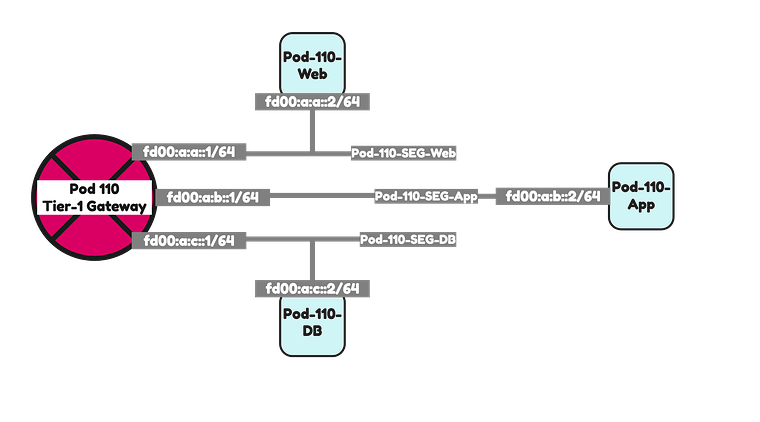
I have created three Virtual Machines, one on each segment using the configuration parameters in the table below.
| VM Name | IPv4 address | IPv4 gateway | IPv6 address | IPv6 gateway |
|---|---|---|---|---|
| Pod-110-Web | 192.168.1.2/24 | 192.168.1.1 | fd00:a:a::2/64 | fd00:a:a::1/64 |
| Pod-110-App | 192.168.2.2/24 | 192.168.2.1 | fd00:a:b::2/64 | fd00:a:b::1/64 |
| Pod-110-DB | 192.168.3.2/24 | 192.168.3.1 | fd00:a:c::3/64 | fd00:a:c::1/64 |
Pod 120
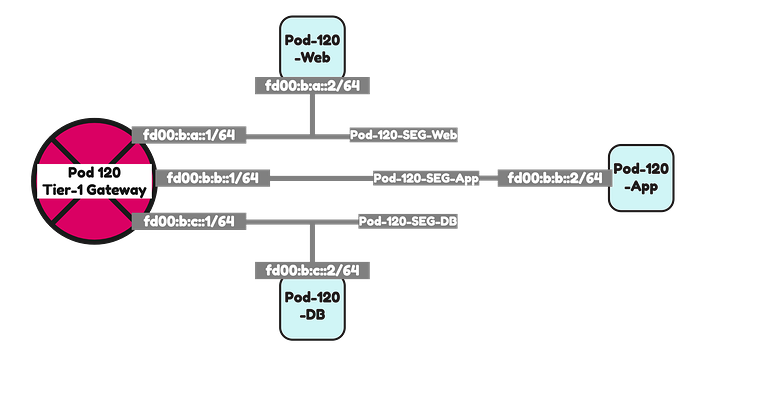
I have created three Virtual Machines, one on each segment using the configuration parameters in the table below.
| VM Name | IPv4 address | IPv4 gateway | IPv6 address | IPv6 gateway |
|---|---|---|---|---|
| Pod-120-Web | 192.168.5.2/24 | 192.168.5.1 | fd00:b:a::2/64 | fd00:b:a::1/64 |
| Pod-120-App | 192.168.6.2/24 | 192.168.6.1 | fd00:b:b::2/64 | fd00:b:b::1/64 |
| Pod-120-DB | 192.168.7.2/24 | 192.168.7.1 | fd00:b:c::3/64 | fd00:b:c::1/64 |
Testing connectivity 1 〈CLI ping〉
Below I have collected all the ping outputs to I can prove that full end-to-end IPv6 connectivity is possible.
Pod 110 to Pod 120 IPv6 connectivity ping tests
Ping tests from the Pod 110 Web VM to all Pod 120 VMs
tc@TinyVM:~$ ifconfigeth0      Link encap:Ethernet  HWaddr 00:50:56:9E:5F:CE          inet addr:192.168.1.240  Bcast:192.168.1.255  Mask:255.255.255.0          inet6 addr: fd00:a:a:0:250:56ff:fe9e:5fce/64 Scope:Global          inet6 addr: fd00:a:a::2/64 Scope:Global          inet6 addr: fe80::250:56ff:fe9e:5fce/64 Scope:Link          UP BROADCAST RUNNING MULTICAST  MTU:1500  Metric:1          RX packets:636 errors:0 dropped:0 overruns:0 frame:0          TX packets:549 errors:0 dropped:0 overruns:0 carrier:0          collisions:0 txqueuelen:1000          RX bytes:57952 (56.5 KiB)  TX bytes:116362 (113.6 KiB)
lo        Link encap:Local Loopback          inet addr:127.0.0.1  Mask:255.0.0.0          inet6 addr: ::1/128 Scope:Host          UP LOOPBACK RUNNING  MTU:65536  Metric:1          RX packets:30 errors:0 dropped:0 overruns:0 frame:0          TX packets:30 errors:0 dropped:0 overruns:0 carrier:0          collisions:0 txqueuelen:1000          RX bytes:19496 (19.0 KiB)  TX bytes:19496 (19.0 KiB)
tc@TinyVM:~$ ping -c 4 fd00:b:a::2PING fd00:b:a::2 (fd00:b:a::2): 56 data bytes64 bytes from fd00:b:a::2: seq=0 ttl=58 time=31.348 ms64 bytes from fd00:b:a::2: seq=1 ttl=58 time=4.846 ms64 bytes from fd00:b:a::2: seq=2 ttl=58 time=4.887 ms64 bytes from fd00:b:a::2: seq=3 ttl=58 time=3.872 ms
--- fd00:b:a::2 ping statistics ---4 packets transmitted, 4 packets received, 0% packet lossround-trip min/avg/max = 3.872/11.238/31.348 mstc@TinyVM:~$ ping -c 4 fd00:b:b::2PING fd00:b:b::2 (fd00:b:b::2): 56 data bytes64 bytes from fd00:b:b::2: seq=0 ttl=58 time=9.647 ms64 bytes from fd00:b:b::2: seq=1 ttl=58 time=3.568 ms64 bytes from fd00:b:b::2: seq=2 ttl=58 time=3.758 ms64 bytes from fd00:b:b::2: seq=3 ttl=58 time=3.196 ms
--- fd00:b:b::2 ping statistics ---4 packets transmitted, 4 packets received, 0% packet lossround-trip min/avg/max = 3.196/5.042/9.647 mstc@TinyVM:~$ ping -c 4 fd00:b:c::2PING fd00:b:c::2 (fd00:b:c::2): 56 data bytes64 bytes from fd00:b:c::2: seq=0 ttl=58 time=9.784 ms64 bytes from fd00:b:c::2: seq=1 ttl=58 time=2.878 ms64 bytes from fd00:b:c::2: seq=2 ttl=58 time=3.095 ms64 bytes from fd00:b:c::2: seq=3 ttl=58 time=5.012 ms
--- fd00:b:c::2 ping statistics ---4 packets transmitted, 4 packets received, 0% packet lossround-trip min/avg/max = 2.878/5.192/9.784 mstc@TinyVM:~$
Ping tests from the Pod 110 App VM to all Pod 120 VMs
tc@TinyVM:~$ ifconfigeth0      Link encap:Ethernet  HWaddr 00:50:56:9E:31:18          inet addr:192.168.2.240  Bcast:192.168.2.255  Mask:255.255.255.0          inet6 addr: fd00:a:b::2/64 Scope:Global          inet6 addr: fe80::250:56ff:fe9e:3118/64 Scope:Link          inet6 addr: fd00:a:b:0:250:56ff:fe9e:3118/64 Scope:Global          UP BROADCAST RUNNING MULTICAST  MTU:1500  Metric:1          RX packets:136 errors:0 dropped:0 overruns:0 frame:0          TX packets:129 errors:0 dropped:0 overruns:0 carrier:0          collisions:0 txqueuelen:1000          RX bytes:16441 (16.0 KiB)  TX bytes:47577 (46.4 KiB)
lo        Link encap:Local Loopback          inet addr:127.0.0.1  Mask:255.0.0.0          inet6 addr: ::1/128 Scope:Host          UP LOOPBACK RUNNING  MTU:65536  Metric:1          RX packets:20 errors:0 dropped:0 overruns:0 frame:0          TX packets:20 errors:0 dropped:0 overruns:0 carrier:0          collisions:0 txqueuelen:1000          RX bytes:12928 (12.6 KiB)  TX bytes:12928 (12.6 KiB)
tc@TinyVM:~$ ping -c 4 fd00:b:a::2PING fd00:b:a::2 (fd00:b:a::2): 56 data bytes64 bytes from fd00:b:a::2: seq=0 ttl=58 time=16.372 ms64 bytes from fd00:b:a::2: seq=1 ttl=58 time=4.004 ms64 bytes from fd00:b:a::2: seq=2 ttl=58 time=4.863 ms64 bytes from fd00:b:a::2: seq=3 ttl=58 time=4.738 ms
--- fd00:b:a::2 ping statistics ---4 packets transmitted, 4 packets received, 0% packet lossround-trip min/avg/max = 4.004/7.494/16.372 mstc@TinyVM:~$ ping -c 4 fd00:b:b::2PING fd00:b:b::2 (fd00:b:b::2): 56 data bytes64 bytes from fd00:b:b::2: seq=0 ttl=58 time=14.835 ms64 bytes from fd00:b:b::2: seq=1 ttl=58 time=5.930 ms64 bytes from fd00:b:b::2: seq=2 ttl=58 time=4.026 ms64 bytes from fd00:b:b::2: seq=3 ttl=58 time=3.303 ms
--- fd00:b:b::2 ping statistics ---4 packets transmitted, 4 packets received, 0% packet lossround-trip min/avg/max = 3.303/7.023/14.835 mstc@TinyVM:~$ ping -c 4 fd00:b:c::2PING fd00:b:c::2 (fd00:b:c::2): 56 data bytes64 bytes from fd00:b:c::2: seq=0 ttl=58 time=3.017 ms64 bytes from fd00:b:c::2: seq=1 ttl=58 time=3.283 ms64 bytes from fd00:b:c::2: seq=2 ttl=58 time=3.823 ms64 bytes from fd00:b:c::2: seq=3 ttl=58 time=5.541 ms
--- fd00:b:c::2 ping statistics ---4 packets transmitted, 4 packets received, 0% packet lossround-trip min/avg/max = 3.017/3.916/5.541 mstc@TinyVM:~$
Ping tests from the Pod 110 DB VM to all Pod 120 VMs
tc@TinyVM:~$ ifconfigeth0      Link encap:Ethernet  HWaddr 00:50:56:9E:AC:7D          inet addr:192.168.3.240  Bcast:192.168.3.255  Mask:255.255.255.0          inet6 addr: fd00:a:c::2/64 Scope:Global          inet6 addr: fe80::250:56ff:fe9e:ac7d/64 Scope:Link          inet6 addr: fd00:a:c:0:250:56ff:fe9e:ac7d/64 Scope:Global          UP BROADCAST RUNNING MULTICAST  MTU:1500  Metric:1          RX packets:137 errors:0 dropped:0 overruns:0 frame:0          TX packets:119 errors:0 dropped:0 overruns:0 carrier:0          collisions:0 txqueuelen:1000          RX bytes:16152 (15.7 KiB)  TX bytes:41590 (40.6 KiB)
lo        Link encap:Local Loopback          inet addr:127.0.0.1  Mask:255.0.0.0          inet6 addr: ::1/128 Scope:Host          UP LOOPBACK RUNNING  MTU:65536  Metric:1          RX packets:10 errors:0 dropped:0 overruns:0 frame:0          TX packets:10 errors:0 dropped:0 overruns:0 carrier:0          collisions:0 txqueuelen:1000          RX bytes:6464 (6.3 KiB)  TX bytes:6464 (6.3 KiB)
tc@TinyVM:~$ ping -c 4 fd00:b:a::2PING fd00:b:a::2 (fd00:b:a::2): 56 data bytes64 bytes from fd00:b:a::2: seq=0 ttl=58 time=13.181 ms64 bytes from fd00:b:a::2: seq=1 ttl=58 time=5.612 ms64 bytes from fd00:b:a::2: seq=2 ttl=58 time=4.381 ms64 bytes from fd00:b:a::2: seq=3 ttl=58 time=3.248 ms
--- fd00:b:a::2 ping statistics ---4 packets transmitted, 4 packets received, 0% packet lossround-trip min/avg/max = 3.248/6.605/13.181 mstc@TinyVM:~$ ping -c 4 fd00:b:b::2PING fd00:b:b::2 (fd00:b:b::2): 56 data bytes64 bytes from fd00:b:b::2: seq=0 ttl=58 time=16.429 ms64 bytes from fd00:b:b::2: seq=1 ttl=58 time=3.889 ms64 bytes from fd00:b:b::2: seq=2 ttl=58 time=4.668 ms64 bytes from fd00:b:b::2: seq=3 ttl=58 time=3.704 ms
--- fd00:b:b::2 ping statistics ---4 packets transmitted, 4 packets received, 0% packet lossround-trip min/avg/max = 3.704/7.172/16.429 mstc@TinyVM:~$ ping -c 4 fd00:b:c::2PING fd00:b:c::2 (fd00:b:c::2): 56 data bytes64 bytes from fd00:b:c::2: seq=0 ttl=58 time=5.868 ms64 bytes from fd00:b:c::2: seq=1 ttl=58 time=3.302 ms64 bytes from fd00:b:c::2: seq=2 ttl=58 time=4.182 ms64 bytes from fd00:b:c::2: seq=3 ttl=58 time=3.468 ms
--- fd00:b:c::2 ping statistics ---4 packets transmitted, 4 packets received, 0% packet lossround-trip min/avg/max = 3.302/4.205/5.868 mstc@TinyVM:~$
Pod 120 to Pod 110 IPv6 connectivity ping tests
Ping tests from the Pod 120 Web VM to all Pod 110 VMs
tc@TinyVM:~$ ifconfigeth0      Link encap:Ethernet  HWaddr 00:50:56:85:66:7D          inet addr:192.168.5.240  Bcast:192.168.5.255  Mask:255.255.255.0          inet6 addr: fd00:b:a::2/64 Scope:Global          inet6 addr: fe80::250:56ff:fe85:667d/64 Scope:Link          inet6 addr: fd00:b:a:0:250:56ff:fe85:667d/64 Scope:Global          UP BROADCAST RUNNING MULTICAST  MTU:1500  Metric:1          RX packets:206 errors:0 dropped:0 overruns:0 frame:0          TX packets:159 errors:0 dropped:0 overruns:0 carrier:0          collisions:0 txqueuelen:1000          RX bytes:21572 (21.0 KiB)  TX bytes:46940 (45.8 KiB)
lo        Link encap:Local Loopback          inet addr:127.0.0.1  Mask:255.0.0.0          inet6 addr: ::1/128 Scope:Host          UP LOOPBACK RUNNING  MTU:65536  Metric:1          RX packets:10 errors:0 dropped:0 overruns:0 frame:0          TX packets:10 errors:0 dropped:0 overruns:0 carrier:0          collisions:0 txqueuelen:1000          RX bytes:6464 (6.3 KiB)  TX bytes:6464 (6.3 KiB)
tc@TinyVM:~$ ping -c 4 fd00:a:a::2PING fd00:a:a::2 (fd00:a:a::2): 56 data bytes64 bytes from fd00:a:a::2: seq=0 ttl=58 time=3.856 ms64 bytes from fd00:a:a::2: seq=1 ttl=58 time=3.572 ms64 bytes from fd00:a:a::2: seq=2 ttl=58 time=3.405 ms64 bytes from fd00:a:a::2: seq=3 ttl=58 time=3.204 ms
--- fd00:a:a::2 ping statistics ---4 packets transmitted, 4 packets received, 0% packet lossround-trip min/avg/max = 3.204/3.509/3.856 mstc@TinyVM:~$ ping -c 4 fd00:a:b::2PING fd00:a:b::2 (fd00:a:b::2): 56 data bytes64 bytes from fd00:a:b::2: seq=0 ttl=58 time=23.314 ms64 bytes from fd00:a:b::2: seq=1 ttl=58 time=6.001 ms64 bytes from fd00:a:b::2: seq=2 ttl=58 time=4.059 ms64 bytes from fd00:a:b::2: seq=3 ttl=58 time=5.081 ms
--- fd00:a:b::2 ping statistics ---4 packets transmitted, 4 packets received, 0% packet lossround-trip min/avg/max = 4.059/9.613/23.314 mstc@TinyVM:~$ ping -c 4 fd00:a:c::2PING fd00:a:c::2 (fd00:a:c::2): 56 data bytes64 bytes from fd00:a:c::2: seq=0 ttl=58 time=10.396 ms64 bytes from fd00:a:c::2: seq=1 ttl=58 time=2.275 ms64 bytes from fd00:a:c::2: seq=2 ttl=58 time=3.289 ms64 bytes from fd00:a:c::2: seq=3 ttl=58 time=3.030 ms
--- fd00:a:c::2 ping statistics ---4 packets transmitted, 4 packets received, 0% packet lossround-trip min/avg/max = 2.275/4.747/10.396 mstc@TinyVM:~$
Ping tests from the Pod 120 App VM to all Pod 110 VMs
tc@TinyVM:~$ ifconfigeth0      Link encap:Ethernet  HWaddr 00:50:56:85:40:F8          inet addr:192.168.6.240  Bcast:192.168.6.255  Mask:255.255.255.0          inet6 addr: fd00:b:b:0:250:56ff:fe85:40f8/64 Scope:Global          inet6 addr: fd00:b:b::2/64 Scope:Global          inet6 addr: fe80::250:56ff:fe85:40f8/64 Scope:Link          UP BROADCAST RUNNING MULTICAST  MTU:1500  Metric:1          RX packets:170 errors:0 dropped:0 overruns:0 frame:0          TX packets:145 errors:0 dropped:0 overruns:0 carrier:0          collisions:0 txqueuelen:1000          RX bytes:20497 (20.0 KiB)  TX bytes:70044 (68.4 KiB)
lo        Link encap:Local Loopback          inet addr:127.0.0.1  Mask:255.0.0.0          inet6 addr: ::1/128 Scope:Host          UP LOOPBACK RUNNING  MTU:65536  Metric:1          RX packets:20 errors:0 dropped:0 overruns:0 frame:0          TX packets:20 errors:0 dropped:0 overruns:0 carrier:0          collisions:0 txqueuelen:1000          RX bytes:13000 (12.6 KiB)  TX bytes:13000 (12.6 KiB)
tc@TinyVM:~$ ping -c 4 fd00:a:a::2PING fd00:a:a::2 (fd00:a:a::2): 56 data bytes64 bytes from fd00:a:a::2: seq=0 ttl=58 time=10.618 ms64 bytes from fd00:a:a::2: seq=1 ttl=58 time=4.168 ms64 bytes from fd00:a:a::2: seq=2 ttl=58 time=3.763 ms64 bytes from fd00:a:a::2: seq=3 ttl=58 time=3.500 ms
--- fd00:a:a::2 ping statistics ---4 packets transmitted, 4 packets received, 0% packet lossround-trip min/avg/max = 3.500/5.512/10.618 mstc@TinyVM:~$ ping -c 4 fd00:a:b::2PING fd00:a:b::2 (fd00:a:b::2): 56 data bytes64 bytes from fd00:a:b::2: seq=0 ttl=58 time=7.505 ms64 bytes from fd00:a:b::2: seq=1 ttl=58 time=3.095 ms64 bytes from fd00:a:b::2: seq=2 ttl=58 time=3.237 ms64 bytes from fd00:a:b::2: seq=3 ttl=58 time=3.434 ms
--- fd00:a:b::2 ping statistics ---4 packets transmitted, 4 packets received, 0% packet lossround-trip min/avg/max = 3.095/4.317/7.505 mstc@TinyVM:~$ ping -c 4 fd00:a:c::2PING fd00:a:c::2 (fd00:a:c::2): 56 data bytes64 bytes from fd00:a:c::2: seq=0 ttl=58 time=11.369 ms64 bytes from fd00:a:c::2: seq=1 ttl=58 time=2.987 ms64 bytes from fd00:a:c::2: seq=2 ttl=58 time=10.894 ms64 bytes from fd00:a:c::2: seq=3 ttl=58 time=4.446 ms
--- fd00:a:c::2 ping statistics ---4 packets transmitted, 4 packets received, 0% packet lossround-trip min/avg/max = 2.987/7.424/11.369 mstc@TinyVM:~$
Ping tests from the Pod 120 DB VM to all Pod 110 VMs
tc@TinyVM:~$ ifconfigeth0      Link encap:Ethernet  HWaddr 00:50:56:85:78:4B          inet addr:192.168.7.240  Bcast:192.168.7.255  Mask:255.255.255.0          inet6 addr: fd00:b:c::2/64 Scope:Global          inet6 addr: fd00:b:c:0:250:56ff:fe85:784b/64 Scope:Global          inet6 addr: fe80::250:56ff:fe85:784b/64 Scope:Link          UP BROADCAST RUNNING MULTICAST  MTU:1500  Metric:1          RX packets:178 errors:0 dropped:0 overruns:0 frame:0          TX packets:166 errors:0 dropped:0 overruns:0 carrier:0          collisions:0 txqueuelen:1000          RX bytes:20023 (19.5 KiB)  TX bytes:51135 (49.9 KiB)
lo        Link encap:Local Loopback          inet addr:127.0.0.1  Mask:255.0.0.0          inet6 addr: ::1/128 Scope:Host          UP LOOPBACK RUNNING  MTU:65536  Metric:1          RX packets:34 errors:0 dropped:0 overruns:0 frame:0          TX packets:34 errors:0 dropped:0 overruns:0 carrier:0          collisions:0 txqueuelen:1000          RX bytes:13731 (13.4 KiB)  TX bytes:13731 (13.4 KiB)
tc@TinyVM:~$ ping -c 4 fd00:a:a::2PING fd00:a:a::2 (fd00:a:a::2): 56 data bytes64 bytes from fd00:a:a::2: seq=0 ttl=58 time=3.223 ms64 bytes from fd00:a:a::2: seq=1 ttl=58 time=3.522 ms64 bytes from fd00:a:a::2: seq=2 ttl=58 time=3.361 ms64 bytes from fd00:a:a::2: seq=3 ttl=58 time=3.831 ms
--- fd00:a:a::2 ping statistics ---4 packets transmitted, 4 packets received, 0% packet lossround-trip min/avg/max = 3.223/3.484/3.831 mstc@TinyVM:~$ ping -c 4 fd00:a:b::2PING fd00:a:b::2 (fd00:a:b::2): 56 data bytes64 bytes from fd00:a:b::2: seq=0 ttl=58 time=10.482 ms64 bytes from fd00:a:b::2: seq=1 ttl=58 time=2.637 ms64 bytes from fd00:a:b::2: seq=2 ttl=58 time=2.015 ms64 bytes from fd00:a:b::2: seq=3 ttl=58 time=4.101 ms
--- fd00:a:b::2 ping statistics ---4 packets transmitted, 4 packets received, 0% packet lossround-trip min/avg/max = 2.015/4.808/10.482 mstc@TinyVM:~$ ping -c 4 fd00:a:c::2PING fd00:a:c::2 (fd00:a:c::2): 56 data bytes64 bytes from fd00:a:c::2: seq=0 ttl=58 time=8.601 ms64 bytes from fd00:a:c::2: seq=1 ttl=58 time=2.742 ms64 bytes from fd00:a:c::2: seq=2 ttl=58 time=2.583 ms64 bytes from fd00:a:c::2: seq=3 ttl=58 time=2.850 ms
--- fd00:a:c::2 ping statistics ---4 packets transmitted, 4 packets received, 0% packet lossround-trip min/avg/max = 2.583/4.194/8.601 mstc@TinyVM:~$
Testing connectivity 2 〈Traceflow〉
As an extra test I also did some traceflow tests,
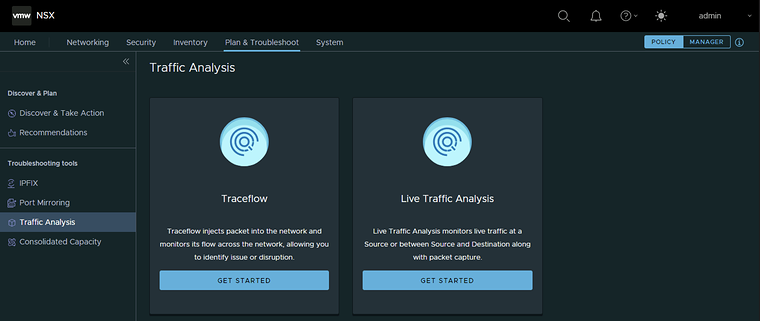
Pod 110 Web to Pod 120 Web IPv6 traceflow test
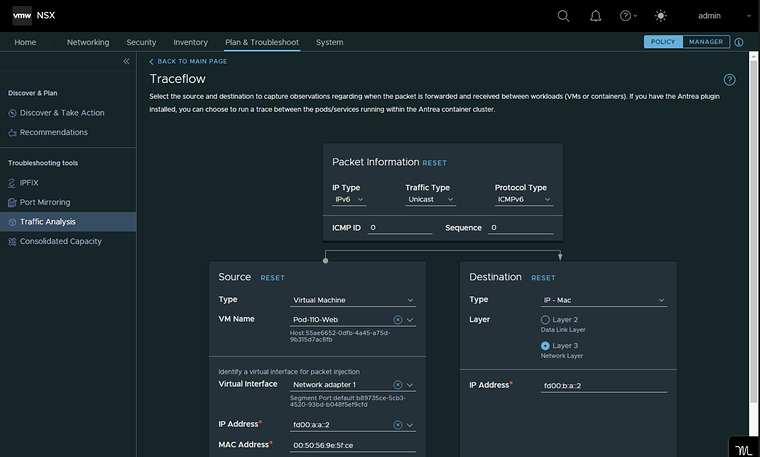
The packets are successfully delivered.
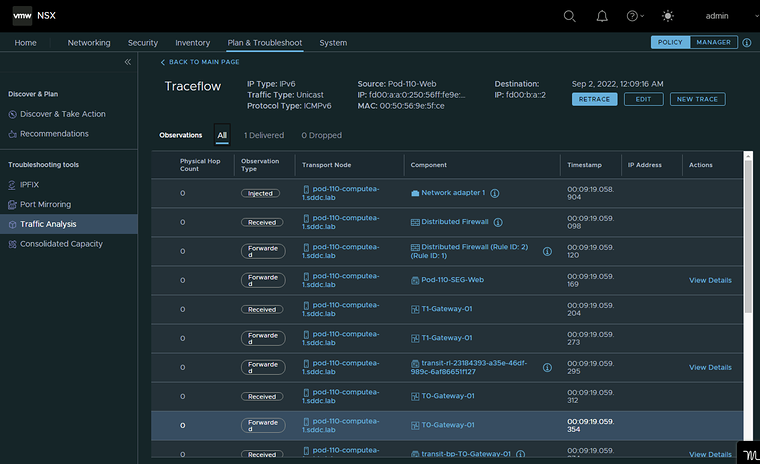
Pod 110 Web to Pod 110 App IPv6 traceflow test
Because the traffic is now staying within the same NSX Domain (Web to App inside Pod 110) traceflow generates a nice diagram and shows how the traffic is flowing. The packets are successfully delivered.
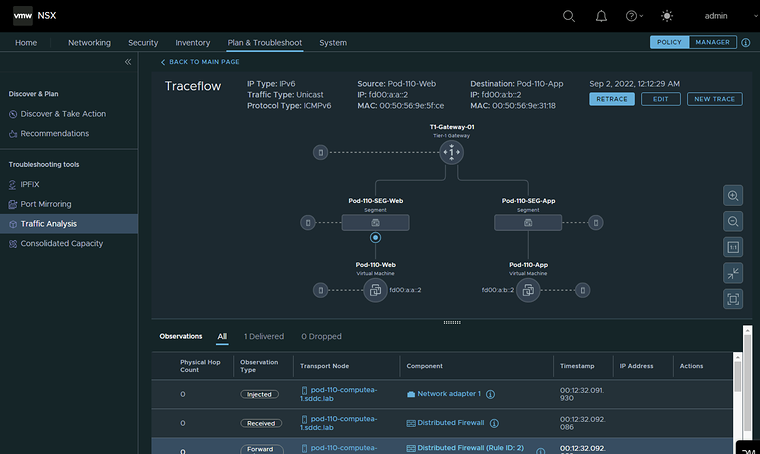
Originally published on the old wiki at /index.php/Lab:_Configure_IPv6_Routing_between_NSX_Segments_and_external_networks.