I have been playing around with vRNI last week and before I am going to write an article about some use cases and about the features I am first going to tell you what I had to do to actually make it work.
One very important thing is that IPFIX traffic needs to be able to flow from wherever to the vRNI proxy. Of course IPFIX needs to be enabled as well and if everything goes right vRNI will enable IPFIX and do the necessary things in order to make it work the moment you configure Data Sources.
For me this was unfortunately not the case.
After troubleshooting this with some internal VMware guys it appeared that vRNI did not automatically created the firewall rule to permit UDP/2055 (IPFIX). After removing / re-enabeling the DataSource a few times the rule still was not added.
So I decided to add it in myself. So I used google again and I stumbled onto this and this article.
Adding a rule to the ESX server by altering the /etc/vmware/firewall/rules.xml file will not make the change persistent. When the host gets a reboot the newly added rule will be deleted.
So I used Google again and I stumbled onto this and this article.
Even tough this is documented I still thought this could be documented in a better fashion so this where the steps that I took to add the IPFIX rule in and make it persistent:
- Download Download SUSE Linux Enterprise Server 11 SP2
- Install SUSE Linux Enterprise Server 11 SP2
- Install the prerequisites for installing the VIB Author fling
- Install the VIB Author fling
- Create the directory structure needed
- Create a descriptor.xml file
- Create the .xml file with the actual firewall rule
- Create the VIB and offline VIB
- Get the VIB of the SUSE Linux Enterprise Server and place it on the ESX Host
- Install the VIB
- Verify if the firewall rule is there
Download Download SUSE Linux Enterprise Server 11 SP2
Because the recommended platform to use the VIB Author fling is SUSE Linux Enterprise Server 11 SP2 I am downloading this from here.
Install SUSE Linux Enterprise Server 11 SP2
When you install the VM just use default settings to create the initial VM and during the installation. After installing the machine just boot it and SSH into it with using the IP Address. For some reason I had problems finding the IP address but eventually I needed to open the Terminal type in “su” enter the password and type in “ifconfig”.
Install the prerequisites for installing the VIB Author fling
After logging into the machine with SSH I started to install the prerequisites that are needed for the VIB Author Fling. Some of the prerequisites where already in by default and other where not.
148:/home/administrator # zypper install pythonLoading repository data...Reading installed packages...'python' is already installed.No update candidate for 'python-2.6.0-8.12.2.x86_64'. The highest available version is already installed.Resolving package dependencies...
Nothing to do.
148:/home/administrator # zypper install python-lxmlLoading repository data...Reading installed packages...Resolving package dependencies...
The following NEW packages are going to be installed:  python-lxml pyxml
2 new packages to install.Overall download size: 1.5 MiB. After the operation, additional 6.9 MiB will be used.Continue? [y/n/?] (y): yRetrieving package pyxml-0.8.4-194.23.38.x86_64 (1/2), 1013.0 KiB (4.8 MiB unpacked)Retrieving package python-lxml-2.1.2-1.20.x86_64 (2/2), 562.0 KiB (2.1 MiB unpacked)Installing: pyxml-0.8.4-194.23.38 [done]Installing: python-lxml-2.1.2-1.20 [done]
148:/home/administrator # zypper install python-urlgrabberLoading repository data...Reading installed packages...Resolving package dependencies...
The following NEW packages are going to be installed:  python-curl python-urlgrabber
2 new packages to install.Overall download size: 131.0 KiB. After the operation, additional 445.0 KiB will be used.Continue? [y/n/?] (y): yRetrieving package python-curl-7.19.0-5.2.1.2.x86_64 (1/2), 50.0 KiB (138.0 KiB unpacked)Retrieving package python-urlgrabber-3.9.1-0.1.2.x86_64 (2/2), 81.0 KiB (307.0 KiB unpacked)Installing: python-curl-7.19.0-5.2.1.2 [done]Installing: python-urlgrabber-3.9.1-0.1.2 [done]148:/home/administrator # zypper install coreutilsLoading repository data...Reading installed packages...'coreutils' is already installed.No update candidate for 'coreutils-8.12-6.19.1.x86_64'. The highest available version is already installed.Resolving package dependencies...
Nothing to do.
148:/home/administrator # zypper install binutilsLoading repository data...Reading installed packages...'binutils' is already installed.No update candidate for 'binutils-2.21.1-0.7.25.x86_64'. The highest available version is already installed.Resolving package dependencies...
Nothing to do.
148:/home/administrator # zypper install tarLoading repository data...Reading installed packages...'tar' is already installed.No update candidate for 'tar-1.26-1.2.4.1.x86_64'. The highest available version is already installed.Resolving package dependencies...
Nothing to do.
148:/home/administrator # zypper install bashLoading repository data...Reading installed packages...'bash' is already installed.No update candidate for 'bash-3.2-147.9.13.x86_64'. The highest available version is already installed.Resolving package dependencies...
Nothing to do.
148:/home/administrator # zypper install grepLoading repository data...Reading installed packages...'grep' is already installed.No update candidate for 'grep-2.7-5.5.61.x86_64'. The highest available version is already installed.Resolving package dependencies...
Nothing to do.
148:/home/administrator # zypper install fileLoading repository data...Reading installed packages...'file' is already installed.No update candidate for 'file-4.24-43.19.1.x86_64'. The highest available version is already installed.Resolving package dependencies...
Nothing to do.
148:/home/administrator # zypper install sedLoading repository data...Reading installed packages...'sed' is already installed.No update candidate for 'sed-4.1.5-85.22.x86_64'. The highest available version is already installed.Resolving package dependencies...
Nothing to do.
148:/home/administrator # zypper install gzipLoading repository data...Reading installed packages...'gzip' is already installed.No update candidate for 'gzip-1.3.12-69.19.1.x86_64'. The highest available version is already installed.Resolving package dependencies...
Nothing to do.
148:/home/administrator # zypper install opensslLoading repository data...Reading installed packages...'openssl' is already installed.No update candidate for 'openssl-0.9.8j-0.26.1.x86_64'. The highest available version is already installed.Resolving package dependencies...
Nothing to do.
148:/home/administrator # zypper install zlibLoading repository data...Reading installed packages...'zlib' is already installed.No update candidate for 'zlib-1.2.3-106.34.x86_64'. The highest available version is already installed.Resolving package dependencies...
Nothing to do.148:/home/administrator #
Install the VIB Author fling
administrator # rpm -ivh vmware-esx-vib-author-5.0.0-0.0.847598.i386.rpmPreparing... ########################################### [100%] 1:vmware-esx-vib-author ########################################### [100%]148:/home/administrator #Create the directory structure needed
According to this article a directory structure needed to be created.
148:/ # mkdir stage
148:/ # mkdir stage/payloads
148:/ # mkdir stage/payloads/payload1
148:/ # mkdir stage/payloads/payload1/etc
148:/ # mkdir stage/payloads/payload1/vmware
148:/ # mkdir stage/payloads/payload1/vmware/firewall
Create a descriptor xml file
Before you create a .vib file you need to create a descriptor.xml file and mine looked like this:
vib version="5.0"> <type>bootbank</type> <name>ipfix</name> <version>5.0.0-0.0.1</version> <vendor>IwanHoogendoorn</vendor> <summary>Custom VIB from Iwan Hoogendoorn</summary> <description>Adds custom firewall rule for ipfix</description> <relationships> <depends> </depends> <conflicts/> <replaces/> <provides/> <compatibleWith/> </relationships> <software-tags> </software-tags> <system-requires> <maintenance-mode>false</maintenance-mode> </system-requires> <file-list> </file-list> <acceptance-level>community</acceptance-level> <live-install-allowed>true</live-install-allowed> <live-remove-allowed>true</live-remove-allowed> <cimom-restart>false</cimom-restart> <stateless-ready>true</stateless-ready> <overlay>false</overlay> <payloads> <payload name="payload1" type="vgz"></payload> </payloads></vib>This file should be placed in the /stage directory
Create the xml file with the actual firewall rule
My .xml file with the rule looked like this:
<ConfigRoot>
  <!-- Ports opened IPFIX-->  <service id='0042'>     <id>ipfix</id>     <rule id='0000'>        <direction>inbound</direction>        <protocol>udp</protocol>        <porttype>dst</porttype>        <port>2055</port>     </rule>     <rule id='0001'>        <direction>outbound</direction>        <protocol>udp</protocol>        <porttype>dst</porttype>        <port>2055</port>     </rule>     <enabled>true</enabled>     <required>false</required>  </service>
</ConfigRoot>
This file should be placed in the /stage/payloads/payload1/vmware/firewall/ directory.
Create the vib and offline vib
148:/ # vibauthor -C -t stage -v ipfix.vib -O ipfix-offline-bundle.zip -fSuccessfully created ipfix.vib.Successfully created ipfix-offline-bundle.zip.148:/ #A copy of my vib + offline bundle that I created can be downloaded here—> Media:ipfix-vib-files.zip.
Get the VIB of the SUSE Linux Enterprise Server and place it on the ESX Host
I used WinSCP to transfer the files from the SUSE Linux Enterprise Server to the ESX Host.
Install the VIB
Log into the ESX host with SSH and install the VIB.
[root@dc1-pod11-esx-b-01:/etc/vmware/firewall] esxcli software vib install -v /tmp/ipfix.vib -fInstallation Result Message: Operation finished successfully. Reboot Required: false VIBs Installed: IwanHoogendoorn_bootbank_IpFixn_5.0.0-0.0.1 VIBs Removed: VIBs Skipped:[root@dc1-pod11-esx-b-01:/etc/vmware/firewall]Verify if the firewall rule is there
[root@dc1-pod11-esx-b-01:/etc/vmware/firewall] more ipfix.xml<ConfigRoot>
  <!-- Ports opened IPFIX-->  <service id='0042'>     <id>ipfix</id>     <rule id='0000'>        <direction>inbound</direction>        <protocol>udp</protocol>        <porttype>dst</porttype>        <port>2055</port>     </rule>     <rule id='0001'>        <direction>outbound</direction>        <protocol>udp</protocol>        <porttype>dst</porttype>        <port>2055</port>     </rule>     <enabled>true</enabled>     <required>false</required>  </service>
</ConfigRoot>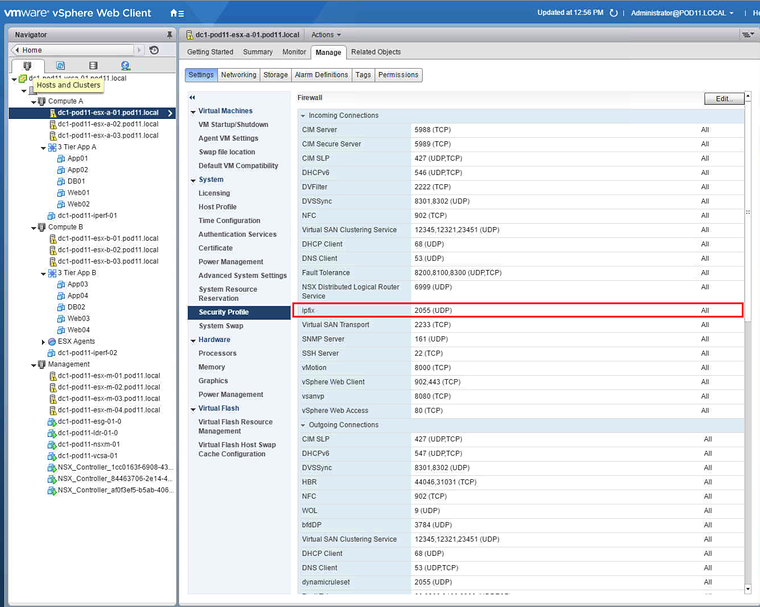
If needed you can always remove the VIB with:
[root@dc1-pod11-esx-b-01:/etc/vmware/firewall] esxcli software vib remove --vibname=ipfixRemoval Result Message: Operation finished successfully. Reboot Required: false VIBs Installed: VIBs Removed: ipfix_bootbank_ipfix_5.0.0-0.0.1 VIBs Skipped:Originally published on the old wiki at /index.php/Manually_installing_a_(persistent)_Firewall_Rule_to_allow_IPFIX_on_the_ESX_Host.