Last week I blogged about how to get started with PowerNSX.
Reason for me to dive into the wonderful world of PowerNSX was because I needed to implement Application Fencing. More about Application Fencing wan be found here and here.
The whole purpose of implementing Application Fencing is to get visibility what VM / Application is talking to what VM / Application with what protocol and port.
This information can be used to implement an Zero Trust Security Architecture
I will write a separate blog about Application Fencing in the future but in order to get there there are some steps that needs to be done.
In my example I will use the traditional 3-tier Bookstore App. This vApp has the following VM’s:
- Web01
- Web02
- App01
- App02
- DB01
Right now we only have 5 VM’s so creating the Security Tags, Security Groups, Assigning the tags to specific VM’s and Creating the Distributed Firewall Rules is done pretty fast.
BUT WHAT IF … you need to implement Application Fencing in an infrastructure with more than 1000 VM’s with 500 security tags and 500 security groups and the corresponding firewall rules?
This could take a while right?
You can speed this up with the use of PowerNSX! Below you will find a method to run PowerNSX in combination with external Comma Separated Value (CSV) files. This will save you a lot of time!
The steps to implement Application Fencing are:
- Add Security Tags and Tier based Security Groups (and statically make the security tag an member of the tier security group)
- Assign the Security Tags to the correct VM’s (so that the VM’s are placed in the correct tier group)
- Add separate Application based Security Groups (so that the Tier based Security Groups can be nested inside an Application Security Group)
- Nest the Tier based Security Groups into the Application Security Group
- Add Distributed Firewall Sections to add in the Distributed Firewall Rules
- Add in the Tier based Distributed Firewall Rules
- Add in the Application based Distributed Firewall Rules
The scripts and CSV files that I used for this exercise are found below.
Add Security Tags and Tier based Security Groups 〈and statically make the security tag an member of the tier security group〉
The script /script.ps1:
## Author: Iwan Hoogendoorn t:@i1wan m:iwan@i-1.nl## version 1.0## August 2016#--------------------------------------------------# ____   __   _  _  ____  ____  __ _  ____  _  _# (  _ \ /  \ / )( \(  __)(  _ \(  ( \/ ___)( \/ )#  ) __/(  O )\ /\ / ) _)  )   //    /\___ \ )  (# (__)   \__/ (_/\_)(____)(__\_)\_)__)(____/(_/\_)#     PowerShell extensions for NSX for vSphere#--------------------------------------------------
#This will create the security tags and the groups based on a CSV.#Note that the tags and groups will need to be UNIQUE as this script does not do error handling.
#import the CSV file content and place the content in a loopimport-csv .\CSV.csv | % {
#Create security tag based on field in CSV$st = New-NsxSecurityTag -name $_.SECTAG
#Create security group based on field in CSV and makes the security tag a member of the new security group$sg = New-NsxSecurityGroup -name $_.SECGROUP -includemember ($st)}
The CSV:
SECTAG,SECGROUPST-WEB,SG-TIER-WEBST-APP,SG-TIER-APPST-DB,SG-TIER-DBExecuting the Script:
PowerCLI C:\new> .\script.ps1Result:
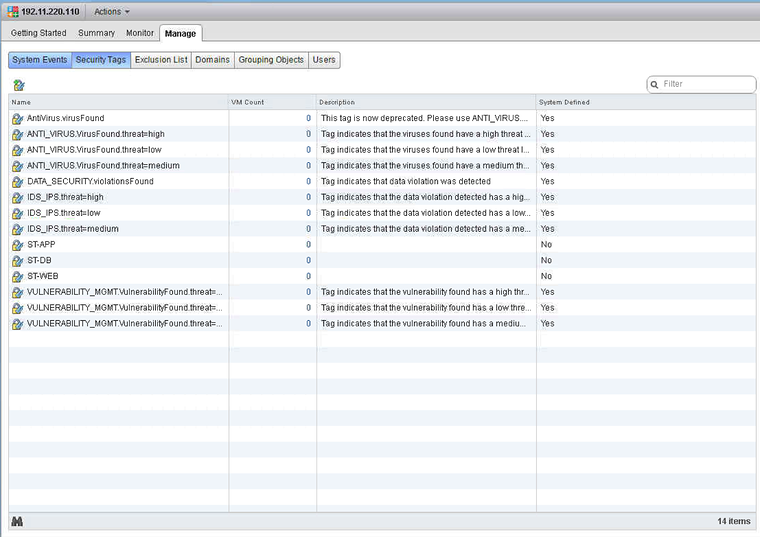
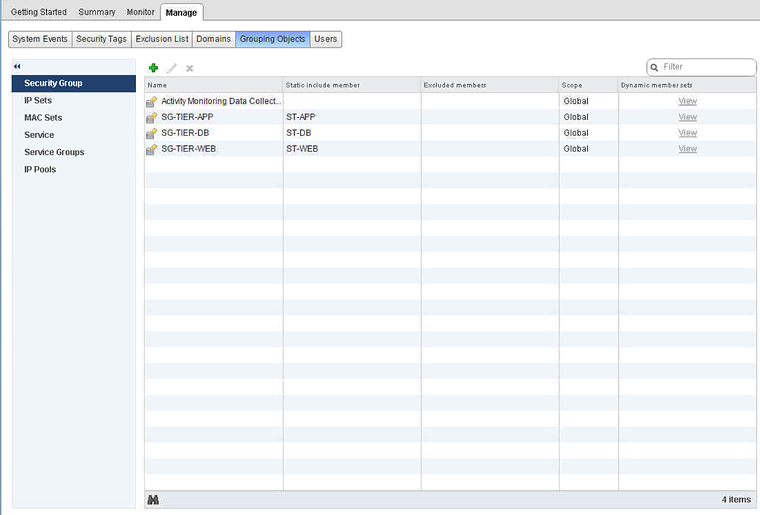
Assign the Security Tags to the correct VMs so that the VMs are placed in the correct tier group
The script /script.ps1:
## Author: Iwan Hoogendoorn t:@i1wan m:iwan@i-1.nl## version 1.0## August 2016#--------------------------------------------------# ____   __   _  _  ____  ____  __ _  ____  _  _# (  _ \ /  \ / )( \(  __)(  _ \(  ( \/ ___)( \/ )#  ) __/(  O )\ /\ / ) _)  )   //    /\___ \ )  (# (__)   \__/ (_/\_)(____)(__\_)\_)__)(____/(_/\_)#     PowerShell extensions for NSX for vSphere#--------------------------------------------------
#This will go trough the list of VM's and apply the tag that is on the same line of the VMimport-csv .\CSV.csv|% {
#Read security tag from a field in the CSV$st = Get-NsxSecurityTag -name $_.SECTAG
#Read VM Name from a field in the CSV$vm = Get-Vm -name $_.VMNAME
#Assign security tag to the VM Name$vm = Get-Vm -name $_.VMNAME|New-NsxSecurityTagAssignment -ApplyTag $st}
The CSV:
VMNAME,SECTAGWeb01,ST-WEBWeb02,ST-WEBApp01,ST-APPApp02,ST-APPDB01,ST-DBExecuting the Script:
PowerCLI C:\new> .\script.ps1Result:
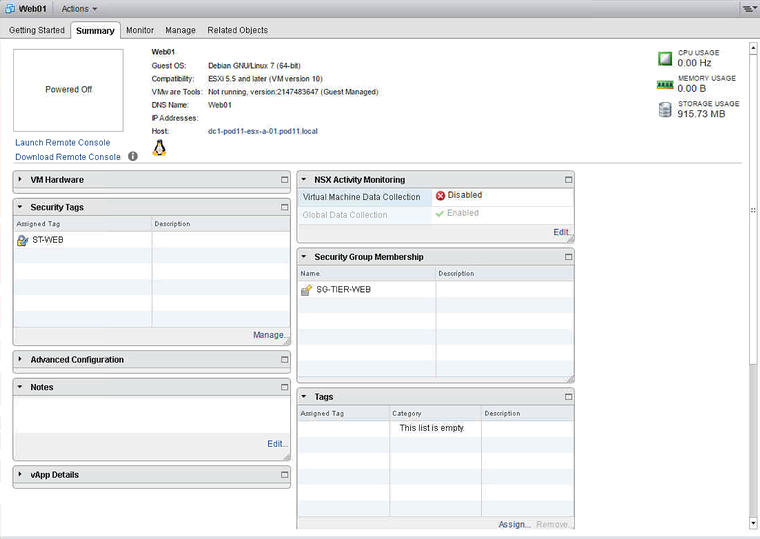
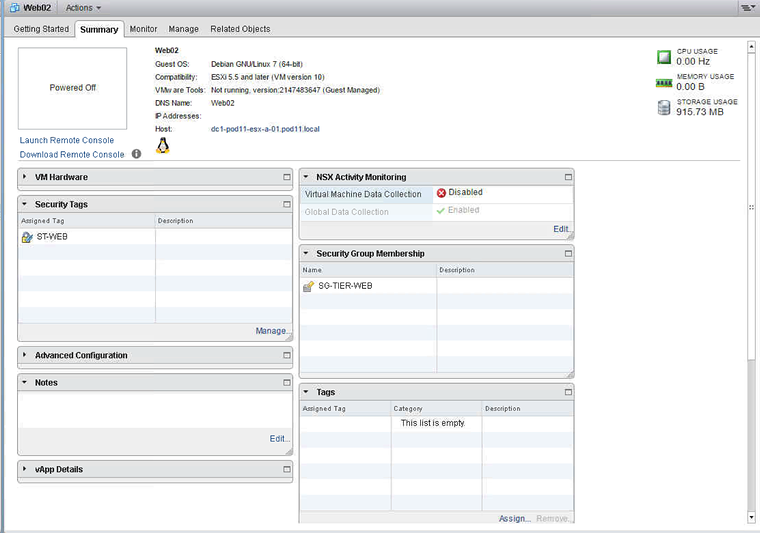
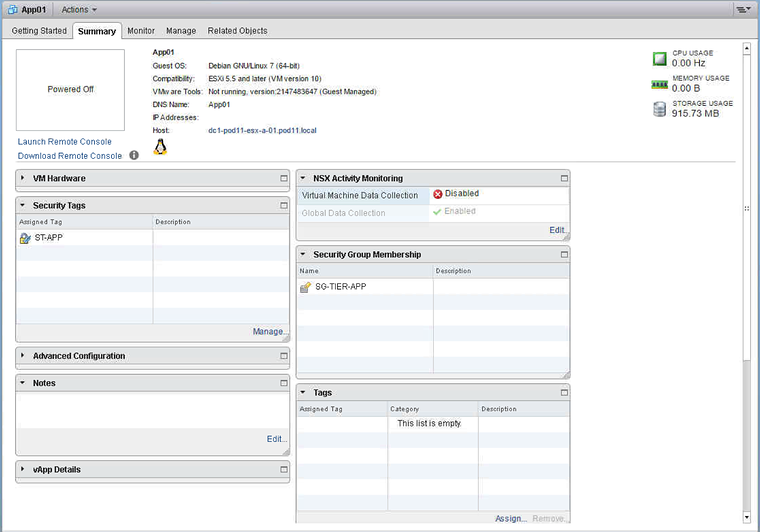
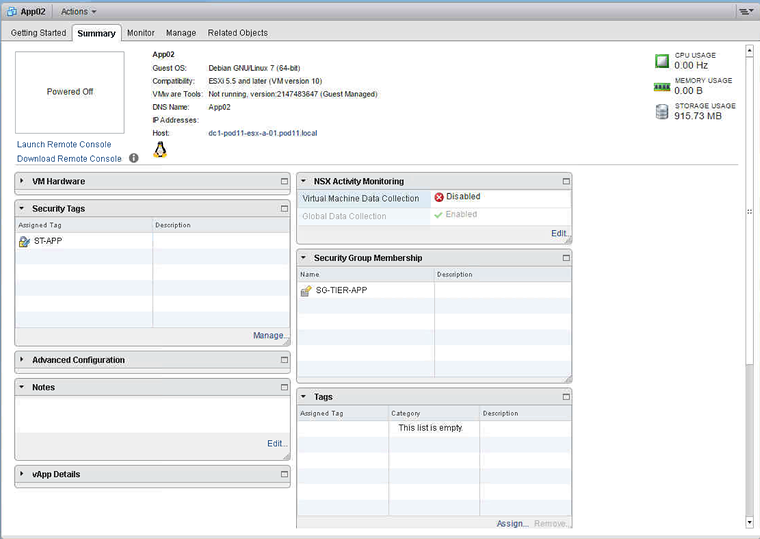
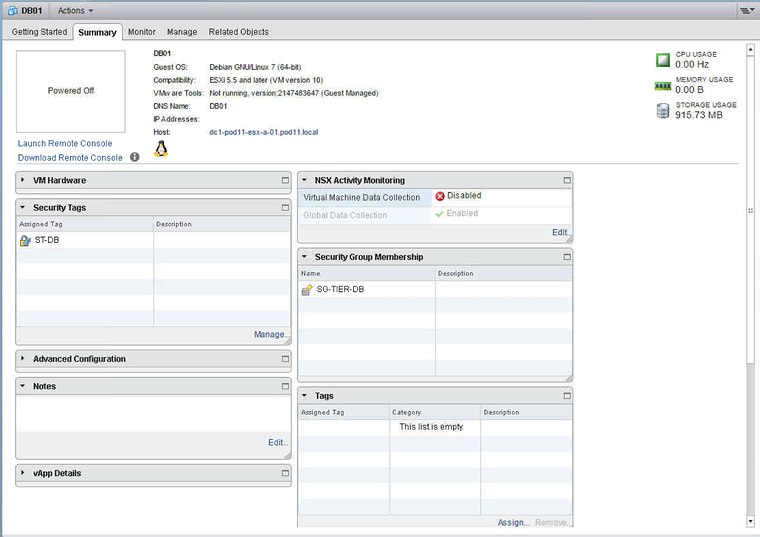
Add separate Application based Security Groups 〈so that the Tier based Security Groups can be nested inside an Application Security Group〉
The script /script.ps1:
## Author: Iwan Hoogendoorn t:@i1wan m:iwan@i-1.nl## version 1.0## August 2016#--------------------------------------------------# ____   __   _  _  ____  ____  __ _  ____  _  _# (  _ \ /  \ / )( \(  __)(  _ \(  ( \/ ___)( \/ )#  ) __/(  O )\ /\ / ) _)  )   //    /\___ \ )  (# (__)   \__/ (_/\_)(____)(__\_)\_)__)(____/(_/\_)#     PowerShell extensions for NSX for vSphere#--------------------------------------------------
#This will create the security groups.#Note that the tags and groups will need to be UNIQUE as this script does not do error handling.
#Create security groupsNew-NsxSecurityGroup -name SG-APP-BOOKSTORE
Executing the Script:
PowerCLI C:\new> .\script.ps1
objectId           : securitygroup-31objectTypeName     : SecurityGroupvsmUuid            : 4223B69E-2DE2-804A-0BE0-FA7307BB2D02nodeId             : c1afd25d-49fe-4259-bd07-f4508a80d472revision           : 1type               : typename               : SG-APP-BOOKSTOREdescription        :scope              : scopeclientHandle       :extendedAttributes :isUniversal        : falseuniversalRevision  : 0inheritanceAllowed : false
Result:
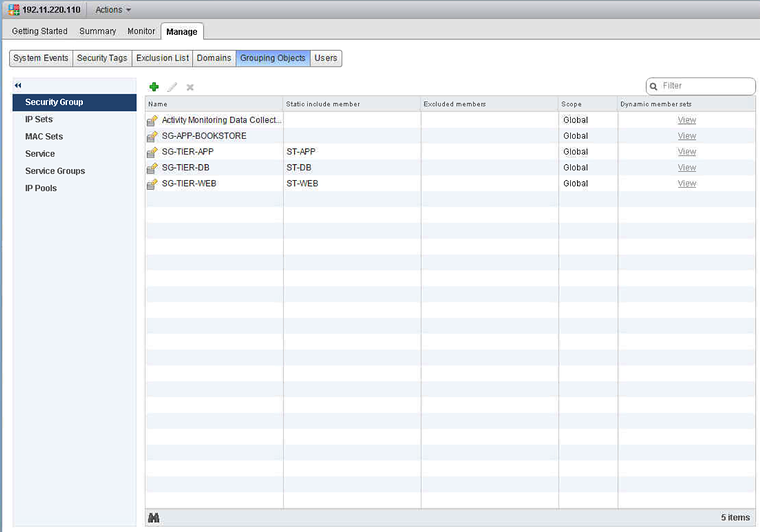
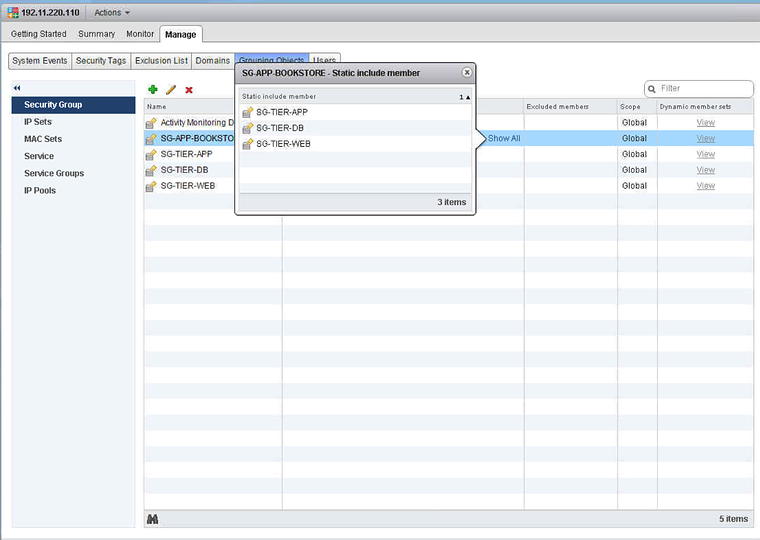
Nest the Tier based Security Groups into the Application Security Group
The script /script.ps1:
## Author: Iwan Hoogendoorn t:@i1wan m:iwan@i-1.nl## version 1.0## August 2016#--------------------------------------------------# ____   __   _  _  ____  ____  __ _  ____  _  _# (  _ \ /  \ / )( \(  __)(  _ \(  ( \/ ___)( \/ )#  ) __/(  O )\ /\ / ) _)  )   //    /\___ \ )  (# (__)   \__/ (_/\_)(____)(__\_)\_)__)(____/(_/\_)#     PowerShell extensions for NSX for vSphere#--------------------------------------------------
#This will read the security groups from the CSV and will nest the groups into other groups in the CSV.
import-csv .\CSV.csv|% {
#Read the TIER Security Group$app = Get-NsxSecurityGroup -name $_.SECTIERGROUP
#Read the APP Security Group$ags = Get-NsxSecurityGroup -name $_.SECAPPGROUP
#Nest one group into another$ags|Add-NsxSecurityGroupMember -member $app}
The CSV:
APPNAME,SECTIERGROUP,SECAPPGROUPBOOKSTORE,SG-TIER-WEB,SG-APP-BOOKSTOREBOOKSTORE,SG-TIER-APP,SG-APP-BOOKSTOREBOOKSTORE,SG-TIER-DB,SG-APP-BOOKSTOREExecuting the Script:
PowerCLI C:\new> .\script.ps1
objectId           : securitygroup-31objectTypeName     : SecurityGroupvsmUuid            : 4223B69E-2DE2-804A-0BE0-FA7307BB2D02nodeId             : c1afd25d-49fe-4259-bd07-f4508a80d472revision           : 2type               : typename               : SG-APP-BOOKSTOREdescription        :scope              : scopeclientHandle       :extendedAttributes :isUniversal        : falseuniversalRevision  : 0inheritanceAllowed : falsemember             : member
objectId           : securitygroup-31objectTypeName     : SecurityGroupvsmUuid            : 4223B69E-2DE2-804A-0BE0-FA7307BB2D02nodeId             : c1afd25d-49fe-4259-bd07-f4508a80d472revision           : 3type               : typename               : SG-APP-BOOKSTOREdescription        :scope              : scopeclientHandle       :extendedAttributes :isUniversal        : falseuniversalRevision  : 0inheritanceAllowed : falsemember             : {SG-TIER-APP, SG-TIER-WEB}
objectId           : securitygroup-31objectTypeName     : SecurityGroupvsmUuid            : 4223B69E-2DE2-804A-0BE0-FA7307BB2D02nodeId             : c1afd25d-49fe-4259-bd07-f4508a80d472revision           : 4type               : typename               : SG-APP-BOOKSTOREdescription        :scope              : scopeclientHandle       :extendedAttributes :isUniversal        : falseuniversalRevision  : 0inheritanceAllowed : falsemember             : {SG-TIER-DB, SG-TIER-APP, SG-TIER-WEB}
PowerCLI C:\new>
Result:
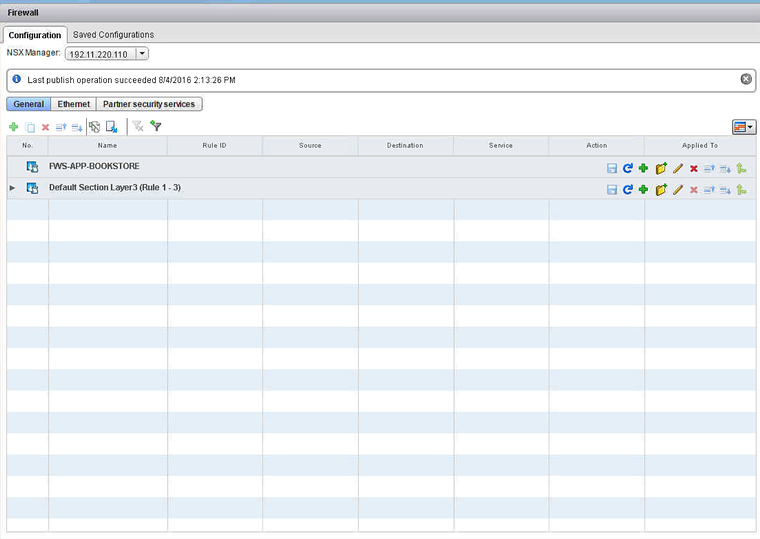
Add Distributed Firewall Sections to add in the Distributed Firewall Rules
The script /script.ps1:
## Author: Iwan Hoogendoorn t:@i1wan m:iwan@i-1.nl## version 1.0## August 2016#--------------------------------------------------# ____   __   _  _  ____  ____  __ _  ____  _  _# (  _ \ /  \ / )( \(  __)(  _ \(  ( \/ ___)( \/ )#  ) __/(  O )\ /\ / ) _)  )   //    /\___ \ )  (# (__)   \__/ (_/\_)(____)(__\_)\_)__)(____/(_/\_)#     PowerShell extensions for NSX for vSphere#--------------------------------------------------
#This will only add 1 new Distributed Firewall Section.New-NsxFirewallSection FWS-APP-BOOKSTORE
Executing the Script:
PowerCLI C:\new> .\script.ps1
id               : 1012name             : FWS-APP-BOOKSTOREgenerationNumber : 1470349159308timestamp        : 1470349159308type             : LAYER3
Result:
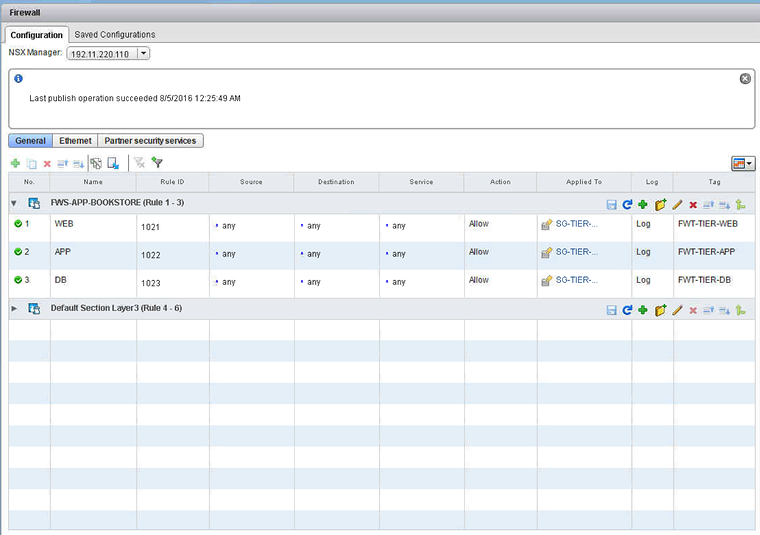
Add in the Tier based Distributed Firewall Rules
The script /script.ps1:
## Author: Iwan Hoogendoorn t:@i1wan m:iwan@i-1.nl## version 1.0## August 2016#--------------------------------------------------# ____   __   _  _  ____  ____  __ _  ____  _  _# (  _ \ /  \ / )( \(  __)(  _ \(  ( \/ ___)( \/ )#  ) __/(  O )\ /\ / ) _)  )   //    /\___ \ )  (# (__)   \__/ (_/\_)(____)(__\_)\_)__)(____/(_/\_)#     PowerShell extensions for NSX for vSphere#--------------------------------------------------
#This will go trough the list of Firewall Rulesimport-csv .\CSV.csv|% {
#Collect the varables from the CSV file$tn = $_.TIERNAME$sg = get-nsxsecuritygroup $_.SECGROUP$sec = get-nsxfirewallsection $_.FWSECTION$fwt = $_.FWT
#Add rule to Firewall section$sec|new-nsxfirewallrule -name $tn -Action allow -position bottom -appliedto $sg -Tag $fwt -EnableLogging}
The CSV:
TIERNAME,SECGROUP,FWSECTION,FWTWEB,SG-TIER-WEB,FWS-APP-BOOKSTORE,FWT-TIER-WEBAPP,SG-TIER-APP,FWS-APP-BOOKSTORE,FWT-TIER-APPDB,SG-TIER-DB,FWS-APP-BOOKSTORE,FWT-TIER-DBExecuting the Script:
PowerCLI C:\new> .\script.ps1
id               : 1012name             : FWS-APP-BOOKSTOREgenerationNumber : 1470349548233timestamp        : 1470349548233type             : LAYER3rule             : rule
id               : 1012name             : FWS-APP-BOOKSTOREgenerationNumber : 1470349548784timestamp        : 1470349548784type             : LAYER3rule             : {WEB, APP}
id               : 1012name             : FWS-APP-BOOKSTOREgenerationNumber : 1470349549337timestamp        : 1470349549337type             : LAYER3rule             : {WEB, APP, DB}
Result:
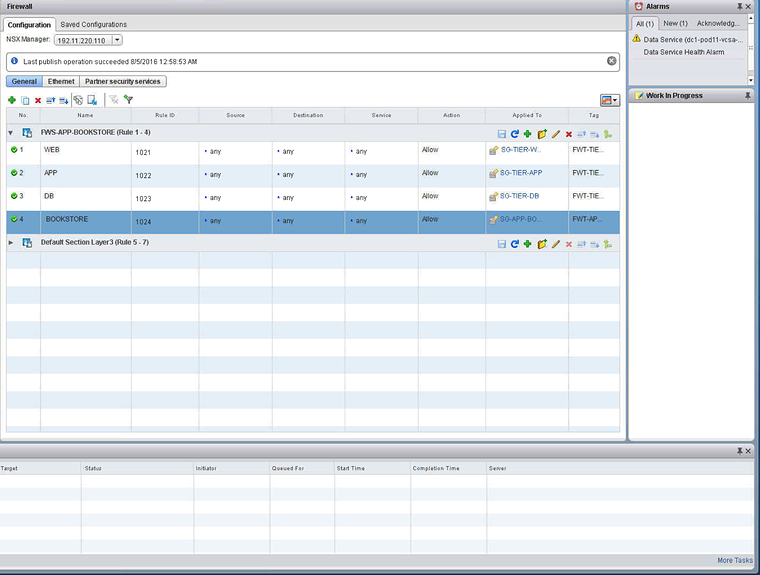
Add in the Application based Distributed Firewall Rules
The script /script.ps1:
## Author: Iwan Hoogendoorn t:@i1wan m:iwan@i-1.nl## version 1.0## August 2016#--------------------------------------------------# ____   __   _  _  ____  ____  __ _  ____  _  _# (  _ \ /  \ / )( \(  __)(  _ \(  ( \/ ___)( \/ )#  ) __/(  O )\ /\ / ) _)  )   //    /\___ \ )  (# (__)   \__/ (_/\_)(____)(__\_)\_)__)(____/(_/\_)#     PowerShell extensions for NSX for vSphere#--------------------------------------------------
#This will set the variables$sec = $_.FWSECTION$arn = $_.APPNAME$sg = "$_.SECGROUP$fwt = $_.FWT
#Here we create a new Distributed Firewall Rule with the variables set above$sec|new-nsxfirewallrule -name $arn -Action allow -position bottom -appliedto $sg -Tag $fwt -EnableLogging
The CSV:
APPNAME,SECGROUP,FWSECTION,FWTBOOKSTORE,SG-APP-BOOKSTORE,FWS-APP-BOOKSTORE,FWT-APP-BOOKSTOREExecuting the Script:
PowerCLI C:\new> .\script.ps1
id               : 1012name             : FWS-APP-BOOKSTOREgenerationNumber : 1470353361332timestamp        : 1470353361332type             : LAYER3rule             : {WEB, APP, DB, BOOKSTORE}
If you want to run the script without an CSV file your can use this:
## Author: Iwan Hoogendoorn t:@i1wan m:iwan@i-1.nl## version 1.0## August 2016#--------------------------------------------------# ____   __   _  _  ____  ____  __ _  ____  _  _# (  _ \ /  \ / )( \(  __)(  _ \(  ( \/ ___)( \/ )#  ) __/(  O )\ /\ / ) _)  )   //    /\___ \ )  (# (__)   \__/ (_/\_)(____)(__\_)\_)__)(____/(_/\_)#     PowerShell extensions for NSX for vSphere#--------------------------------------------------
$an = "BOOKSTORE"$sg = get-nsxsecuritygroup "SG-APP-BOOKSTORE"$sec = get-nsxfirewallsection "FWS-APP-BOOKSTORE"$fwt = "FWT-APP-BOOKSTORE"
#Add rule to Firewall section$sec|new-nsxfirewallrule -name $an -Action allow -position bottom -appliedto $sg -Tag $fwt -EnableLogging
Result:
Thanks Kyle for pointing out how to work with PowerShell and external CSV’s and Anthony for finetuning this. And thanks Nick for this awesome PowerNSX!
Originally published on the old wiki at /index.php/PowerNSX:_NSX_Security_Tags,_Security_Groups,_Distributed_Firewall_Sections_and_Distributed_Firewall_Rules_with_external_CSV_files.