Routing with NSX using multiple sites using Locale ID (with eBGP all the way)
Introduction
In one of my previous articles I demonstrated the routing between two Data Centers with using eBGP and iBGP. These previous articles focussed on using only one path northbound as the primary exit point. So workloads that are in DC1 and DC2 will either choose the DC1 WAN or the DC2 WAN as the primary path (where DC1 is always prefered and DC2 is always secondary)
This article will be about doing almost the same, but now with the use of the NSX Locale ID feature. With this feature the workloads that are in DC1 will exit trough the DC1 WAN and the workloads that are in DC2 will exit trough the DC2 WAN.
Diagram
The following diagram will be used for our setup.
>> LAB100_-_NSX_Routing_based_on_eBGP_and_locale_ID.pdf
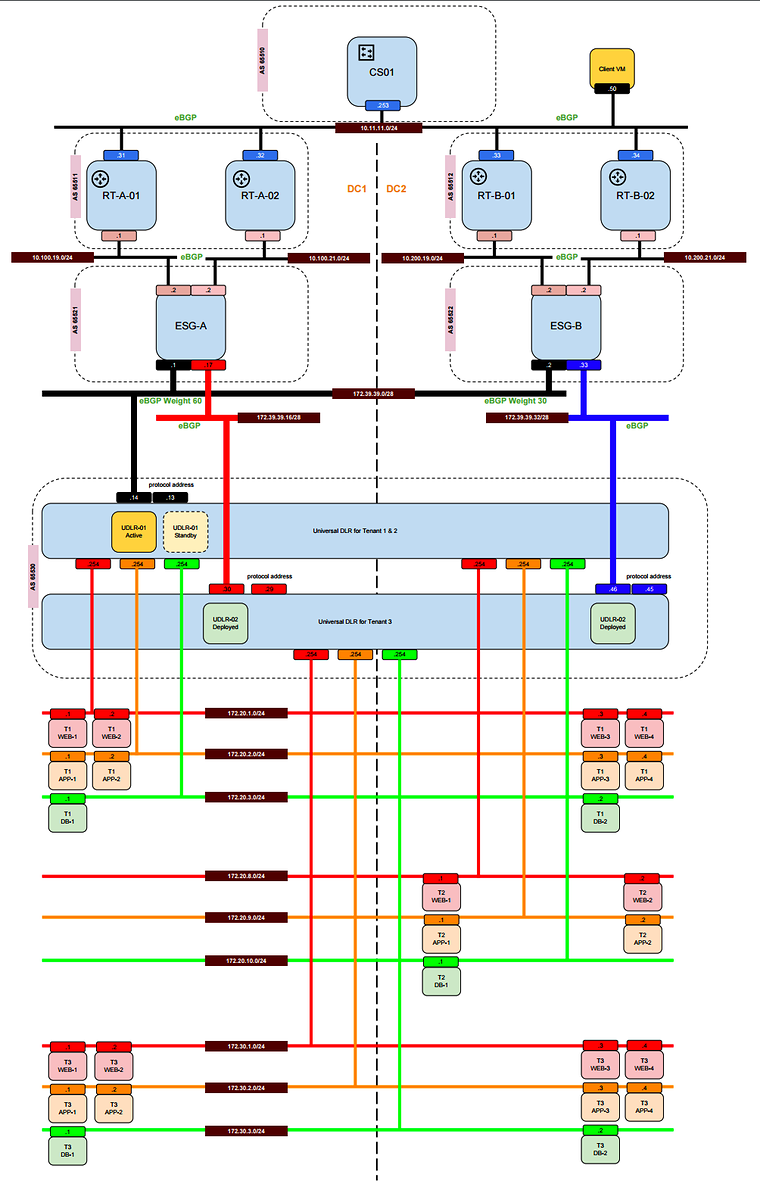
Components
I am still using the same componenents as in this previous article but in this article we will actively use the UDLR-02 and leave the UDLR-1 alone.
Use–Cases
I have thought of the following use-cases below.
As it is not possible to test active/passive and active/active with one UDLR I am using two UDLR instances here.
For testing purpose, I will use three tenants with each having their own Web, App and DB tiers.
Tenant one and two will be using the first UDLR (UDLR-01) with active/passive site egress. Tenant three will be using the second UDLR (UDLR-02) with active/active site egress.
Tenant three
Tenant three will have workloads in DC1 and in DC2 and because it is using local egress the traffic will exit from the Cisco CSR1000V routers local to that site. When the primary site is down the traffic should exit from the secondary site and when the secondary is down traffic should exit from the primary.
Routing protocol options
All possible routing options are described in the previous article.
The routing option in this article will be:
Option 1
- eBGP peering between the UDLR and the ESG’s
- eBGP peering between the ESG’s and the external routers
- eBGP peering between the external routers and the CORE
Option 1
Because of the many options available in the setup I want to start with the following: Tenant 3 workloads with the use of UDLR-02 and option 1 routing.
UDLR configuration
When Locale ID is used the UDLR Control VM needs to be deployed in both DC’s. After the deployment is done on the primary site we need to browse to the secondary NSX Manager and manually deploy an instance of the UDLR control VM in DC2. When this is done some DC2 site specific configurations are needed.
- DC1 and DC2 UDLR-02 instances will have their own interfaces with own IP addresses
- DC1 and DC2 UDLR-02 instances will have their own eBGP peerings
- DC1 and DC2 UDLR-02 instances will have their own site (or NSX Manager) specific Locale ID
DC1
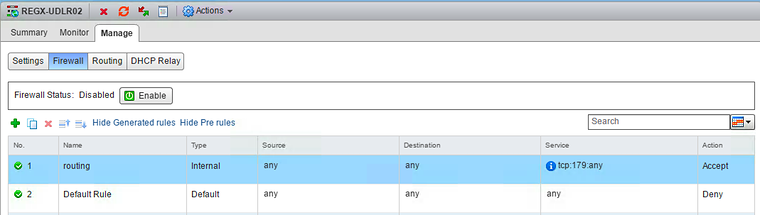
Manage —> Firewall
- Make sure the firewall is disabled
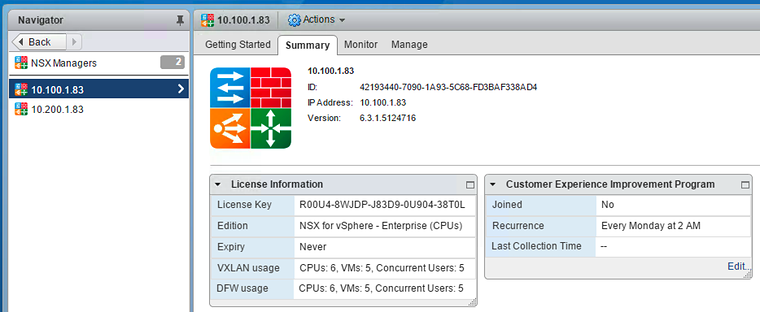
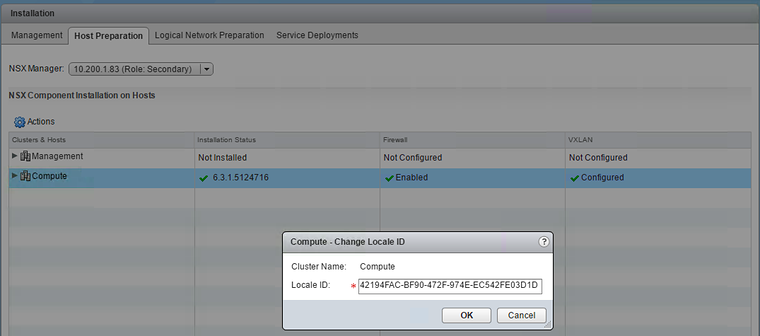
- Get the Locale ID from the NSX Manager
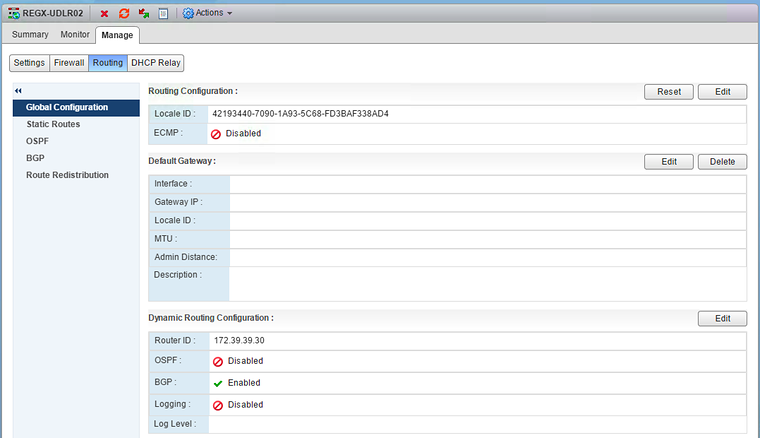
Manage —> Routing —> Global Configuration
- Configure Locale ID and make sure this is the same as the NSX Manager
- Enable ECMP
- Make sure that the default gateway is not configured
- Configure a router ID
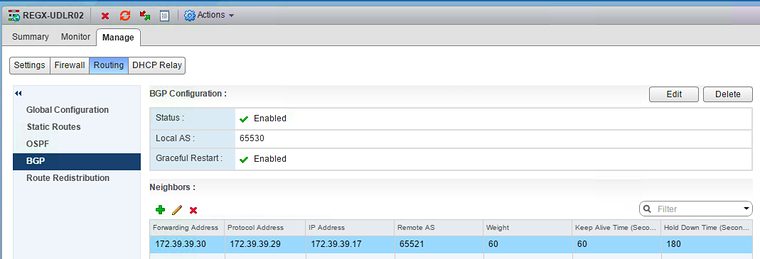
Manage —> Routing —> BGP
- Enable BGP
- Configure the Local AS
- Disable Graceful Restart
- Configure the BGP peers towards ESG-A
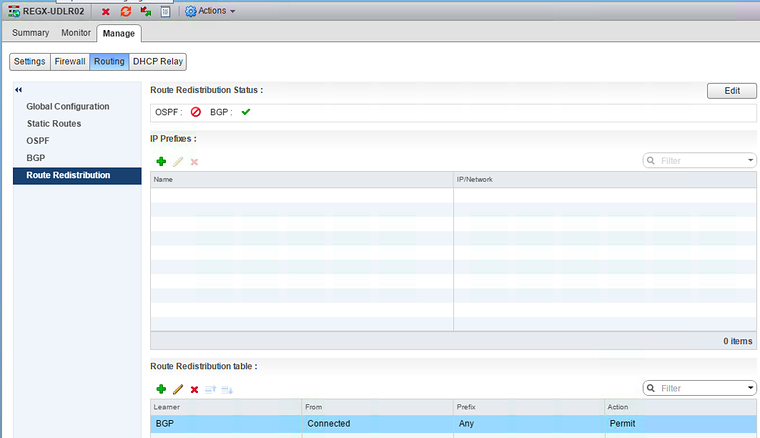
Manage —> Routing —> Route Redistribution
- Enable route redistribution for BGP
- Specify what you allow to redistribute
DC2
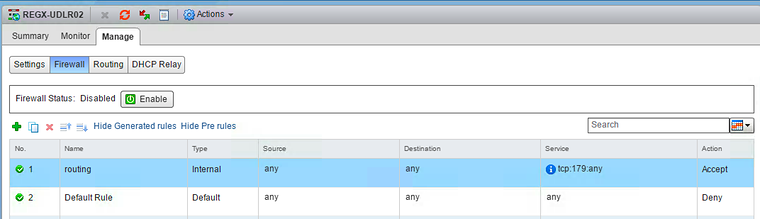
- Make sure the firewall is disabled
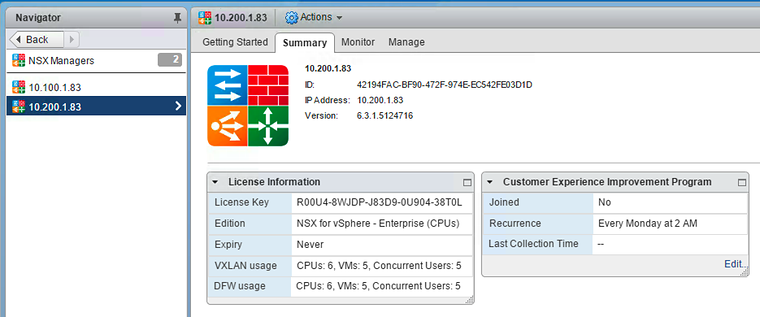
- Get the Locale ID from the NSX Manager
Manage —> Routing —> Global Configuration
- Configure Locale ID and make sure this is the same as the NSX Manager
- Enable ECMP
- Make sure that the default gateway is not configured
- Configure a router ID
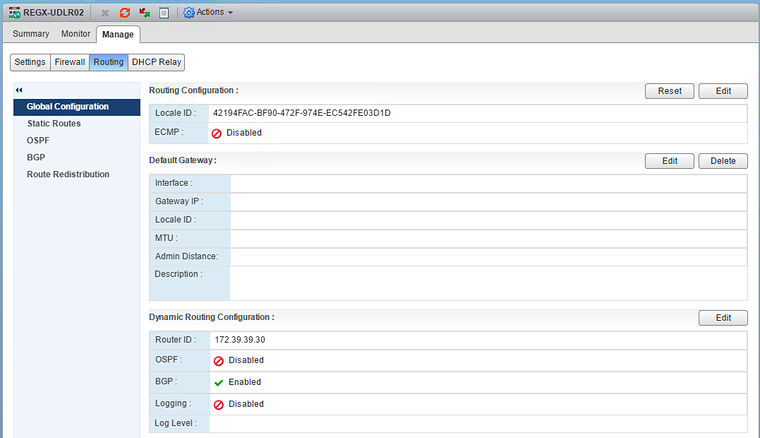
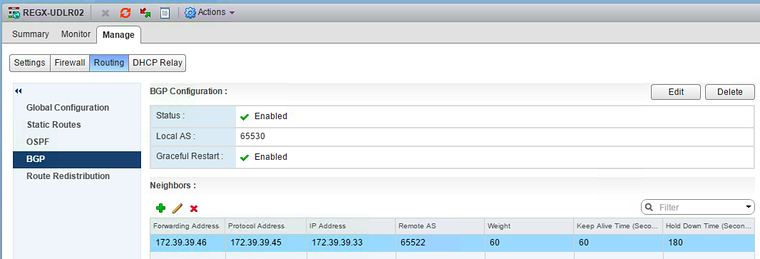
Manage —> Routing —> BGP
- Enable BGP
- Configure the Local AS
- Disable Graceful Restart
- Configure the BGP peers towards ESG-A
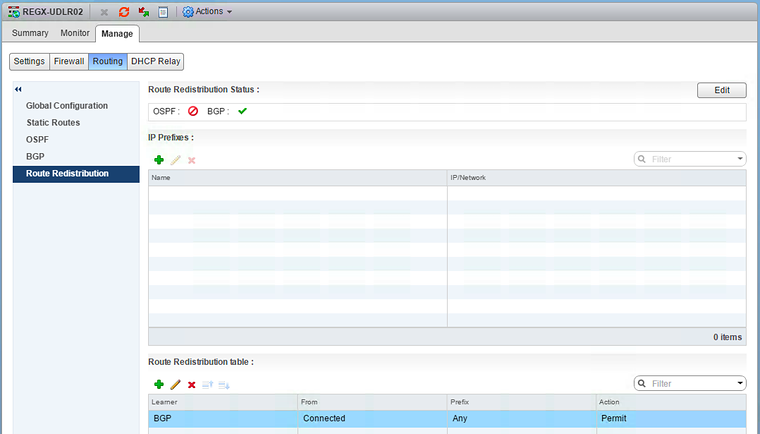
Manage —> Routing —> Route Redistribution
- Enable route redistribution for BGP
- Specify what you allow to redistribute
Compute Cluster configuration
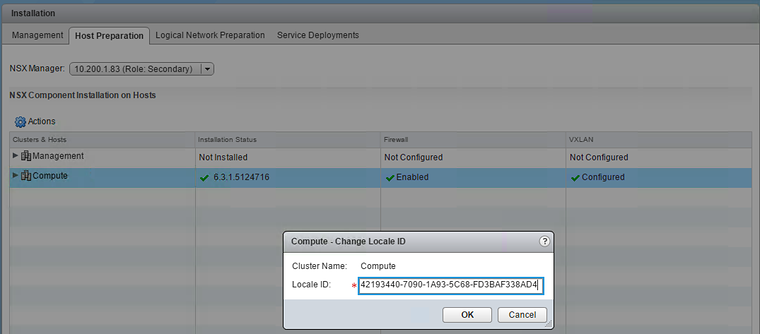
The same locale ID (per site) also need to be configured on the Compute Clusters. We need to verify this if this happened automatically and if this is not the case we need to configure this manually.
DC1
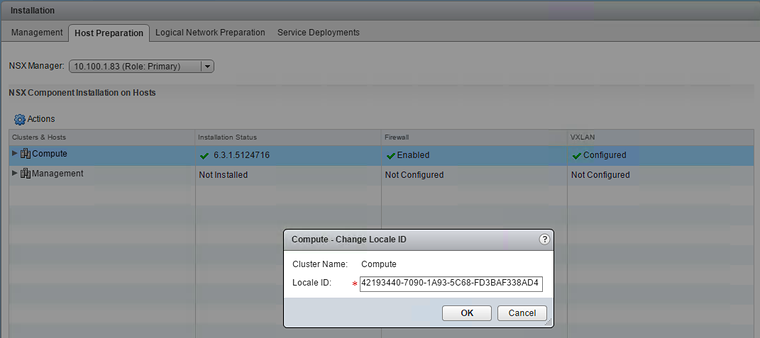
DC2
ESG configuration
DC1
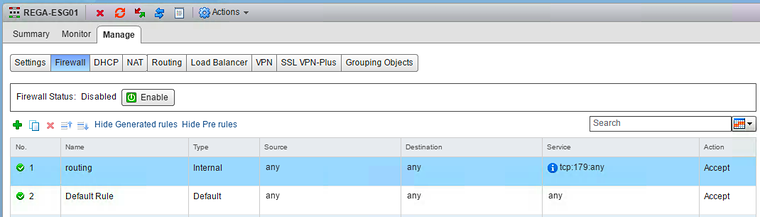
Manage —> Firewall
- Make sure the firewall is disabled
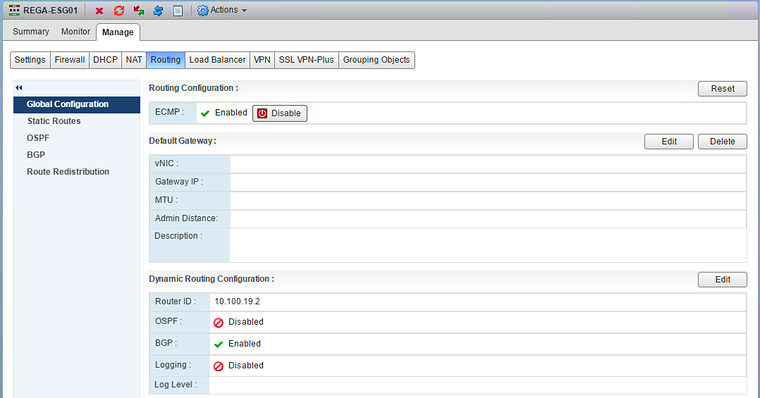
Manage —> Routing —> Global Configuration
- Enable ECMP
- Make sure that the default gateway is not configured
- Configure a router ID
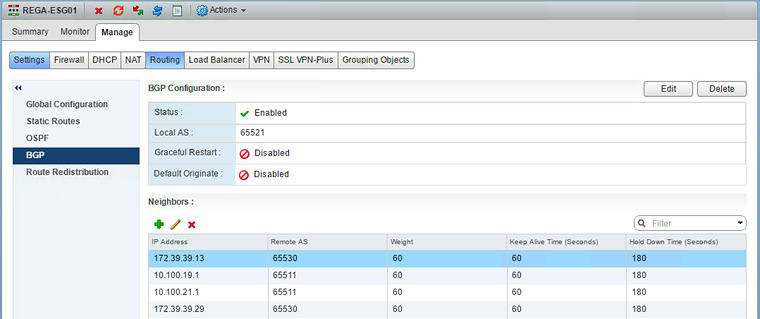
Manage —> Routing —> BGP
- Enable BGP
- Configure the Local AS
- Disable Graceful Restart
- Configure the BGP peers towards the external routers and the UDLR.
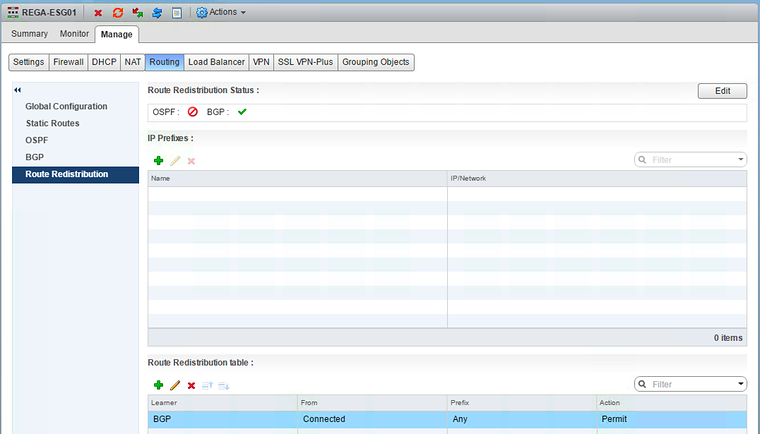
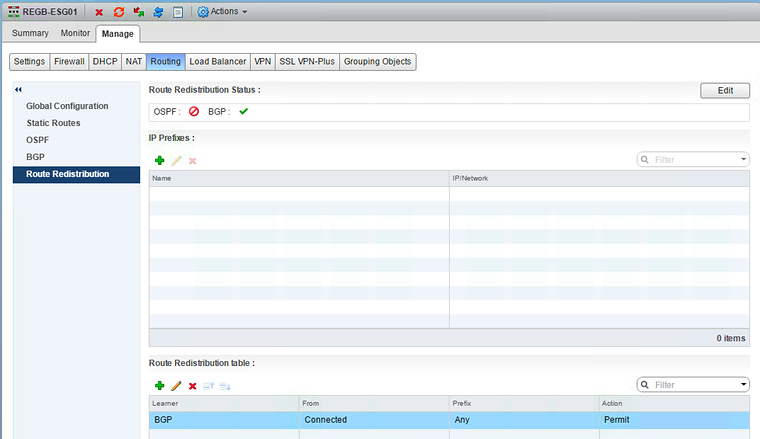
Manage —> Routing —> Route Redistribution
- Enable route redistribution for BGP
- Specify what you allow to redistribute
DC2
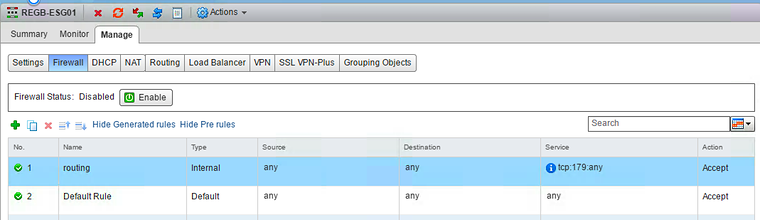
Manage —> Firewall
- Make sure the firewall is disabled
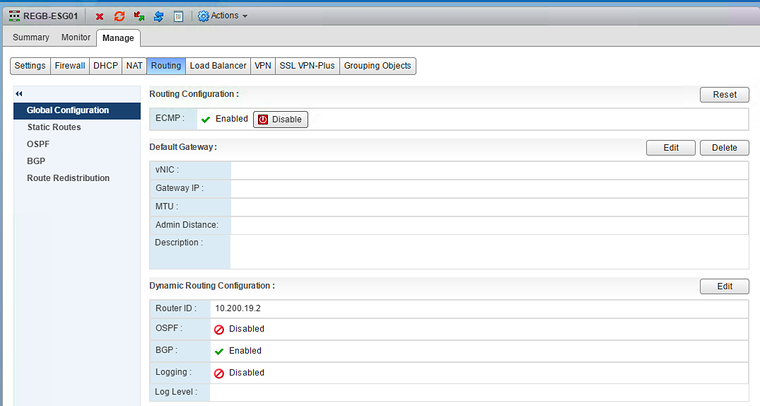
Manage —> Routing —> Global Configuration
- Enable ECMP
- Make sure that the default gateway is not configured
- Configure a router ID
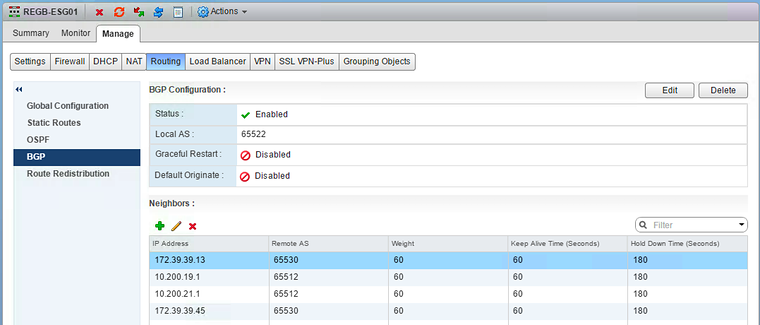
Manage —> Routing —> BGP
- Enable BGP
- Configure the Local AS
- Disable Graceful Restart
- Configure the BGP peers towards the external routers and the UDLR
Manage —> Routing —> Route Redistribution
- Enable route redistribution for BGP
- Specify what you allow to redistribute
Cisco1000V configuration
DC1
!hostname rt-a-01!router bgp 65511 bgp router-id 10.11.11.31 bgp log-neighbor-changes neighbor 10.11.11.253 remote-as 65510 neighbor 10.11.11.253 description CS01 neighbor 10.100.19.2 remote-as 65521 neighbor 10.100.19.2 description ESG-A ! address-family ipv4 neighbor 10.11.11.253 activate neighbor 10.100.19.2 activate exit-address-family!ip route 10.200.19.0 255.255.255.0 10.11.11.253ip route 10.200.21.0 255.255.255.0 10.11.11.253!!hostname rt-a-02!router bgp 65511 bgp router-id 10.11.11.32 bgp log-neighbor-changes neighbor 10.11.11.253 remote-as 65510 neighbor 10.11.11.253 description CS01 neighbor 10.100.21.2 remote-as 65521 neighbor 10.100.21.2 description ESG-A ! address-family ipv4 neighbor 10.11.11.253 activate neighbor 10.100.21.2 activate exit-address-family!ip route 10.200.19.0 255.255.255.0 10.11.11.253ip route 10.200.21.0 255.255.255.0 10.11.11.253!DC2
!hostname rt-b-01!router bgp 65512 bgp router-id 10.11.11.33 bgp log-neighbor-changes neighbor 10.11.11.253 remote-as 65510 neighbor 10.11.11.253 description CS01 neighbor 10.200.19.2 remote-as 65522 neighbor 10.200.19.2 description ESG-B ! address-family ipv4 neighbor 10.11.11.253 activate neighbor 10.200.19.2 activate exit-address-family!ip route 10.100.19.0 255.255.255.0 10.11.11.253ip route 10.100.21.0 255.255.255.0 10.11.11.253!!hostname rt-b-02!router bgp 65512 bgp router-id 10.11.11.34 bgp log-neighbor-changes neighbor 10.11.11.253 remote-as 65510 neighbor 10.11.11.253 description CS01 neighbor 10.200.21.2 remote-as 65522 neighbor 10.200.21.2 description ESG-B ! address-family ipv4 neighbor 10.11.11.253 activate neighbor 10.200.21.2 activate exit-address-family!ip route 10.100.19.0 255.255.255.0 10.11.11.253ip route 10.100.21.0 255.255.255.0 10.11.11.253!Core configuration
!hostname cs-01!router bgp 65510 bgp router-id 10.11.11.253 bgp log-neighbor-changes neighbor 10.11.11.31 remote-as 65511 neighbor 10.11.11.31 description RT-A-01 neighbor 10.11.11.32 remote-as 65511 neighbor 10.11.11.32 description RT-A-02 neighbor 10.11.11.33 remote-as 65512 neighbor 10.11.11.33 description RT-B-01 neighbor 10.11.11.34 remote-as 65512 neighbor 10.11.11.34 description RT-B-02 ! address-family ipv4 network 10.11.11.0 mask 255.255.255.0 neighbor 10.11.11.31 activate neighbor 10.11.11.31 next-hop-self neighbor 10.11.11.32 activate neighbor 10.11.11.32 next-hop-self neighbor 10.11.11.33 activate neighbor 10.11.11.33 next-hop-self neighbor 10.11.11.34 activate neighbor 10.11.11.34 next-hop-self no auto-summary exit-address-family!UDLR route peering verification
DC1
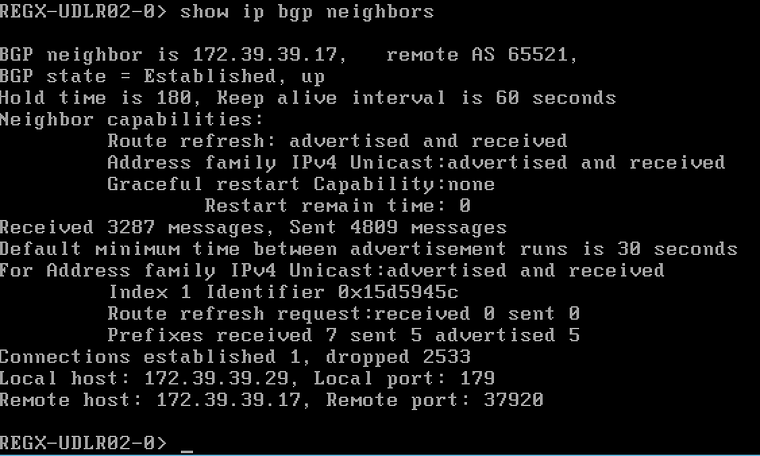
DC2
NSX-edge-71b9e24f-9a47-423d-b8e7-392dc8b3e47a-0> show ip bgp neighbors
BGP neighbor is 172.39.39.33,   remote AS 65522,BGP state = Established, upHold time is 180, Keep alive interval is 60 secondsNeighbor capabilities:         Route refresh: advertised and received         Address family IPv4 Unicast:advertised and received         Graceful restart Capability:none                 Restart remain time: 0Received 3194 messages, Sent 4728 messagesDefault minimum time between advertisement runs is 30 secondsFor Address family IPv4 Unicast:advertised and received         Index 1 Identifier 0x3740211c         Route refresh request:received 0 sent 0         Prefixes received 13 sent 5 advertised 5Connections established 1, dropped 2468Local host: 172.39.39.45, Local port: 179Remote host: 172.39.39.33, Remote port: 53355
NSX-edge-71b9e24f-9a47-423d-b8e7-392dc8b3e47a-0>
ESG route peering verification
DC1
REGA-ESG01-0> show ip bgp neighbors
BGP neighbor is 10.100.19.1,   remote AS 65511,BGP state = Established, upHold time is 180, Keep alive interval is 60 secondsNeighbor capabilities:         Route refresh: advertised and received         Address family IPv4 Unicast:advertised and received         Graceful restart Capability:none                 Restart remain time: 0Received 2203 messages, Sent 2301 messagesDefault minimum time between advertisement runs is 30 secondsFor Address family IPv4 Unicast:advertised and received         Index 1 Identifier 0xa87fda9c         Route refresh request:received 0 sent 0         Prefixes received 3 sent 14 advertised 14Connections established 1, dropped 1Local host: 10.100.19.2, Local port: 12895Remote host: 10.100.19.1, Remote port: 179
BGP neighbor is 10.100.21.1,   remote AS 65511,BGP state = Established, upHold time is 180, Keep alive interval is 60 secondsNeighbor capabilities:         Route refresh: advertised and received         Address family IPv4 Unicast:advertised and received         Graceful restart Capability:none                 Restart remain time: 0Received 2201 messages, Sent 2300 messagesDefault minimum time between advertisement runs is 30 secondsFor Address family IPv4 Unicast:advertised and received         Index 2 Identifier 0xa87fda9c         Route refresh request:received 0 sent 0         Prefixes received 3 sent 14 advertised 14Connections established 1, dropped 1Local host: 10.100.21.2, Local port: 31006Remote host: 10.100.21.1, Remote port: 179
BGP neighbor is 172.39.39.13,   remote AS 65530,BGP state = Established, upHold time is 180, Keep alive interval is 60 secondsNeighbor capabilities:         Route refresh: advertised and received         Address family IPv4 Unicast:advertised and received         Graceful restart Capability:none                 Restart remain time: 0Received 2340 messages, Sent 2323 messagesDefault minimum time between advertisement runs is 30 secondsFor Address family IPv4 Unicast:advertised and received         Index 3 Identifier 0xa87fda9c         Route refresh request:received 0 sent 0         Prefixes received 7 sent 7 advertised 7Connections established 2, dropped 42Local host: 172.39.39.1, Local port: 13445Remote host: 172.39.39.13, Remote port: 179
BGP neighbor is 172.39.39.29,   remote AS 65530,BGP state = Established, upHold time is 180, Keep alive interval is 60 secondsNeighbor capabilities:         Route refresh: advertised and received         Address family IPv4 Unicast:advertised and received         Graceful restart Capability:none                 Restart remain time: 0Received 2286 messages, Sent 2282 messagesDefault minimum time between advertisement runs is 30 secondsFor Address family IPv4 Unicast:advertised and received         Index 4 Identifier 0xa87fda9c         Route refresh request:received 0 sent 0         Prefixes received 5 sent 7 advertised 7Connections established 1, dropped 1Local host: 172.39.39.17, Local port: 37920Remote host: 172.39.39.29, Remote port: 179
REGA-ESG01-0>
DC2
REGB-ESG01-0> show ip bgp neighbors
BGP neighbor is 10.200.19.1,   remote AS 65512,BGP state = Established, upHold time is 180, Keep alive interval is 60 secondsNeighbor capabilities:         Route refresh: advertised and received         Address family IPv4 Unicast:advertised and received         Graceful restart Capability:none                 Restart remain time: 0Received 2192 messages, Sent 2287 messagesDefault minimum time between advertisement runs is 30 secondsFor Address family IPv4 Unicast:advertised and received         Index 1 Identifier 0x637a1aec         Route refresh request:received 0 sent 0         Prefixes received 9 sent 8 advertised 8Connections established 1, dropped 1Local host: 10.200.19.2, Local port: 57360Remote host: 10.200.19.1, Remote port: 179
BGP neighbor is 10.200.21.1,   remote AS 65512,BGP state = Established, upHold time is 180, Keep alive interval is 60 secondsNeighbor capabilities:         Route refresh: advertised and received         Address family IPv4 Unicast:advertised and received         Graceful restart Capability:none                 Restart remain time: 0Received 2191 messages, Sent 2280 messagesDefault minimum time between advertisement runs is 30 secondsFor Address family IPv4 Unicast:advertised and received         Index 2 Identifier 0x637a1aec         Route refresh request:received 0 sent 0         Prefixes received 9 sent 8 advertised 8Connections established 1, dropped 1Local host: 10.200.21.2, Local port: 17297Remote host: 10.200.21.1, Remote port: 179
BGP neighbor is 172.39.39.13,   remote AS 65530,BGP state = Idle, upHold time is 180, Keep alive interval is 60 secondsNeighbor capabilities:         Route refresh: None         Address family none         Graceful restart Capability:none                 Restart remain time: 0Received 15751 messages, Sent 11421 messagesDefault minimum time between advertisement runs is 30 secondsFor Address family none         Index 3 Identifier 0x637a1aec         Route refresh request:received 0 sent 0         Prefixes received 0 sent 0 advertised 0Connections established 0, dropped 15751Local host: 10.200.21.2, Local port: 0Remote host: 172.39.39.13, Remote port: 0
BGP neighbor is 172.39.39.45,   remote AS 65530,BGP state = Established, upHold time is 180, Keep alive interval is 60 secondsNeighbor capabilities:         Route refresh: advertised and received         Address family IPv4 Unicast:advertised and received         Graceful restart Capability:none                 Restart remain time: 0Received 2278 messages, Sent 2279 messagesDefault minimum time between advertisement runs is 30 secondsFor Address family IPv4 Unicast:advertised and received         Index 4 Identifier 0x637a1aec         Route refresh request:received 0 sent 0         Prefixes received 5 sent 13 advertised 13Connections established 1, dropped 1Local host: 172.39.39.33, Local port: 53355Remote host: 172.39.39.45, Remote port: 179
REGB-ESG01-0>
Cisco1000V route peering verification
DC1
rt-a-01#show ip bgp summaryBGP router identifier 10.11.11.31, local AS number 65511BGP table version is 54, main routing table version 5417 network entries using 4216 bytes of memory21 path entries using 2520 bytes of memory3/3 BGP path/bestpath attribute entries using 720 bytes of memory3 BGP AS-PATH entries using 88 bytes of memory0 BGP route-map cache entries using 0 bytes of memory0 BGP filter-list cache entries using 0 bytes of memoryBGP using 7544 total bytes of memoryBGP activity 30/13 prefixes, 47/26 paths, scan interval 60 secs
Neighbor V AS MsgRcvd MsgSent TblVer InQ OutQ Up/Down State/PfxRcd10.11.11.253 4 65510 2218 2206 54 0 0 1d09h 710.100.19.2 4 65521 2304 2205 54 0 0 1d09h 14rt-a-01#rt-a-02#show ip bgp summaryBGP router identifier 10.11.11.32, local AS number 65511BGP table version is 54, main routing table version 5417 network entries using 4216 bytes of memory21 path entries using 2520 bytes of memory3/3 BGP path/bestpath attribute entries using 720 bytes of memory3 BGP AS-PATH entries using 88 bytes of memory0 BGP route-map cache entries using 0 bytes of memory0 BGP filter-list cache entries using 0 bytes of memoryBGP using 7544 total bytes of memoryBGP activity 35/18 prefixes, 47/26 paths, scan interval 60 secs
Neighbor V AS MsgRcvd MsgSent TblVer InQ OutQ Up/Down State/PfxRcd10.11.11.253 4 65510 2209 2210 54 0 0 1d09h 710.100.21.2 4 65521 2303 2204 54 0 0 1d09h 14rt-a-02#DC2
rt-b-01#show ip bgp summaryBGP router identifier 10.11.11.33, local AS number 65512BGP table version is 76, main routing table version 7617 network entries using 4216 bytes of memory19 path entries using 2280 bytes of memory3/3 BGP path/bestpath attribute entries using 720 bytes of memory3 BGP AS-PATH entries using 88 bytes of memory0 BGP route-map cache entries using 0 bytes of memory0 BGP filter-list cache entries using 0 bytes of memoryBGP using 7304 total bytes of memoryBGP activity 30/13 prefixes, 50/31 paths, scan interval 60 secs
Neighbor V AS MsgRcvd MsgSent TblVer InQ OutQ Up/Down State/PfxRcd10.11.11.253 4 65510 5385 5387 76 0 0 3d09h 1110.200.19.2 4 65522 2290 2194 76 0 0 1d09h 8rt-b-01#rt-b-02#show ip bgp summaryBGP router identifier 10.11.11.34, local AS number 65512BGP table version is 49, main routing table version 4917 network entries using 4216 bytes of memory19 path entries using 2280 bytes of memory3/3 BGP path/bestpath attribute entries using 720 bytes of memory3 BGP AS-PATH entries using 88 bytes of memory0 BGP route-map cache entries using 0 bytes of memory0 BGP filter-list cache entries using 0 bytes of memoryBGP using 7304 total bytes of memoryBGP activity 17/0 prefixes, 35/16 paths, scan interval 60 secs
Neighbor V AS MsgRcvd MsgSent TblVer InQ OutQ Up/Down State/PfxRcd10.11.11.253 4 65510 2210 2204 49 0 0 1d09h 1110.200.21.2 4 65522 2284 2195 49 0 0 1d09h 8rt-b-02#Core route peering verification
cs-01#show ip bgp summary BGP router identifier 10.11.11.253, local AS number 65510BGP table version is 83, main routing table version 8317 network entries using 2312 bytes of memory45 path entries using 2340 bytes of memory3/3 BGP path/bestpath attribute entries using 372 bytes of memory2 BGP AS-PATH entries using 48 bytes of memory0 BGP route-map cache entries using 0 bytes of memory0 BGP filter-list cache entries using 0 bytes of memoryBGP using 5072 total bytes of memoryBGP activity 30/13 prefixes, 109/64 paths, scan interval 60 secs
Neighbor        V           AS MsgRcvd MsgSent   TblVer  InQ OutQ Up/Down  State/PfxRcd10.11.11.31     4        65511    2209    2221       83    0    0 1d09h          1410.11.11.32     4        65511    2212    2212       83    0    0 1d09h          1410.11.11.33     4        65512    5389    5387       83    0    0 3d09h           810.11.11.34     4        65512    2205    2210       83    0    0 1d09h           8cs-01#
UDLR routing tables
DC1
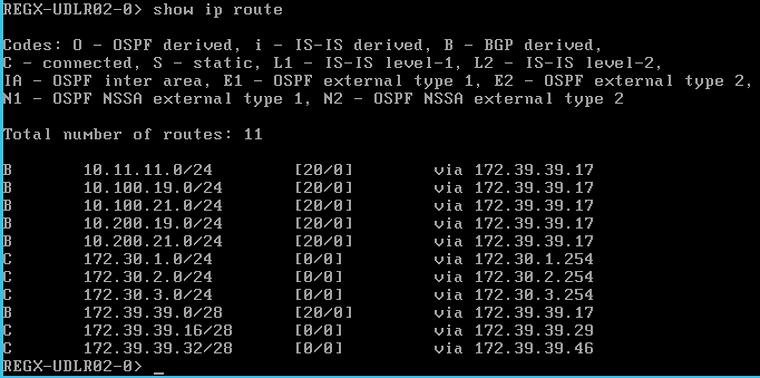
DC2
NSX-edge-71b9e24f-9a47-423d-b8e7-392dc8b3e47a-0> show ip route
Codes: O - OSPF derived, i - IS-IS derived, B - BGP derived,C - connected, S - static, L1 - IS-IS level-1, L2 - IS-IS level-2,IA - OSPF inter area, E1 - OSPF external type 1, E2 - OSPF external type 2,N1 - OSPF NSSA external type 1, N2 - OSPF NSSA external type 2
Total number of routes: 17
B       10.11.11.0/24        [20/0]        via 172.39.39.33B       10.100.19.0/24       [20/0]        via 172.39.39.33B       10.100.21.0/24       [20/0]        via 172.39.39.33B       10.200.19.0/24       [20/0]        via 172.39.39.33B       10.200.21.0/24       [20/0]        via 172.39.39.33B       172.20.1.0/24        [20/0]        via 172.39.39.33B       172.20.2.0/24        [20/0]        via 172.39.39.33B       172.20.3.0/24        [20/0]        via 172.39.39.33B       172.20.8.0/24        [20/0]        via 172.39.39.33B       172.20.9.0/24        [20/0]        via 172.39.39.33B       172.20.10.0/24       [20/0]        via 172.39.39.33C       172.30.1.0/24        [0/0]         via 172.30.1.254C       172.30.2.0/24        [0/0]         via 172.30.2.254C       172.30.3.0/24        [0/0]         via 172.30.3.254B       172.39.39.0/28       [20/0]        via 172.39.39.33C       172.39.39.16/28      [0/0]         via 172.39.39.30C       172.39.39.32/28      [0/0]         via 172.39.39.45NSX-edge-71b9e24f-9a47-423d-b8e7-392dc8b3e47a-0>
ESG routing tables
DC1
REGA-ESG01-0> show ip route
Codes: O - OSPF derived, i - IS-IS derived, B - BGP derived,C - connected, S - static, L1 - IS-IS level-1, L2 - IS-IS level-2,IA - OSPF inter area, E1 - OSPF external type 1, E2 - OSPF external type 2,N1 - OSPF NSSA external type 1, N2 - OSPF NSSA external type 2
Total number of routes: 17
B       10.11.11.0/24        [20/0]        via 10.100.19.1B       10.11.11.0/24        [20/0]        via 10.100.21.1C       10.100.19.0/24       [0/0]         via 10.100.19.2C       10.100.21.0/24       [0/0]         via 10.100.21.2B       10.200.19.0/24       [20/0]        via 10.100.19.1B       10.200.19.0/24       [20/0]        via 10.100.21.1B       10.200.21.0/24       [20/0]        via 10.100.19.1B       10.200.21.0/24       [20/0]        via 10.100.21.1B       172.20.1.0/24        [20/0]        via 172.39.39.14B       172.20.2.0/24        [20/0]        via 172.39.39.14B       172.20.3.0/24        [20/0]        via 172.39.39.14B       172.20.8.0/24        [20/0]        via 172.39.39.14B       172.20.9.0/24        [20/0]        via 172.39.39.14B       172.20.10.0/24       [20/0]        via 172.39.39.14B       172.30.1.0/24        [20/0]        via 172.39.39.30B       172.30.2.0/24        [20/0]        via 172.39.39.30B       172.30.3.0/24        [20/0]        via 172.39.39.30C       172.39.39.0/28       [0/0]         via 172.39.39.1C       172.39.39.16/28      [0/0]         via 172.39.39.17B       172.39.39.32/28      [20/0]        via 172.39.39.30REGA-ESG01-0>
DC2
REGB-ESG01-0> show ip route
Codes: O - OSPF derived, i - IS-IS derived, B - BGP derived,C - connected, S - static, L1 - IS-IS level-1, L2 - IS-IS level-2,IA - OSPF inter area, E1 - OSPF external type 1, E2 - OSPF external type 2,N1 - OSPF NSSA external type 1, N2 - OSPF NSSA external type 2
Total number of routes: 17
B       10.11.11.0/24        [20/0]        via 10.200.19.1B       10.11.11.0/24        [20/0]        via 10.200.21.1B       10.100.19.0/24       [20/0]        via 10.200.19.1B       10.100.19.0/24       [20/0]        via 10.200.21.1B       10.100.21.0/24       [20/0]        via 10.200.19.1B       10.100.21.0/24       [20/0]        via 10.200.21.1C       10.200.19.0/24       [0/0]         via 10.200.19.2C       10.200.21.0/24       [0/0]         via 10.200.21.2B       172.20.1.0/24        [20/0]        via 10.200.19.1B       172.20.1.0/24        [20/0]        via 10.200.21.1B       172.20.2.0/24        [20/0]        via 10.200.19.1B       172.20.2.0/24        [20/0]        via 10.200.21.1B       172.20.3.0/24        [20/0]        via 10.200.19.1B       172.20.3.0/24        [20/0]        via 10.200.21.1B       172.20.8.0/24        [20/0]        via 10.200.19.1B       172.20.8.0/24        [20/0]        via 10.200.21.1B       172.20.9.0/24        [20/0]        via 10.200.19.1B       172.20.9.0/24        [20/0]        via 10.200.21.1B       172.20.10.0/24       [20/0]        via 10.200.19.1B       172.20.10.0/24       [20/0]        via 10.200.21.1B       172.30.1.0/24        [20/0]        via 172.39.39.46B       172.30.2.0/24        [20/0]        via 172.39.39.46B       172.30.3.0/24        [20/0]        via 172.39.39.46C       172.39.39.0/28       [0/0]         via 172.39.39.2B       172.39.39.16/28      [20/0]        via 172.39.39.46C       172.39.39.32/28      [0/0]         via 172.39.39.33REGB-ESG01-0>
Cisco1000V routing tables
DC1
rt-a-01#show ip routeCodes: L - local, C - connected, S - static, R - RIP, M - mobile, B - BGP       D - EIGRP, EX - EIGRP external, O - OSPF, IA - OSPF inter area       N1 - OSPF NSSA external type 1, N2 - OSPF NSSA external type 2       E1 - OSPF external type 1, E2 - OSPF external type 2       i - IS-IS, su - IS-IS summary, L1 - IS-IS level-1, L2 - IS-IS level-2       ia - IS-IS inter area, * - candidate default, U - per-user static route       o - ODR, P - periodic downloaded static route, H - NHRP, l - LISP       a - application route       + - replicated route, % - next hop override
Gateway of last resort is not set
10.0.0.0/8 is variably subnetted, 9 subnets, 2 masksC 10.11.11.0/24 is directly connected, GigabitEthernet2L 10.11.11.31/32 is directly connected, GigabitEthernet2C 10.100.1.0/24 is directly connected, GigabitEthernet1L 10.100.1.101/32 is directly connected, GigabitEthernet1C 10.100.19.0/24 is directly connected, GigabitEthernet3L 10.100.19.1/32 is directly connected, GigabitEthernet3B 10.100.21.0/24 [20/0] via 10.100.19.2, 1d09hS 10.200.19.0/24 [1/0] via 10.11.11.253S 10.200.21.0/24 [1/0] via 10.11.11.253 172.20.0.0/24 is subnetted, 6 subnetsB 172.20.1.0 [20/0] via 10.100.19.2, 1d09hB 172.20.2.0 [20/0] via 10.100.19.2, 1d09hB 172.20.3.0 [20/0] via 10.100.19.2, 1d09hB 172.20.8.0 [20/0] via 10.100.19.2, 1d09hB 172.20.9.0 [20/0] via 10.100.19.2, 1d09hB 172.20.10.0 [20/0] via 10.100.19.2, 1d09h 172.30.0.0/24 is subnetted, 3 subnetsB 172.30.1.0 [20/0] via 10.100.19.2, 1d09hB 172.30.2.0 [20/0] via 10.100.19.2, 1d09hB 172.30.3.0 [20/0] via 10.100.19.2, 1d09h 172.39.0.0/28 is subnetted, 3 subnetsB 172.39.39.0 [20/0] via 10.100.19.2, 1d09hB 172.39.39.16 [20/0] via 10.100.19.2, 1d09hB 172.39.39.32 [20/0] via 10.100.19.2, 1d09hrt-a-01#rt-a-02#show ip routeCodes: L - local, C - connected, S - static, R - RIP, M - mobile, B - BGP D - EIGRP, EX - EIGRP external, O - OSPF, IA - OSPF inter area N1 - OSPF NSSA external type 1, N2 - OSPF NSSA external type 2 E1 - OSPF external type 1, E2 - OSPF external type 2 i - IS-IS, su - IS-IS summary, L1 - IS-IS level-1, L2 - IS-IS level-2 ia - IS-IS inter area, * - candidate default, U - per-user static route o - ODR, P - periodic downloaded static route, H - NHRP, l - LISP a - application route + - replicated route, % - next hop override
Gateway of last resort is not set
10.0.0.0/8 is variably subnetted, 9 subnets, 2 masksC 10.11.11.0/24 is directly connected, GigabitEthernet2L 10.11.11.32/32 is directly connected, GigabitEthernet2C 10.100.1.0/24 is directly connected, GigabitEthernet1L 10.100.1.102/32 is directly connected, GigabitEthernet1B 10.100.19.0/24 [20/0] via 10.100.21.2, 1d09hC 10.100.21.0/24 is directly connected, GigabitEthernet3L 10.100.21.1/32 is directly connected, GigabitEthernet3S 10.200.19.0/24 [1/0] via 10.11.11.253S 10.200.21.0/24 [1/0] via 10.11.11.253 172.20.0.0/24 is subnetted, 6 subnetsB 172.20.1.0 [20/0] via 10.100.21.2, 1d09hB 172.20.2.0 [20/0] via 10.100.21.2, 1d09hB 172.20.3.0 [20/0] via 10.100.21.2, 1d09hB 172.20.8.0 [20/0] via 10.100.21.2, 1d09hB 172.20.9.0 [20/0] via 10.100.21.2, 1d09hB 172.20.10.0 [20/0] via 10.100.21.2, 1d09h 172.30.0.0/24 is subnetted, 3 subnetsB 172.30.1.0 [20/0] via 10.100.21.2, 1d09hB 172.30.2.0 [20/0] via 10.100.21.2, 1d09hB 172.30.3.0 [20/0] via 10.100.21.2, 1d09h 172.39.0.0/28 is subnetted, 3 subnetsB 172.39.39.0 [20/0] via 10.100.21.2, 1d09hB 172.39.39.16 [20/0] via 10.100.21.2, 1d09hB 172.39.39.32 [20/0] via 10.100.21.2, 1d09hrt-a-02#DC2
rt-b-01#show ip routeCodes: L - local, C - connected, S - static, R - RIP, M - mobile, B - BGP       D - EIGRP, EX - EIGRP external, O - OSPF, IA - OSPF inter area       N1 - OSPF NSSA external type 1, N2 - OSPF NSSA external type 2       E1 - OSPF external type 1, E2 - OSPF external type 2       i - IS-IS, su - IS-IS summary, L1 - IS-IS level-1, L2 - IS-IS level-2       ia - IS-IS inter area, * - candidate default, U - per-user static route       o - ODR, P - periodic downloaded static route, H - NHRP, l - LISP       a - application route       + - replicated route, % - next hop override
Gateway of last resort is not set
10.0.0.0/8 is variably subnetted, 9 subnets, 2 masksC 10.11.11.0/24 is directly connected, GigabitEthernet2L 10.11.11.33/32 is directly connected, GigabitEthernet2S 10.100.19.0/24 [1/0] via 10.11.11.253S 10.100.21.0/24 [1/0] via 10.11.11.253C 10.200.1.0/24 is directly connected, GigabitEthernet1L 10.200.1.101/32 is directly connected, GigabitEthernet1C 10.200.19.0/24 is directly connected, GigabitEthernet3L 10.200.19.1/32 is directly connected, GigabitEthernet3B 10.200.21.0/24 [20/0] via 10.200.19.2, 1d09h 172.20.0.0/24 is subnetted, 6 subnetsB 172.20.1.0 [20/0] via 10.11.11.253, 1d09hB 172.20.2.0 [20/0] via 10.11.11.253, 1d09hB 172.20.3.0 [20/0] via 10.11.11.253, 1d09hB 172.20.8.0 [20/0] via 10.11.11.253, 1d09hB 172.20.9.0 [20/0] via 10.11.11.253, 1d09hB 172.20.10.0 [20/0] via 10.11.11.253, 1d09h 172.30.0.0/24 is subnetted, 3 subnetsB 172.30.1.0 [20/0] via 10.200.19.2, 1d09hB 172.30.2.0 [20/0] via 10.200.19.2, 1d09hB 172.30.3.0 [20/0] via 10.200.19.2, 1d09h 172.39.0.0/28 is subnetted, 3 subnetsB 172.39.39.0 [20/0] via 10.200.19.2, 1d09hB 172.39.39.16 [20/0] via 10.200.19.2, 1d09hB 172.39.39.32 [20/0] via 10.200.19.2, 1d09hrt-b-01#rt-b-02#show ip routeCodes: L - local, C - connected, S - static, R - RIP, M - mobile, B - BGP D - EIGRP, EX - EIGRP external, O - OSPF, IA - OSPF inter area N1 - OSPF NSSA external type 1, N2 - OSPF NSSA external type 2 E1 - OSPF external type 1, E2 - OSPF external type 2 i - IS-IS, su - IS-IS summary, L1 - IS-IS level-1, L2 - IS-IS level-2 ia - IS-IS inter area, * - candidate default, U - per-user static route o - ODR, P - periodic downloaded static route, H - NHRP, l - LISP a - application route + - replicated route, % - next hop override
Gateway of last resort is not set
10.0.0.0/8 is variably subnetted, 9 subnets, 2 masksC 10.11.11.0/24 is directly connected, GigabitEthernet2L 10.11.11.34/32 is directly connected, GigabitEthernet2S 10.100.19.0/24 [1/0] via 10.11.11.253S 10.100.21.0/24 [1/0] via 10.11.11.253C 10.200.1.0/24 is directly connected, GigabitEthernet1L 10.200.1.102/32 is directly connected, GigabitEthernet1B 10.200.19.0/24 [20/0] via 10.200.21.2, 1d09hC 10.200.21.0/24 is directly connected, GigabitEthernet3L 10.200.21.1/32 is directly connected, GigabitEthernet3 172.20.0.0/24 is subnetted, 6 subnetsB 172.20.1.0 [20/0] via 10.11.11.253, 1d09hB 172.20.2.0 [20/0] via 10.11.11.253, 1d09hB 172.20.3.0 [20/0] via 10.11.11.253, 1d09hB 172.20.8.0 [20/0] via 10.11.11.253, 1d09hB 172.20.9.0 [20/0] via 10.11.11.253, 1d09hB 172.20.10.0 [20/0] via 10.11.11.253, 1d09h 172.30.0.0/24 is subnetted, 3 subnetsB 172.30.1.0 [20/0] via 10.200.21.2, 1d09hB 172.30.2.0 [20/0] via 10.200.21.2, 1d09hB 172.30.3.0 [20/0] via 10.200.21.2, 1d09h 172.39.0.0/28 is subnetted, 3 subnetsB 172.39.39.0 [20/0] via 10.200.21.2, 1d09hB 172.39.39.16 [20/0] via 10.200.21.2, 1d09hB 172.39.39.32 [20/0] via 10.200.21.2, 1d09hrt-b-02#Core routing table
cs-01#show ip route bgp Codes: L - local, C - connected, S - static, R - RIP, M - mobile, B - BGP       D - EIGRP, EX - EIGRP external, O - OSPF, IA - OSPF inter area       N1 - OSPF NSSA external type 1, N2 - OSPF NSSA external type 2       E1 - OSPF external type 1, E2 - OSPF external type 2       i - IS-IS, su - IS-IS summary, L1 - IS-IS level-1, L2 - IS-IS level-2       ia - IS-IS inter area, * - candidate default, U - per-user static route       o - ODR, P - periodic downloaded static route, H - NHRP, l - LISP       + - replicated route, % - next hop override
Gateway of last resort is 10.11.11.254 to network 0.0.0.0
      172.20.0.0/24 is subnetted, 6 subnetsB        172.20.1.0 [20/0] via 10.11.11.31, 1d09hB        172.20.2.0 [20/0] via 10.11.11.31, 1d09hB        172.20.3.0 [20/0] via 10.11.11.31, 1d09hB        172.20.8.0 [20/0] via 10.11.11.31, 1d09hB        172.20.9.0 [20/0] via 10.11.11.31, 1d09hB        172.20.10.0 [20/0] via 10.11.11.31, 1d09h      172.30.0.0/24 is subnetted, 3 subnetsB        172.30.1.0 [20/0] via 10.11.11.33, 1d09hB        172.30.2.0 [20/0] via 10.11.11.33, 1d09hB        172.30.3.0 [20/0] via 10.11.11.33, 1d09h      172.39.0.0/28 is subnetted, 3 subnetsB        172.39.39.0 [20/0] via 10.11.11.31, 1d09hB        172.39.39.16 [20/0] via 10.11.11.31, 1d09hB        172.39.39.32 [20/0] via 10.11.11.34, 1d09hcs-01#
UDLR BGP tables
DC1
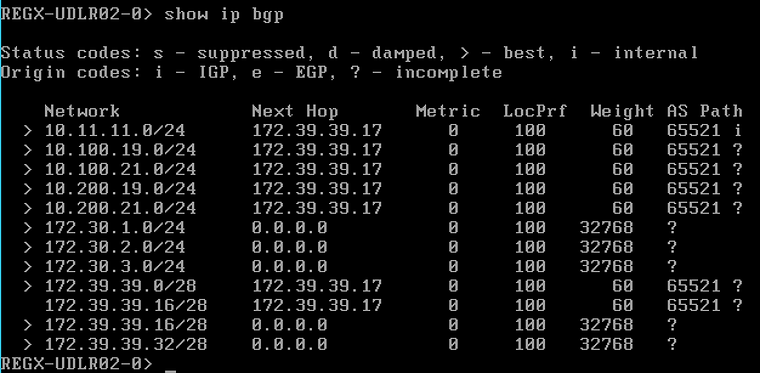
DC2
NSX-edge-71b9e24f-9a47-423d-b8e7-392dc8b3e47a-0> show ip bgp
Status codes: s - suppressed, d - damped, > - best, i - internalOrigin codes: i - IGP, e - EGP, ? - incomplete
    Network            Next Hop       Metric  LocPrf  Weight AS Path  > 10.11.11.0/24      172.39.39.33      0     100      60   65522 i  > 10.100.19.0/24     172.39.39.33      0     100      60   65522 ?  > 10.100.21.0/24     172.39.39.33      0     100      60   65522 ?  > 10.200.19.0/24     172.39.39.33      0     100      60   65522 ?  > 10.200.21.0/24     172.39.39.33      0     100      60   65522 ?  > 172.20.1.0/24      172.39.39.33      0     100      60   65522 ?  > 172.20.2.0/24      172.39.39.33      0     100      60   65522 ?  > 172.20.3.0/24      172.39.39.33      0     100      60   65522 ?  > 172.20.8.0/24      172.39.39.33      0     100      60   65522 ?  > 172.20.9.0/24      172.39.39.33      0     100      60   65522 ?  > 172.20.10.0/24     172.39.39.33      0     100      60   65522 ?  > 172.30.1.0/24      0.0.0.0           0     100   32768   ?  > 172.30.2.0/24      0.0.0.0           0     100   32768   ?  > 172.30.3.0/24      0.0.0.0           0     100   32768   ?  > 172.39.39.0/28     172.39.39.33      0     100      60   65522 ?  > 172.39.39.16/28    0.0.0.0           0     100   32768   ?    172.39.39.32/28    172.39.39.33      0     100      60   65522 ?  > 172.39.39.32/28    0.0.0.0           0     100   32768   ?NSX-edge-71b9e24f-9a47-423d-b8e7-392dc8b3e47a-0>
ESG BGP tables
DC1
REGA-ESG01-0> show ip bgp
Status codes: s - suppressed, d - damped, > - best, i - internalOrigin codes: i - IGP, e - EGP, ? - incomplete
    Network            Next Hop       Metric  LocPrf  Weight AS Path  > 10.11.11.0/24      10.100.19.1       0     100      60   65511 65510 i    10.11.11.0/24      10.100.21.1       0     100      60   65511 65510 i  > 10.100.19.0/24     0.0.0.0           0     100   32768   ?  > 10.100.21.0/24     0.0.0.0           0     100   32768   ?  > 10.200.19.0/24     10.100.19.1       0     100      60   65511 65510 65512 65522 ?    10.200.19.0/24     10.100.21.1       0     100      60   65511 65510 65512 65522 ?  > 10.200.21.0/24     10.100.19.1       0     100      60   65511 65510 65512 65522 ?    10.200.21.0/24     10.100.21.1       0     100      60   65511 65510 65512 65522 ?  > 172.20.1.0/24      172.39.39.14      0     100      60   65530 ?  > 172.20.2.0/24      172.39.39.14      0     100      60   65530 ?  > 172.20.3.0/24      172.39.39.14      0     100      60   65530 ?  > 172.20.8.0/24      172.39.39.14      0     100      60   65530 ?  > 172.20.9.0/24      172.39.39.14      0     100      60   65530 ?  > 172.20.10.0/24     172.39.39.14      0     100      60   65530 ?  > 172.30.1.0/24      172.39.39.30      0     100      60   65530 ?  > 172.30.2.0/24      172.39.39.30      0     100      60   65530 ?  > 172.30.3.0/24      172.39.39.30      0     100      60   65530 ?    172.39.39.0/28     172.39.39.14      0     100      60   65530 ?  > 172.39.39.0/28     0.0.0.0           0     100   32768   ?    172.39.39.16/28    172.39.39.30      0     100      60   65530 ?  > 172.39.39.16/28    0.0.0.0           0     100   32768   ?  > 172.39.39.32/28    172.39.39.30      0     100      60   65530 ?REGA-ESG01-0>
DC2
REGB-ESG01-0> show ip bgp
Status codes: s - suppressed, d - damped, > - best, i - internalOrigin codes: i - IGP, e - EGP, ? - incomplete
    Network            Next Hop       Metric  LocPrf  Weight AS Path  > 10.11.11.0/24      10.200.19.1       0     100      60   65512 65510 i    10.11.11.0/24      10.200.21.1       0     100      60   65512 65510 i  > 10.100.19.0/24     10.200.19.1       0     100      60   65512 65510 65511 65521 ?    10.100.19.0/24     10.200.21.1       0     100      60   65512 65510 65511 65521 ?  > 10.100.21.0/24     10.200.19.1       0     100      60   65512 65510 65511 65521 ?    10.100.21.0/24     10.200.21.1       0     100      60   65512 65510 65511 65521 ?  > 10.200.19.0/24     0.0.0.0           0     100   32768   ?  > 10.200.21.0/24     0.0.0.0           0     100   32768   ?  > 172.20.1.0/24      10.200.19.1       0     100      60   65512 65510 65511 65521 ?    172.20.1.0/24      10.200.21.1       0     100      60   65512 65510 65511 65521 ?  > 172.20.2.0/24      10.200.19.1       0     100      60   65512 65510 65511 65521 ?    172.20.2.0/24      10.200.21.1       0     100      60   65512 65510 65511 65521 ?  > 172.20.3.0/24      10.200.19.1       0     100      60   65512 65510 65511 65521 ?    172.20.3.0/24      10.200.21.1       0     100      60   65512 65510 65511 65521 ?  > 172.20.8.0/24      10.200.19.1       0     100      60   65512 65510 65511 65521 ?    172.20.8.0/24      10.200.21.1       0     100      60   65512 65510 65511 65521 ?  > 172.20.9.0/24      10.200.19.1       0     100      60   65512 65510 65511 65521 ?    172.20.9.0/24      10.200.21.1       0     100      60   65512 65510 65511 65521 ?  > 172.20.10.0/24     10.200.19.1       0     100      60   65512 65510 65511 65521 ?    172.20.10.0/24     10.200.21.1       0     100      60   65512 65510 65511 65521 ?  > 172.30.1.0/24      172.39.39.46      0     100      60   65530 ?  > 172.30.2.0/24      172.39.39.46      0     100      60   65530 ?  > 172.30.3.0/24      172.39.39.46      0     100      60   65530 ?  > 172.39.39.0/28     0.0.0.0           0     100   32768   ?  > 172.39.39.16/28    172.39.39.46      0     100      60   65530 ?    172.39.39.32/28    172.39.39.46      0     100      60   65530 ?  > 172.39.39.32/28    0.0.0.0           0     100   32768   ?REGB-ESG01-0>
Cisco1000V BGP tables
DC1
rt-a-01#show ip bgpBGP table version is 54, local router ID is 10.11.11.31Status codes: s suppressed, d damped, h history, * valid, > best, i - internal,              r RIB-failure, S Stale, m multipath, b backup-path, f RT-Filter,              x best-external, a additional-path, c RIB-compressed,Origin codes: i - IGP, e - EGP, ? - incompleteRPKI validation codes: V valid, I invalid, N Not found
Network Next Hop Metric LocPrf Weight Path r> 10.11.11.0/24 10.11.11.253 0 0 65510 i r> 10.100.19.0/24 10.100.19.2 0 65521 ? *> 10.100.21.0/24 10.100.19.2 0 65521 ? r> 10.200.19.0/24 10.11.11.253 0 65510 65512 65522 ? r> 10.200.21.0/24 10.11.11.253 0 65510 65512 65522 ? *> 172.20.1.0/24 10.100.19.2 0 65521 ? *> 172.20.2.0/24 10.100.19.2 0 65521 ? *> 172.20.3.0/24 10.100.19.2 0 65521 ? *> 172.20.8.0/24 10.100.19.2 0 65521 ? *> 172.20.9.0/24 10.100.19.2 0 65521 ? *> 172.20.10.0/24 10.100.19.2 0 65521 ? *> 172.30.1.0/24 10.100.19.2 0 65521 ? * 10.11.11.253 0 65510 65512 65522 ? Network Next Hop Metric LocPrf Weight Path *> 172.30.2.0/24 10.100.19.2 0 65521 ? * 10.11.11.253 0 65510 65512 65522 ? *> 172.30.3.0/24 10.100.19.2 0 65521 ? * 10.11.11.253 0 65510 65512 65522 ? *> 172.39.39.0/28 10.100.19.2 0 65521 ? *> 172.39.39.16/28 10.100.19.2 0 65521 ? *> 172.39.39.32/28 10.100.19.2 0 65521 ? * 10.11.11.253 0 65510 65512 65522 ?rt-a-01#rt-a-02#show ip bgpBGP table version is 54, local router ID is 10.11.11.32Status codes: s suppressed, d damped, h history, * valid, > best, i - internal, r RIB-failure, S Stale, m multipath, b backup-path, f RT-Filter, x best-external, a additional-path, c RIB-compressed,Origin codes: i - IGP, e - EGP, ? - incompleteRPKI validation codes: V valid, I invalid, N Not found
Network Next Hop Metric LocPrf Weight Path r> 10.11.11.0/24 10.11.11.253 0 0 65510 i *> 10.100.19.0/24 10.100.21.2 0 65521 ? r> 10.100.21.0/24 10.100.21.2 0 65521 ? r> 10.200.19.0/24 10.11.11.253 0 65510 65512 65522 ? r> 10.200.21.0/24 10.11.11.253 0 65510 65512 65522 ? *> 172.20.1.0/24 10.100.21.2 0 65521 ? *> 172.20.2.0/24 10.100.21.2 0 65521 ? *> 172.20.3.0/24 10.100.21.2 0 65521 ? *> 172.20.8.0/24 10.100.21.2 0 65521 ? *> 172.20.9.0/24 10.100.21.2 0 65521 ? *> 172.20.10.0/24 10.100.21.2 0 65521 ? *> 172.30.1.0/24 10.100.21.2 0 65521 ? * 10.11.11.253 0 65510 65512 65522 ? Network Next Hop Metric LocPrf Weight Path *> 172.30.2.0/24 10.100.21.2 0 65521 ? * 10.11.11.253 0 65510 65512 65522 ? *> 172.30.3.0/24 10.100.21.2 0 65521 ? * 10.11.11.253 0 65510 65512 65522 ? *> 172.39.39.0/28 10.100.21.2 0 65521 ? *> 172.39.39.16/28 10.100.21.2 0 65521 ? *> 172.39.39.32/28 10.100.21.2 0 65521 ? * 10.11.11.253 0 65510 65512 65522 ?rt-a-02#DC2
rt-b-01#show ip bgpBGP table version is 76, local router ID is 10.11.11.33Status codes: s suppressed, d damped, h history, * valid, > best, i - internal,              r RIB-failure, S Stale, m multipath, b backup-path, f RT-Filter,              x best-external, a additional-path, c RIB-compressed,Origin codes: i - IGP, e - EGP, ? - incompleteRPKI validation codes: V valid, I invalid, N Not found
Network Next Hop Metric LocPrf Weight Path r> 10.11.11.0/24 10.11.11.253 0 0 65510 i r> 10.100.19.0/24 10.11.11.253 0 65510 65511 65521 ? r> 10.100.21.0/24 10.11.11.253 0 65510 65511 65521 ? r> 10.200.19.0/24 10.200.19.2 0 65522 ? *> 10.200.21.0/24 10.200.19.2 0 65522 ? *> 172.20.1.0/24 10.11.11.253 0 65510 65511 65521 ? *> 172.20.2.0/24 10.11.11.253 0 65510 65511 65521 ? *> 172.20.3.0/24 10.11.11.253 0 65510 65511 65521 ? *> 172.20.8.0/24 10.11.11.253 0 65510 65511 65521 ? Network Next Hop Metric LocPrf Weight Path *> 172.20.9.0/24 10.11.11.253 0 65510 65511 65521 ? *> 172.20.10.0/24 10.11.11.253 0 65510 65511 65521 ? *> 172.30.1.0/24 10.200.19.2 0 65522 ? *> 172.30.2.0/24 10.200.19.2 0 65522 ? *> 172.30.3.0/24 10.200.19.2 0 65522 ? *> 172.39.39.0/28 10.200.19.2 0 65522 ? * 10.11.11.253 0 65510 65511 65521 ? *> 172.39.39.16/28 10.200.19.2 0 65522 ? * 10.11.11.253 0 65510 65511 65521 ? *> 172.39.39.32/28 10.200.19.2 0 65522 ?rt-b-01#rt-b-02#show ip bgpBGP table version is 49, local router ID is 10.11.11.34Status codes: s suppressed, d damped, h history, * valid, > best, i - internal, r RIB-failure, S Stale, m multipath, b backup-path, f RT-Filter, x best-external, a additional-path, c RIB-compressed,Origin codes: i - IGP, e - EGP, ? - incompleteRPKI validation codes: V valid, I invalid, N Not found
Network Next Hop Metric LocPrf Weight Path r> 10.11.11.0/24 10.11.11.253 0 0 65510 i r> 10.100.19.0/24 10.11.11.253 0 65510 65511 65521 ? r> 10.100.21.0/24 10.11.11.253 0 65510 65511 65521 ? *> 10.200.19.0/24 10.200.21.2 0 65522 ? r> 10.200.21.0/24 10.200.21.2 0 65522 ? *> 172.20.1.0/24 10.11.11.253 0 65510 65511 65521 ? *> 172.20.2.0/24 10.11.11.253 0 65510 65511 65521 ? *> 172.20.3.0/24 10.11.11.253 0 65510 65511 65521 ? *> 172.20.8.0/24 10.11.11.253 0 65510 65511 65521 ? Network Next Hop Metric LocPrf Weight Path *> 172.20.9.0/24 10.11.11.253 0 65510 65511 65521 ? *> 172.20.10.0/24 10.11.11.253 0 65510 65511 65521 ? *> 172.30.1.0/24 10.200.21.2 0 65522 ? *> 172.30.2.0/24 10.200.21.2 0 65522 ? *> 172.30.3.0/24 10.200.21.2 0 65522 ? *> 172.39.39.0/28 10.200.21.2 0 65522 ? * 10.11.11.253 0 65510 65511 65521 ? *> 172.39.39.16/28 10.200.21.2 0 65522 ? * 10.11.11.253 0 65510 65511 65521 ? *> 172.39.39.32/28 10.200.21.2 0 65522 ?rt-b-02#Core BGP tables
cs-01#show ip bgpBGP table version is 83, local router ID is 10.11.11.253Status codes: s suppressed, d damped, h history, * valid, > best, i - internal,              r RIB-failure, S Stale, m multipath, b backup-path, x best-externalOrigin codes: i - IGP, e - EGP, ? - incomplete
   Network          Next Hop            Metric LocPrf Weight Path*> 10.11.11.0/24    0.0.0.0                  0         32768 ir  10.100.19.0/24   10.11.11.32                            0 65511 65521 ?r>                  10.11.11.31                            0 65511 65521 ?r  10.100.21.0/24   10.11.11.32                            0 65511 65521 ?r>                  10.11.11.31                            0 65511 65521 ?r  10.200.19.0/24   10.11.11.33                            0 65512 65522 ?r>                  10.11.11.34                            0 65512 65522 ?r  10.200.21.0/24   10.11.11.33                            0 65512 65522 ?r>                  10.11.11.34                            0 65512 65522 ?*  172.20.1.0/24    10.11.11.32                            0 65511 65521 ?*>                  10.11.11.31                            0 65511 65521 ?*  172.20.2.0/24    10.11.11.32                            0 65511 65521 ?*>                  10.11.11.31                            0 65511 65521 ?*  172.20.3.0/24    10.11.11.32                            0 65511 65521 ?*>                  10.11.11.31                            0 65511 65521 ?*  172.20.8.0/24    10.11.11.32                            0 65511 65521 ?*>                  10.11.11.31                            0 65511 65521 ?*  172.20.9.0/24    10.11.11.32                            0 65511 65521 ?*>                  10.11.11.31                            0 65511 65521 ?*  172.20.10.0/24   10.11.11.32                            0 65511 65521 ?*>                  10.11.11.31                            0 65511 65521 ?*  172.30.1.0/24    10.11.11.31                            0 65511 65521 ?*                   10.11.11.32                            0 65511 65521 ?*                   10.11.11.34                            0 65512 65522 ?*>                  10.11.11.33                            0 65512 65522 ?*  172.30.2.0/24    10.11.11.31                            0 65511 65521 ?*                   10.11.11.32                            0 65511 65521 ?*                   10.11.11.34                            0 65512 65522 ?*>                  10.11.11.33                            0 65512 65522 ?*  172.30.3.0/24    10.11.11.31                            0 65511 65521 ?*                   10.11.11.32                            0 65511 65521 ?*                   10.11.11.34                            0 65512 65522 ?*>                  10.11.11.33                            0 65512 65522 ?*  172.39.39.0/28   10.11.11.33                            0 65512 65522 ?*                   10.11.11.34                            0 65512 65522 ?*                   10.11.11.32                            0 65511 65521 ?*>                  10.11.11.31                            0 65511 65521 ?*  172.39.39.16/28  10.11.11.34                            0 65512 65522 ?*                   10.11.11.33                            0 65512 65522 ?*                   10.11.11.32                            0 65511 65521 ?*>                  10.11.11.31                            0 65511 65521 ?*  172.39.39.32/28  10.11.11.31                            0 65511 65521 ?*                   10.11.11.32                            0 65511 65521 ?*                   10.11.11.33                            0 65512 65522 ?*>                  10.11.11.34                            0 65512 65522 ?cs-01#
Routing path verifications
Routing path verification from the external client VM to T3–WEB–1, T3–WEB–2, T3–WEB–3 and T3–WEB–4
This is an INGRESS trafficflow. As we did not make any configuration changes to manipulate the INGRESS trafficflow the INGRESS traffic can either choose to select the DC1 path or the DC2 path. This is currently determined by BGP.
C:\Users\Administrator>tracert 172.30.1.1
Tracing route to 172.30.1.1 over a maximum of 30 hops
  1     1 ms     1 ms     1 ms  cs-01.home.local [10.11.11.253]  2    <1 ms    <1 ms    <1 ms  10.11.11.33  3     1 ms    <1 ms    <1 ms  10.200.21.2  4     1 ms    <1 ms    <1 ms  172.39.39.46  5     1 ms     1 ms     1 ms  172.30.1.1
Trace complete.C:\Users\Administrator>tracert 172.30.1.2
Tracing route to 172.30.1.2 over a maximum of 30 hops
1 2 ms 1 ms 1 ms cs-01.home.local [10.11.11.253] 2 <1 ms <1 ms <1 ms 10.11.11.33 3 <1 ms <1 ms <1 ms 10.200.21.2 4 <1 ms <1 ms <1 ms 172.39.39.46 5 944 ms 1 ms <1 ms 172.30.1.2
Trace complete.C:\Users\Administrator>tracert 172.30.1.3
Tracing route to 172.30.1.3 over a maximum of 30 hops
1 1 ms 1 ms 6 ms cs-01.home.local [10.11.11.253] 2 <1 ms <1 ms <1 ms 10.11.11.33 3 <1 ms <1 ms <1 ms 10.200.21.2 4 <1 ms <1 ms <1 ms 172.39.39.46 5 723 ms 1 ms <1 ms 172.30.1.3
Trace complete.C:\Users\Administrator>tracert 172.30.1.4
Tracing route to 172.30.1.4 over a maximum of 30 hops
1 1 ms 1 ms 4 ms cs-01.home.local [10.11.11.253] 2 <1 ms <1 ms <1 ms 10.11.11.33 3 <1 ms <1 ms <1 ms 10.200.21.2 4 <1 ms <1 ms <1 ms 172.39.39.46 5 82 ms 1 ms <1 ms 172.30.1.4
Trace complete.Routing path verification from the T3–WEB–1, T3–WEB–2, T3–WEB–3 and T3–WEB–4 to the external client VM
This is an EGRESS trafficflow. The expectation is that the traffic towards T3-WEB-1 and T3-WEB-2 will fo trough the DC1 routers and the traffic towards T3-WEB-3 and T3-WEB-4 will fo trough the DC2 routers. The reason for this is that Locale ID is configured.
root@Web01:~# traceroute 10.11.11.50traceroute to 10.11.11.50 (10.11.11.50), 30 hops max, 60 byte packets 1 172.30.1.254 (172.30.1.254) 0.082 ms 2.689 ms 2.687 ms 2 172.39.39.17 (172.39.39.17) 0.666 ms 0.527 ms 0.524 ms 3 10.100.21.1 (10.100.21.1) 1.067 ms 1.091 ms 1.072 ms 4 10.11.11.50 (10.11.11.50) 1.347 ms * *root@Web01:~#root@Web02:~# traceroute 10.11.11.50traceroute to 10.11.11.50 (10.11.11.50), 30 hops max, 60 byte packets 1 172.30.1.254 (172.30.1.254) 0.172 ms 0.149 ms 0.131 ms 2 * * 172.39.39.17 (172.39.39.17) 0.455 ms 3 10.100.21.1 (10.100.21.1) 0.758 ms 0.599 ms 0.494 ms 4 10.11.11.50 (10.11.11.50) 0.918 ms * *root@Web02:~#root@Web03:~# traceroute 10.11.11.50traceroute to 10.11.11.50 (10.11.11.50), 30 hops max, 60 byte packets 1 172.30.1.254 (172.30.1.254) 0.120 ms 0.109 ms 0.060 ms 2 172.39.39.33 (172.39.39.33) 0.387 ms 0.345 ms 0.445 ms 3 10.200.21.1 (10.200.21.1) 1.249 ms 1.371 ms 1.383 ms 4 10.11.11.50 (10.11.11.50) 1.210 ms * *root@Web03:~#root@Web04:~# traceroute 10.11.11.50traceroute to 10.11.11.50 (10.11.11.50), 30 hops max, 60 byte packets 1 172.30.1.254 (172.30.1.254) 0.109 ms 0.181 ms 0.132 ms 2 172.39.39.33 (172.39.39.33) 0.471 ms 0.470 ms 0.466 ms 3 10.200.21.1 (10.200.21.1) 0.900 ms 0.871 ms 0.868 ms 4 10.11.11.50 (10.11.11.50) 1.063 ms * *root@Web04:~#Change the Locale ID manually on DC2 to match DC1
DC1
The locale ID will not change here and these settings are kept te same
DC2
Compute Cluster
Routing path verifications
Routing path verification from the external client VM to T3–WEB–1, T3–WEB–2, T3–WEB–3 and T3–WEB–4
This is an INGRESS trafficflow. As we did not make any configuration changes to manipulate the INGRESS trafficflow the INGRESS traffic can either choose to select the DC1 path or the DC2 path. This is currently determined by BGP.
C:\Users\Administrator>tracert 172.30.1.1
Tracing route to 172.30.1.1 over a maximum of 30 hops
  1    <1 ms    <1 ms     3 ms  cs-01.home.local [10.11.11.253]  2    <1 ms    <1 ms    <1 ms  10.11.11.33  3     1 ms    <1 ms    <1 ms  10.200.21.2  4   231 ms    <1 ms    <1 ms  172.39.39.30  5   966 ms     1 ms    <1 ms  172.30.1.1
Trace complete.C:\Users\Administrator>tracert 172.30.1.2
Tracing route to 172.30.1.2 over a maximum of 30 hops
1 <1 ms <1 ms <1 ms cs-01.home.local [10.11.11.253] 2 <1 ms <1 ms <1 ms 10.11.11.33 3 <1 ms <1 ms <1 ms 10.200.21.2 4 1 ms <1 ms <1 ms 172.39.39.30 5 1 ms 1 ms <1 ms 172.30.1.2
Trace complete.C:\Users\Administrator>tracert 172.30.1.3
Tracing route to 172.30.1.3 over a maximum of 30 hops
1 <1 ms <1 ms 3 ms cs-01.home.local [10.11.11.253] 2 <1 ms <1 ms <1 ms 10.11.11.33 3 <1 ms <1 ms <1 ms 10.200.21.2 4 1 ms <1 ms <1 ms 172.39.39.30 5 2 ms <1 ms <1 ms 172.30.1.3
Trace complete.C:\Users\Administrator>tracert 172.30.1.4
Tracing route to 172.30.1.4 over a maximum of 30 hops
1 <1 ms <1 ms <1 ms cs-01.home.local [10.11.11.253] 2 <1 ms <1 ms <1 ms 10.11.11.33 3 <1 ms <1 ms <1 ms 10.200.21.2 4 1 ms <1 ms <1 ms 172.39.39.30 5 761 ms 1 ms 1 ms 172.30.1.4
Trace complete.Routing path verification from the T3–WEB–1, T3–WEB–2, T3–WEB–3 and T3–WEB–4 to the external client VM
This is an EGRESS trafficflow. The expectation is that the traffic towards T3-WEB-1, T3-WEB-2, T3-WEB-3 and T3-WEB-4 will go trough the DC1 routers. The reason for this is that Locale ID is configured and tweaked.
root@Web01:~# traceroute 10.11.11.50traceroute to 10.11.11.50 (10.11.11.50), 30 hops max, 60 byte packets 1 172.30.1.254 (172.30.1.254) 0.209 ms 0.086 ms 0.091 ms 2 172.39.39.17 (172.39.39.17) 0.612 ms 0.603 ms 0.594 ms 3 10.100.21.1 (10.100.21.1) 1.129 ms 1.234 ms 1.184 ms 4 10.11.11.50 (10.11.11.50) 1.583 ms * *root@Web01:~#root@Web02:~# traceroute 10.11.11.50traceroute to 10.11.11.50 (10.11.11.50), 30 hops max, 60 byte packets 1 172.30.1.254 (172.30.1.254) 0.223 ms 0.098 ms 0.107 ms 2 172.39.39.17 (172.39.39.17) 0.559 ms 0.564 ms 0.546 ms 3 10.100.21.1 (10.100.21.1) 1.179 ms 1.226 ms 1.221 ms 4 10.11.11.50 (10.11.11.50) 2.281 ms * *root@Web02:~#root@Web03:~# traceroute 10.11.11.50traceroute to 10.11.11.50 (10.11.11.50), 30 hops max, 60 byte packets 1 172.30.1.254 (172.30.1.254) 0.250 ms 0.126 ms 0.130 ms 2 * * 172.39.39.17 (172.39.39.17) 0.991 ms 3 10.100.19.1 (10.100.19.1) 1.303 ms 1.323 ms 1.350 ms 4 10.11.11.50 (10.11.11.50) 1.345 ms * *root@Web03:~#root@Web04:~# traceroute 10.11.11.50traceroute to 10.11.11.50 (10.11.11.50), 30 hops max, 60 byte packets 1 172.30.1.254 (172.30.1.254) 0.147 ms 0.093 ms 0.079 ms 2 * * 172.39.39.17 (172.39.39.17) 1.076 ms 3 10.100.19.1 (10.100.19.1) 1.951 ms 1.948 ms 2.100 ms 4 10.11.11.50 (10.11.11.50) 1.799 ms * *root@Web04:~#Lets now put the Locale ID back to how it was and have the egress traffic exiting locally again. What happens in case of any failures on DC2. Does DC1 takes over the path for the DC2 workloads when the ESG-B goes down automatically?
Take ESG–B down and verify the paths
After I have verified if the locale ID is working as it should I did a power-off on the ESG-B to see what happens. The expectation is that all the traffic that was exiting the DC2 WAN routers will now go trough the DC1 WAN routers. After the power-off of the ESG-B the route was not rerouted automatically. A change of the Locale ID of the DC2 compute cluster (manually) forced a re-route to the DC1 WAN routers.
Originally published on the old wiki at /index.php/Routing_with_NSX_using_multiple_sites_using_Locale_ID_(with_eBGP_all_the_way).