Last week I needed to do something in a production network where I needed to place a switch and the requirement was that the new switch should not contain all the OSPF routes that where advertised across the whole network.
So as multiple ways lead to Rome, I decided to go with OSPF totally stubby or with static routing …
The network in particular are from Juniper and runs JunOS.
Below you will find the drawing and the configuration
Drawing
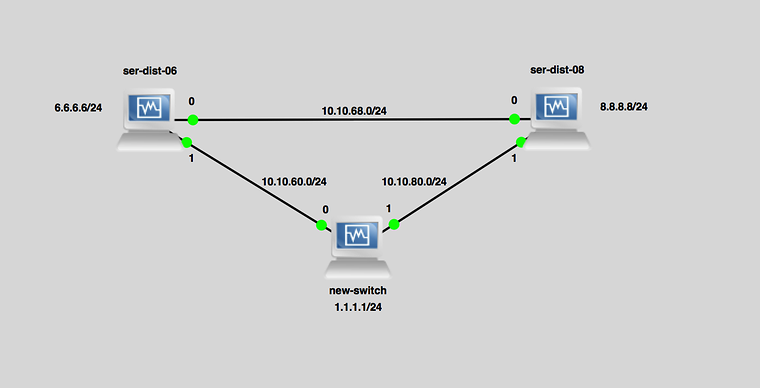
Configs Static with BFD
ser-dist-06
#set system host-name ser-dist-06#set interfaces em0 unit 0 family inet address 10.10.68.6/24set interfaces em1 unit 0 family inet address 10.10.60.6/24set interfaces lo0 unit 2256 family inet address 6.6.6.6/24#set routing-options static route 1.1.1.0/24 qualified-next-hop 10.10.60.1 bfd-liveness-detection minimum-interval 60#set protocols ospf area 0.0.0.0 interface em0.0set protocols ospf area 0.0.0.0 interface lo0.2256#set policy-options policy-statement exportstatic term exportstatic1 from protocol staticset policy-options policy-statement exportstatic term exportstatic1 then acceptset protocols ospf export exportstatic#ser-dist-08
#set system host-name ser-dist-08#set interfaces em0 unit 0 family inet address 10.10.68.8/24set interfaces em1 unit 0 family inet address 10.10.80.8/24set interfaces lo0 unit 2257 family inet address 8.8.8.8/24#set routing-options static route 1.1.1.0/24 qualified-next-hop 10.10.80.1 bfd-liveness-detection minimum-interval 60#set protocols ospf area 0.0.0.0 interface em0.0set protocols ospf area 0.0.0.0 interface lo0.2257#set policy-options policy-statement exportstatic term exportstatic1 from protocol staticset policy-options policy-statement exportstatic term exportstatic1 then acceptset protocols ospf export exportstatic#NEW-SWITCH
#set system host-name new-switch#set interfaces em0 unit 0 family inet address 10.10.60.1/24set interfaces em1 unit 0 family inet address 10.10.80.1/24set interfaces lo0 unit 2258 family inet address 1.1.1.1/24#set routing-options static route 0.0.0.0/0 qualified-next-hop 10.10.60.6set routing-options static route 0.0.0.0/0 qualified-next-hop 10.10.80.8set routing-options static route 0.0.0.0/0 bfd-liveness-detection minimum-interval 60#Configs OSPF Totally stubby
ser-dist-06
#set system host-name ser-dist-06#set interfaces em0 unit 0 family inet address 10.10.68.6/24set interfaces em1 unit 0 family inet address 10.10.60.6/24set interfaces lo0 unit 2256 family inet address 6.6.6.6/24#set routing-options router-id 6.6.6.6#set protocols ospf area 0.0.0.7 stubset protocols ospf area 0.0.0.7 stub no-summariesset protocols ospf area 0.0.0.7 stub default-metric 10set protocols ospf area 0.0.0.7 interface em1#set protocols ospf area 0.0.0.0 interface em0set protocols ospf area 0.0.0.0 interface lo0.2256#ser-dist-08
#set system host-name ser-dist-08#set interfaces em0 unit 0 family inet address 10.10.68.8/24set interfaces em1 unit 0 family inet address 10.10.80.8/24set interfaces lo0 unit 2257 family inet address 8.8.8.8/24#set routing-options router-id 8.8.8.8#set protocols ospf area 0.0.0.7 stubset protocols ospf area 0.0.0.7 stub no-summariesset protocols ospf area 0.0.0.7 stub default-metric 10set protocols ospf area 0.0.0.7 interface em1#set protocols ospf area 0.0.0.0 interface em0set protocols ospf area 0.0.0.0 interface lo0.2257#NEW-SWITCH
#set system host-name new-switch#set interfaces em0 unit 0 family inet address 10.10.60.1/24set interfaces em1 unit 0 family inet address 10.10.80.1/24set interfaces lo0 unit 2258 family inet address 1.1.1.1/24#set routing-options router-id 1.1.1.1#set protocols ospf area 0.0.0.7 stubset protocols ospf area 0.0.0.7 interface em0set protocols ospf area 0.0.0.7 interface em1set protocols ospf area 0.0.0.7 interface lo0#Verification
- Start ping from “new-switch” to 8.8.8.8
- Disable interface on ser-dist-06 with “set interfaces em1 disable” and “commit”
- Ping is still running successful
- Enable interface on ser-dist-06 with “delete interfaces em1 disable” and “commit”
- Disable interface on ser-dist-08 with “set interfaces em1 disable” and “commit”
- Ping is still running successful
- Enable interface on ser-dist-08 with “delete interfaces em1 disable” and “commit”
- Observation is that ping will still flow towards 8.8.8.8 if one path is broken
Originally published on the old wiki at /index.php/Static_routing_with_BFD_vs_OSPF_Totally_Stubby_on_JunOS.